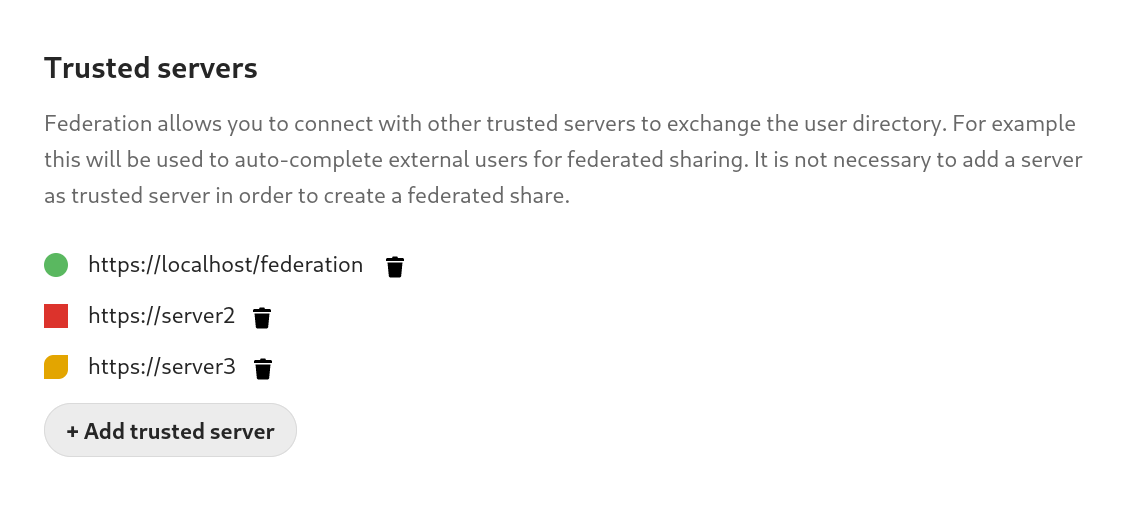
Add tooltips on server status indicators for federated sharing / tidy up Federated/Federation settings section(s)
Open
Nobody has claimed this yet.
0. Needs triage
design
enhancement
feature: federation
feature: settings
- Dominant language
- PHP
- Stars
- 36.9k
- Forks
- 5.2k
- Avg merge
- 2d 3h
- Merged PRs (30d)
- 713
Description
Description
- I just learnt that you DON'T need green status in federation for the servers to actually federate.
- Green status is just to symbolize successful exchange of contact lists which means you can just add the usernames yourself in the search bar without the suggestions and it would work.
- This is an important and relieving discovery for me, because I typically waste a lot of time when trying to get green status with two servers to test federated stuff.
Steps to reproduce
See notes on federating : https://docs.nextcloud.com/server/latest/admin_manual/configuration_files/federated_cloud_sharing_configuration.html
Expected behavior
- I think hovering over the status icons should explain what is possible or what the dots mean right in the UI
- I addition to existing overview text, users can be directed to hover over the status icon to learn more about the current status.
cc: @nextcloud/d
Nextcloud Server version
master
Operating system
None
PHP engine version
None
Web server
None
Database engine version
None
Is this bug present after an update or on a fresh install?
None
Are you using the Nextcloud Server Encryption module?
None
What user-backends are you using?
- Default user-backend (database)
- LDAP/ Active Directory
- SSO - SAML
- Other
Configuration report
No response
List of activated Apps
No response
Nextcloud Signing status
No response
Nextcloud Logs
No response
Additional info
No response
Contributor guide
First steps
- Read the whole issue, then the project's contributing guide.
- Comment on the issue to say you are picking it up — it saves two people doing the same work.
- Fork the repository and make your change on a branch.
- Open a pull request that references the issue number.
Research direction
Start with the federated cloud sharing configuration documentation linked in the issue, then locate the server-status indicators and Federated/Federation settings entry points it describes. Confirm the meaning of each status and define the tooltip and overview wording; done means the UI explains each indicator and whether federation can work without green status.
Written by the indexing model from the issue text.
Assessment
- Domain
- cloud, design, frontend
- Issue type
- Feature
- Difficulty
- 4/5
- Estimated time
- 3-5 days
- Activity status
- Stale
- Clarity
- Mostly clear
- Newbie friendliness
- 42/100