Seach bar input not clearing after navigating to a folder
Nobody has claimed this yet.
- Dominant language
- PHP
- Stars
- 36.9k
- Forks
- 5.2k
- Avg merge
- 2d 3h
- Merged PRs (30d)
- 713
Description
⚠️ This issue respects the following points: ⚠️
- This is a bug, not a question or a configuration/webserver/proxy issue.
- This issue is not already reported on Github (I've searched it).
- Nextcloud Server is up to date. See Maintenance and Release Schedule for supported versions.
- Nextcloud Server is running on 64bit capable CPU, PHP and OS.
- I agree to follow Nextcloud's Code of Conduct.
Bug description
The top right search bar content is not cleared after clicking/navigating into a folder in the current location list of files/folders outside of the search results list.
Filling search bar:
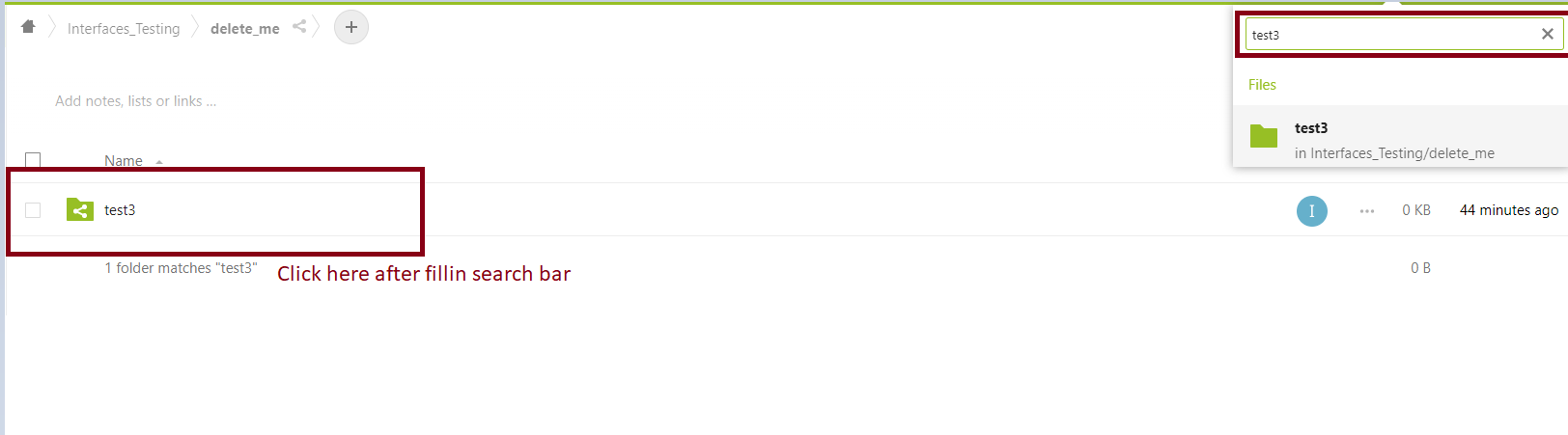
After navigating to "test3" folder:

Steps to reproduce
- Search for a folder that contains elements in the top right search bar.
- Click in a folder on the list of elements of the current directory.
- See that the search bar filter is not clear and the filter is being applied.
Expected behavior
Clear search bar input after navigation.
Installation method
No response
Operating system
No response
PHP engine version
No response
Web server
No response
Database engine version
No response
Is this bug present after an update or on a fresh install?
No response
Are you using the Nextcloud Server Encryption module?
No response
What user-backends are you using?
- Default user-backend (database)
- LDAP/ Active Directory
- SSO - SAML
- Other
Configuration report
No response
List of activated Apps
Not possible since this is an external/third-party service.
Nextcloud Signing status
No response
Nextcloud Logs
No response
Additional info
No response
Contributor guide
First steps
- Read the whole issue, then the project's contributing guide.
- Comment on the issue to say you are picking it up — it saves two people doing the same work.
- Fork the repository and make your change on a branch.
- Open a pull request that references the issue number.
Research direction
Reproduce the issue by searching for a folder in the top-right bar, then opening a folder from the current directory list. Trace the search-bar and folder-navigation entry points to determine why the filter remains applied. Done means the input and active filter are cleared after navigation, without changing search-result behavior.
Written by the indexing model from the issue text.
Assessment
- Tech stack
- javascript
- Domain
- frontend
- Issue type
- Bug
- Difficulty
- 3/5
- Estimated time
- 1-2 days
- Activity status
- Stale
- Clarity
- Mostly clear
- Newbie friendliness
- 38/100