Give indication that long comments are cut off initially (e. g. three dots or fade out)
Nobody has claimed this yet.
- Dominant language
- PHP
- Stars
- 36.9k
- Forks
- 5.2k
- Avg merge
- 2d 3h
- Merged PRs (30d)
- 713
Description
How to use GitHub
- Please use the 👍 reaction to show that you are interested into the same feature.
- Please don't comment if you have no relevant information to add. It's just extra noise for everyone subscribed to this issue.
- Subscribe to receive notifications on status change and new comments.
Is your feature request related to a problem? Please describe.
Longer comments are initially cut off (or rather collapsed). This is because of comment__message { max-height: 70px; }, which makes sense in general. You must click on the comment to expand it. However, there is no indication, that a part is missing.
Describe the solution you'd like
After the last visible word in the collapsed version, there are three dots. The best way would be comment__message { text-overflow: ellipsis; }, but this only works with white-space: nowrap, which is no solution in this case (the comment would only stretch one single line and then be cut off, at least with three dots).
Describe alternatives you've considered
An alternative could be fading out into white, see this thread. In our example, the CSS could be:
.comment__message::before {
    content: '';
    width: 100%;
    height: 100%;
    position: absolute;
    left: 0;
    top: 0;
    background: linear-gradient(transparent 45px, #fffd);
}
With this result:
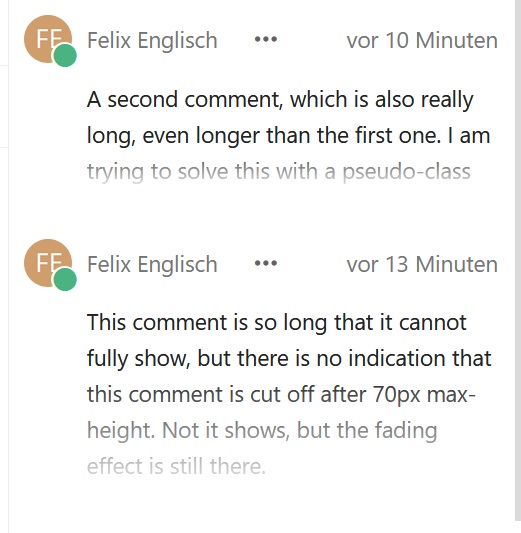
As you can see, this is anything than perfect. The fading effect should disappear, when the comment is expanded, and it should only appear, when a comment is actually to long and not if it perfectly fits into the three lines.
I've got no solutions for this on hand, but maybe someone can help.
Contributor guide
First steps
- Read the whole issue, then the project's contributing guide.
- Comment on the issue to say you are picking it up — it saves two people doing the same work.
- Fork the repository and make your change on a branch.
- Open a pull request that references the issue number.
Research direction
Search the codebase for the comment__message selector and inspect how comments are collapsed and expanded. Determine how to show an overflow indication only for comments that exceed the collapsed height, then verify that the indication disappears when the comment is expanded.
Written by the indexing model from the issue text.
Assessment
- Tech stack
- css
- Domain
- frontend
- Issue type
- Feature
- Difficulty
- 3/5
- Estimated time
- 1-2 days
- Activity status
- Stale
- Clarity
- Mostly clear
- Newbie friendliness
- 45/100