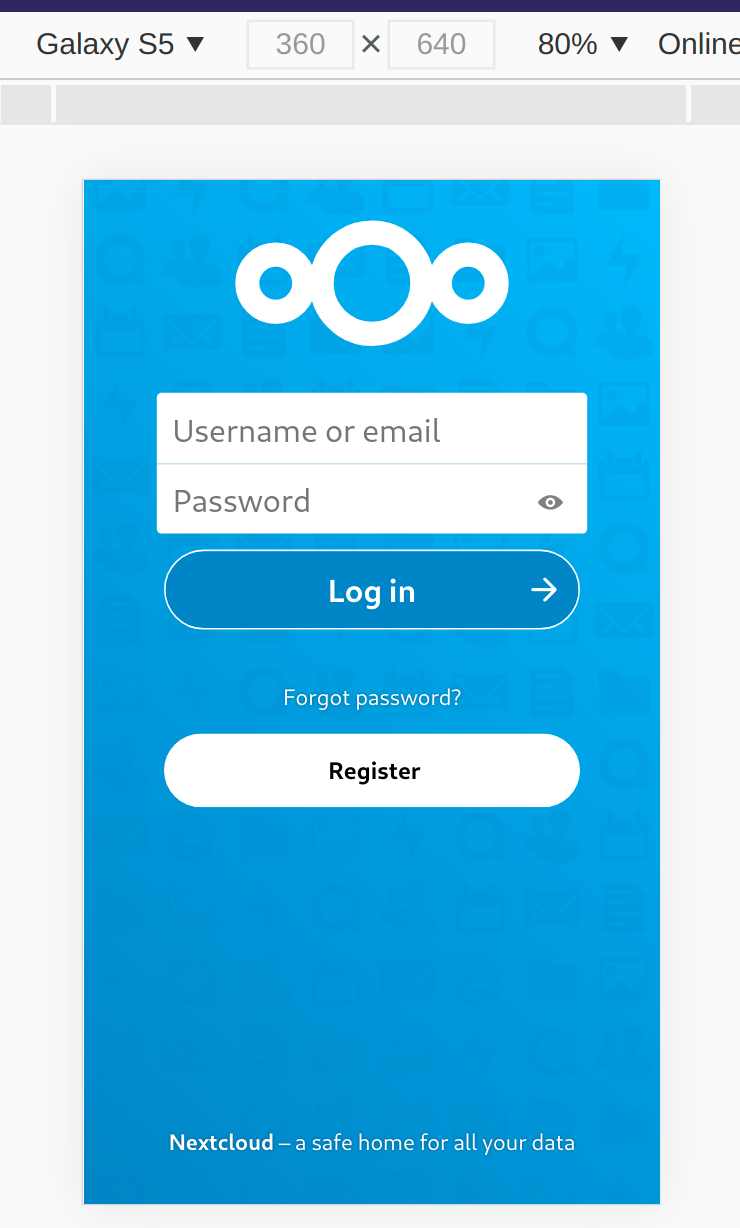
'Forgot Password' and 'Register' too close
Nobody has claimed this yet.
- Dominant language
- PHP
- Stars
- 36.9k
- Forks
- 5.2k
- Avg merge
- 2d 3h
- Merged PRs (30d)
- 713
Description
Actual Behaviour
On this picture from nextcloud/registration#276, i realised these buttons (or their order) are a bit confusing....
Just seeing this, it looks to me like one should press the register-button for forgotten passwords.
Any thoughts on this? @jancborchardt @nextcloud/designers
Expected behaviour
Non-confusing order 😉
Steps to reproduce
- Have Registration activated
- Open Login page
Contributor guide
First steps
- Read the whole issue, then the project's contributing guide.
- Comment on the issue to say you are picking it up — it saves two people doing the same work.
- Fork the repository and make your change on a branch.
- Open a pull request that references the issue number.
Research direction
Reproduce the issue with Registration activated, then open the login page and compare the placement and order of the “Forgot Password” and “Register” buttons with the attached screenshot. Review the existing discussion for an agreed ordering, and consider the work done when the two actions are clearly distinguishable and no longer suggest registering to recover a password.
Written by the indexing model from the issue text.
Assessment
- Domain
- design, frontend
- Issue type
- Feature
- Difficulty
- 3/5
- Estimated time
- 1-2 days
- Activity status
- Stale
- Clarity
- Mostly clear
- Newbie friendliness
- 35/100