nextcloud / nextcloud/richdocuments
Collabora online not opening when Nextcloud is running in Docker with reverse proxy
Nobody has claimed this yet.
- Dominant language
- JavaScript
- Stars
- 453
- Forks
- 147
- Avg merge
- 14h 54m
- Merged PRs (30d)
- 83
Description
Describe the bug
Collabora Online built-in instance is not opening when Nextcloud is running on docker with the environment variable "OVERWRITEHOST" is set, and nginx is running by reverse proxy
To Reproduce
Steps to reproduce the behavior:
- Run owncloud by
docker run -d --restart always -e OVERWRITEHOST=example.com -e OVERWRITEPROTOCOL=https -p 127.0.0.1:8080:80 nextcloud - Setup nginx reverse proxy (with SSL)
- Enable collabora built-in server in settings
- Try to edit a document
Expected behavior
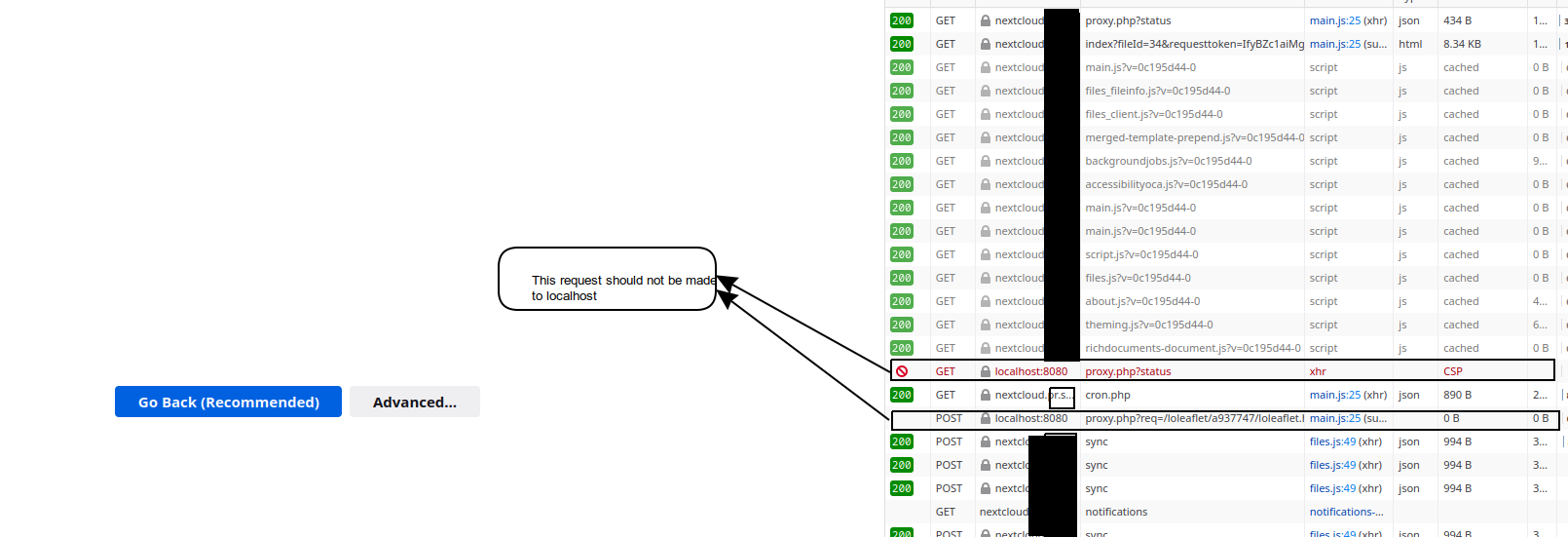
The document should be opened, but instead an error page is shown. I suspect that the problem is that the host in OVERWRITEHOST is not taken by collabora online, because in "Network inspector" it is showing the host "localhost:8080", which is invalid.
Screenshots
Client details:
- OS: Debian 10 buster
- Browser: any
Contributor guide
First steps
- Read the whole issue, then the project's contributing guide.
- Comment on the issue to say you are picking it up — it saves two people doing the same work.
- Fork the repository and make your change on a branch.
- Open a pull request that references the issue number.
Research direction
Reproduce the issue using the documented Docker command with OVERWRITEHOST and OVERWRITEPROTOCOL, an nginx SSL reverse proxy, and the built-in Collabora server. Start with the Network inspector result showing localhost:8080, then trace the Collabora launch/configuration path; done means a document opens through the configured reverse-proxy host.
Written by the indexing model from the issue text.
Assessment
- Tech stack
- docker, nginx
- Domain
- devops, infrastructure
- Issue type
- Bug
- Difficulty
- 4/5
- Estimated time
- 3-5 days
- Activity status
- Stale
- Clarity
- Needs clarification
- Newbie friendliness
- 32/100