nextcloud / nextcloud/officeonline
OOS URL rewritten incorrectly when loading document
Nobody has claimed this yet.
- Dominant language
- JavaScript
- Stars
- 63
- Forks
- 13
- Avg merge
- 6d 17h
- Merged PRs (30d)
- 8
Description
Describe the bug
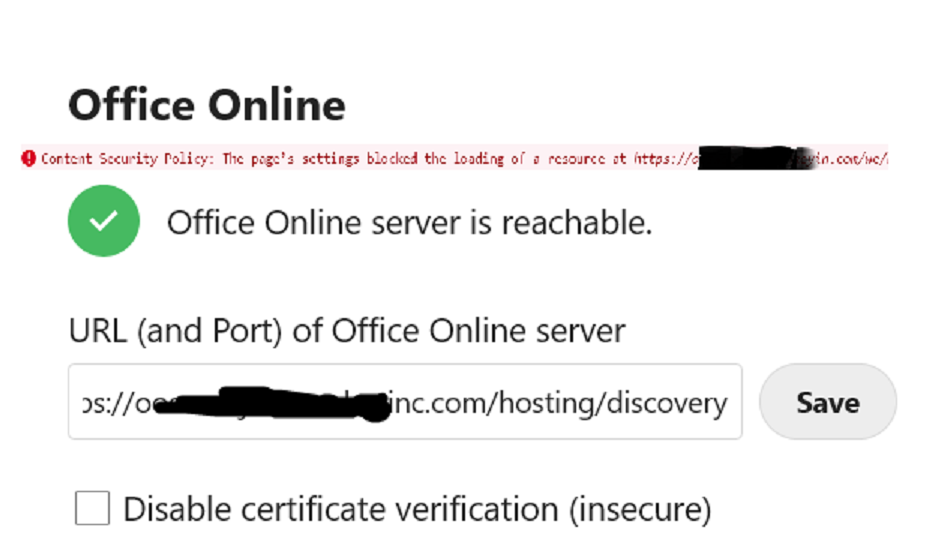
The app is writing the url incorrectly - it's dropping a letter. I've attached a screenshot. As you can see, my domain name end is https://XXXinc.com; look at error when I try to access a document - it drop the final "c" and tries to load https://XXX.in.com which fails for the obvious reason that it's not the correct URL. You might have to zoom in to see it - I tried to make the screenshot bigger but not sure if that worked or not.
Just to be clear: the URL in the app settings is correct and working and I'm not doing anything special, i.e. I'm just going to Files in Nextcloud and clicking a Word document and as you can see something in your app is dropping a letter from the URL in the app settings which is, of course, causing the document to fail to load. I've tried this on different browsers and different machines and it's the same wrong changed URL every time so the issue must be something in app.
To Reproduce
Steps to reproduce the behavior:
- Go to '...'
- Click on '....'
- Scroll down to '....'
- See error
Expected behavior
A clear and concise description of what you expected to happen.
Screenshots
If applicable, add screenshots to help explain your problem.
Client details:
- OS: [e.g. iOS]
- Browser [e.g. chrome, safari]
- Version [e.g. 22]
- Device: [e.g. iPhone6, desktop]
Server details
Operating system:
Ubuntu 20
Web server:
Database:
PHP version:
8.1
Nextcloud version:
24.
Version of the officeonline app
1.1.3
Version of Office Online server
2016
Logs
Nextcloud log (data/nextcloud.log)
Insert your Nextcloud log here
Browser log
Insert your browser log here, this could for example include:

a) The javascript console log
b) The network log
c) ...
Contributor guide
First steps
- Read the whole issue, then the project's contributing guide.
- Comment on the issue to say you are picking it up — it saves two people doing the same work.
- Fork the repository and make your change on a branch.
- Open a pull request that references the issue number.
Research direction
Start by reproducing the issue from the Nextcloud Files view with the configured officeonline URL, then inspect the generated document URL and browser network output. Done means the configured domain remains unchanged when opening a Word document and the document loads successfully.
Written by the indexing model from the issue text.
Assessment
- Tech stack
- javascript
- Domain
- frontend
- Issue type
- Bug
- Difficulty
- 4/5
- Estimated time
- 3-5 days
- Activity status
- Stale
- Clarity
- Needs clarification
- Newbie friendliness
- 25/100