nextcloud / nextcloud/notes-android
Block quote isn't displayed correctly directly following a heading
Nobody has claimed this yet.
- Dominant language
- Java
- Stars
- 1.1k
- Forks
- 168
- Avg merge
- 1d 17h
- Merged PRs (30d)
- 31
Description
Please use GitHub reactions 👍 to show that you are affected by the same issue. Please don't comment if you have no relevant information to add!
Describe the bug
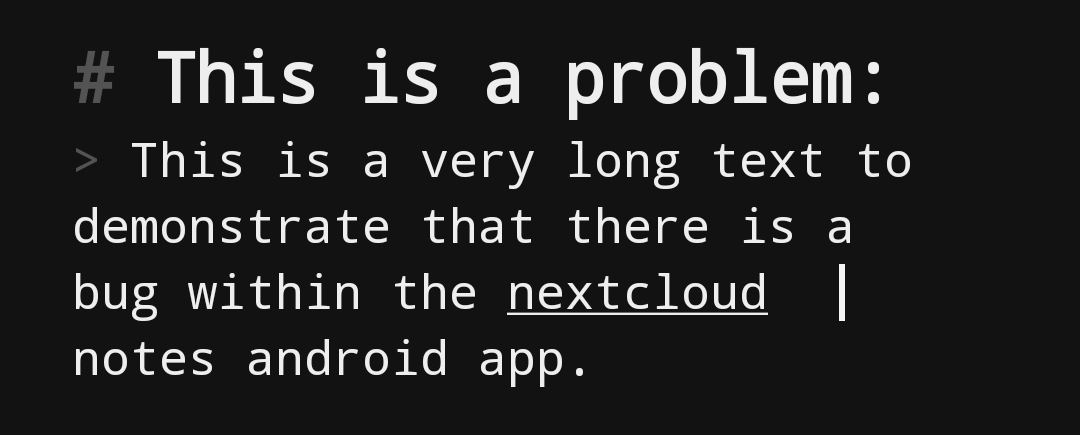
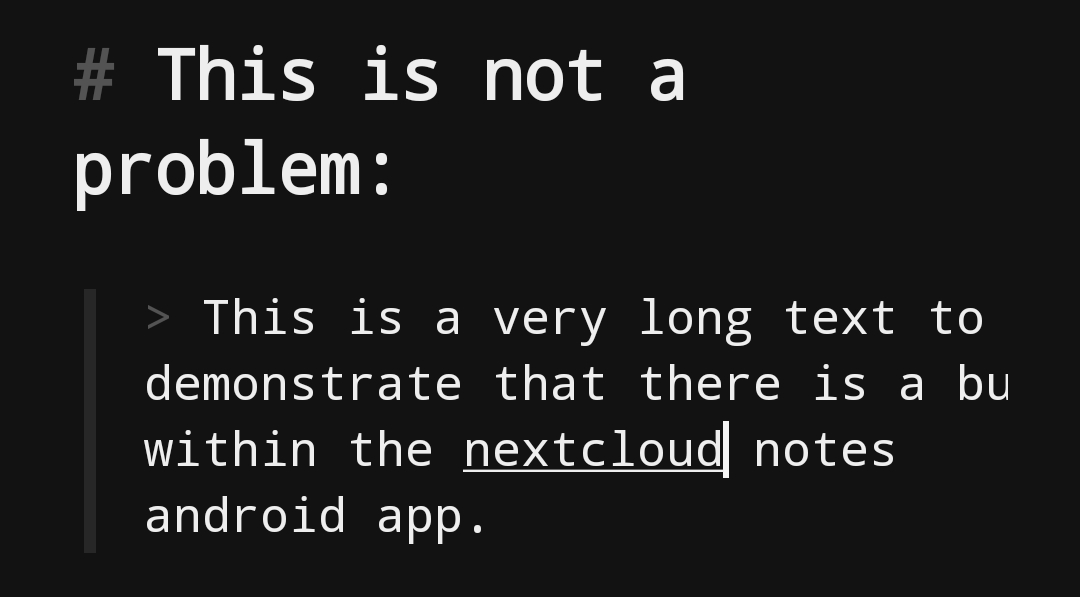
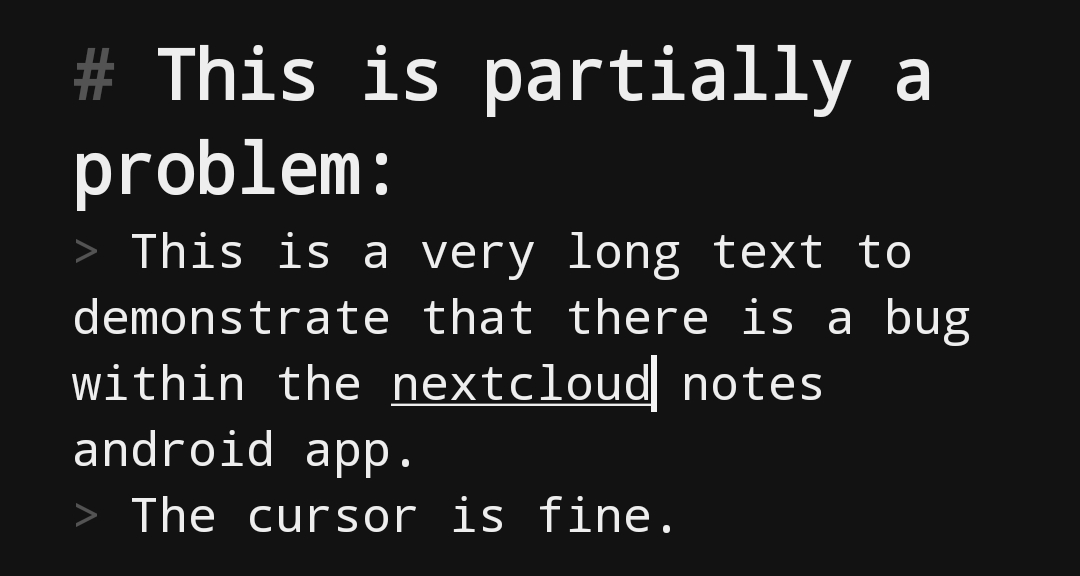
When a block quote is added right after a heading (doesn't matter which one) without a newline in between, the block quote is not indented properly and doesn't have the vertical line in front. This also results in the cursor being offset to the right in wrapped lines as if the block quote was indented correctly, which is very confusing. The problem with the cursor only happens if the block quote is defined in a single line. It doesn't happen if the quote is at least two lines long.
To Reproduce
Steps to reproduce the behavior:
- Create a note with the content
# This is a problem:
> This is a very long text to demonstrate that there is a bug within the nextcloud notes android app.

# This is not a problem:

> This is a very long text to demonstrate that there is a bug within the nextcloud notes android app.

# This is partially a problem:
> This is a very long text to demonstrate that there is a bug within the nextcloud notes android app.
> The cursor is fine.
- Open the note in the app with the simple editor.
- Move the cursor into one of the wrapped lines of the quote.
Expected behavior
I would expect the block quote to be displayed correctly, even if there is no space in between the heading and the quote. Also I would expect that even if it wasn't displayed quite right, it should have an effect on the cursor position, adjusting it to the actual indentation.
Screenshots
Example 1:
Example 2:
Example 3:
Smartphone:
- Nextcloud Notes-Version (android app): 4.0.0
- F-Droid or Play Store: Play Store
- Android-Version: 12
- Device: OnePlus Nord 2 5G
Server
- Nextcloud version: 26.0.0
- Nextcloud Notes version (server app): 4.7.2
Stacktrace
(not applicable)
Contributor guide
First steps
- Read the whole issue, then the project's contributing guide.
- Comment on the issue to say you are picking it up — it saves two people doing the same work.
- Fork the repository and make your change on a branch.
- Open a pull request that references the issue number.
Research direction
Reproduce the issue in the Android app's simple editor using the three heading and block-quote examples from the report, then inspect the editor path responsible for quote indentation and wrapped-line cursor placement. Done means a quote immediately following a heading renders with its indentation and vertical line, and the cursor aligns correctly for both single-line and multi-line quotes.
Written by the indexing model from the issue text.
Assessment
- Tech stack
- android, java
- Domain
- mobile
- Issue type
- Bug
- Difficulty
- 3/5
- Estimated time
- 1-2 days
- Activity status
- Stale
- Clarity
- Mostly clear
- Newbie friendliness
- 45/100