maps fills up /tmp with temporary image files with External Storage
Nobody has claimed this yet.
- Dominant language
- JavaScript
- Stars
- 598
- Forks
- 113
- PR merge metrics
- No merged PRs in 30d
Description
Steps to reproduce
- Enable the maps application on an nextcloud instance
- Have smb storages mounted via nextcloud external storage that has many images
Expected behaviour:
- maps does not create copies of images in
/tmpfile system - maps does not fill the
/tmpfile system
Actual behaviour:
- in
/tmpmanyoc_tmp_*-.JPG,oc_tmp_*-.tiffiles and emptyoc_tmp_*files are created which eventually fill up/tmp - the files are deleted after some time and a new set of files is created
- in our monitoring we observe a saw tooth pattern like this
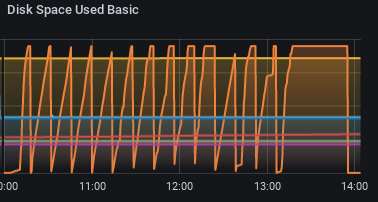
- when disabling maps the saw tooth pattern stops. The last block in the graph is after disabling maps followed by manual deletion of the files after a grace period (shouldn't the app clean up when it disabled?).
If your /tmp partition is not separate from / this leads to problems (e.g. redis can not write back to disk). As a workaround I created a separate /tmp partition with 10 GB, this is what you see in the monitoring, before the root file system was used, which had ~4 GB of free space which were then filled by oc_tmp* files.
I do not know why the files are copied and deleted again shortly after. My guess is, this is connected to external smb shares since I saw a lot of traffic from the smb server to the nextcloud instance, but it might be unrelated.
Also, this instance has some memory available (12 GB of memory of which 5 to 10 GB where available all the time), which could have been used, but instead the files were written out to disk.
Server configuration
- Ubuntu 18.04
- Apache 2.4.29
- postgresql 10
- php 7.2
- nextcloud 18.0.7.1
Server is behind (apache) reverse proxy with ssl offloading.
Please let me know if you need additional information.
Contributor guide
First steps
- Read the whole issue, then the project's contributing guide.
- Comment on the issue to say you are picking it up — it saves two people doing the same work.
- Fork the repository and make your change on a branch.
- Open a pull request that references the issue number.
Research direction
Start by reproducing the issue with the Maps application enabled and an SMB external storage containing many images, while monitoring /tmp for oc_tmp_* files. Trace which Maps entry point or dependency creates and removes these files. Done means identifying the trigger and preventing the temporary files from filling /tmp, including cleanup when Maps is disabled.
Written by the indexing model from the issue text.
Assessment
- Tech stack
- javascript
- Domain
- backend
- Issue type
- Bug
- Difficulty
- 4/5
- Estimated time
- 3-5 days
- Activity status
- Stale
- Clarity
- Needs clarification
- Newbie friendliness
- 25/100