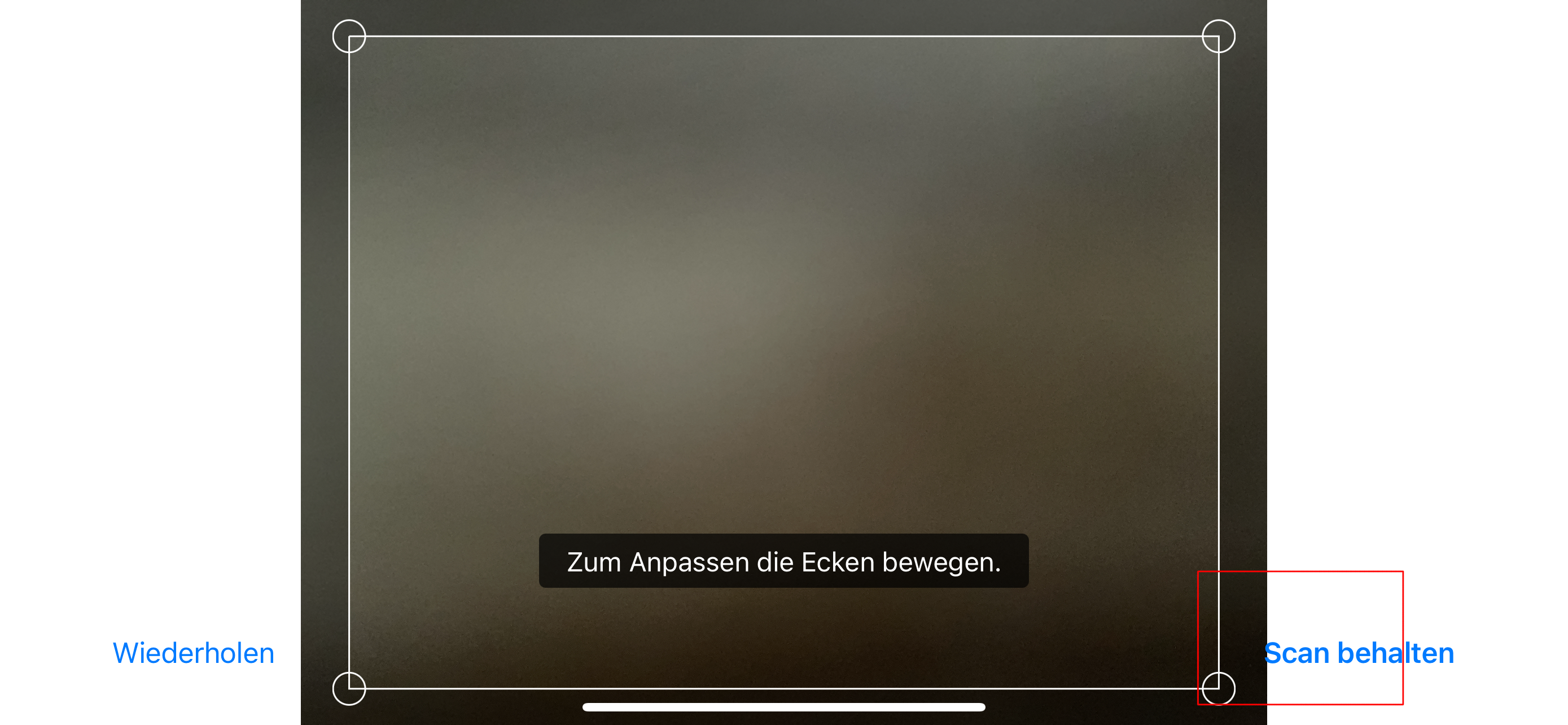
Document scan - Button to keep scan overlaps scan itself in landscape mode
Open
Nobody has claimed this yet.
bug
design
- Dominant language
- Swift
- Stars
- 2.5k
- Forks
- 1k
- Avg merge
- 2d 18h
- Merged PRs (30d)
- 13
Description
Actions Performed
- Open the app and login
- Select the "+" button
- Choose the option to scan a document
- Now turn your device in landscape mode
- Execute the scan
Expected Result
The button for keeping the scan is properly displayed and does not overlap the scan itself.
Actual Result
Incorrectly the button for keeping the scan overlaps the scan itself.
Apple iPhone 12 Pro Max - iOS 15.4
Contributor guide
First steps
- Read the whole issue, then the project's contributing guide.
- Comment on the issue to say you are picking it up — it saves two people doing the same work.
- Fork the repository and make your change on a branch.
- Open a pull request that references the issue number.
Research direction
Start by reproducing the document-scan flow in the iOS app on an iPhone in landscape mode, following the listed steps. Trace the scan result screen and its keep-scan button, then verify that the button no longer overlaps the scan while the expected landscape layout remains usable.
Written by the indexing model from the issue text.
Assessment
- Tech stack
- ios, swift
- Domain
- mobile
- Issue type
- Bug
- Difficulty
- 3/5
- Estimated time
- 1-2 days
- Activity status
- Stale
- Clarity
- Mostly clear
- Newbie friendliness
- 48/100