Auto Uploads with Large Videos is Broken, not Auto, rather stuck.
Nobody has claimed this yet.
- Dominant language
- Swift
- Stars
- 2.5k
- Forks
- 1k
- Avg merge
- 2d 18h
- Merged PRs (30d)
- 13
Description
Steps to reproduce
- curate a photo album around 5gb in size with high quality photos and videos where videos range from 100 to 900mb
- turn on auto upload, photos and videos uploading included,
- turn on use sub folders
- turn on "delete after upload"
- select upload whole camera roll
Expected behavior
Ideally, they all upload and then offer to delete the files that have been uploaded
Actual behavior
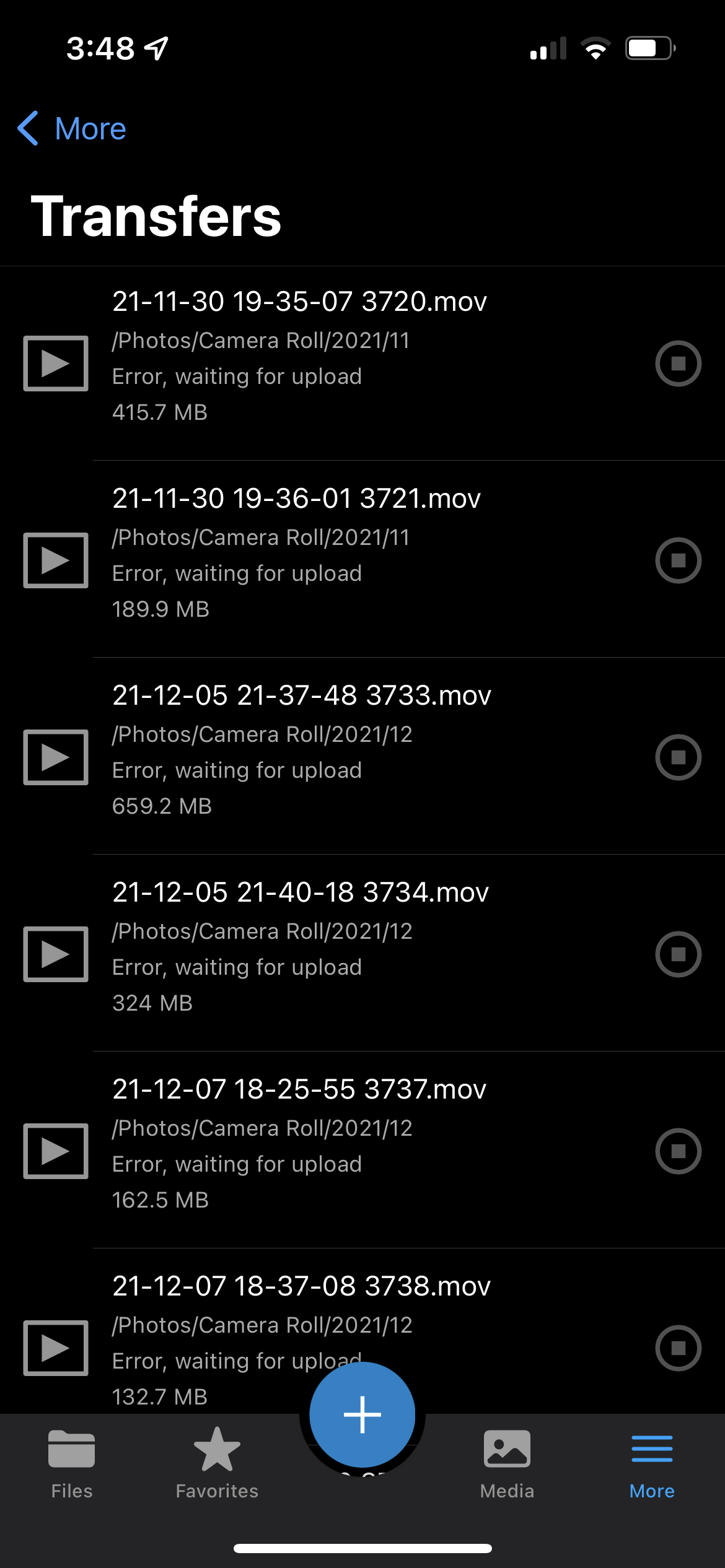
The photos all upload but any videos between >100Mb err and start to cycle in the app from "waiting to upload" to immediately failing to upload to "err, waiting to upload". The file counter over the files icon in the bottom navbar goes from X (in my case 25) to 0 in increments of 5 and then resets within 30 seconds and tries again. This continues forever.
However, if you upload the videos by touching the + icon and selecting them individually then they upload no matter how big they are. The issue only occurs when using auto upload. Otherwise I can upload files of any size
Screenshots
If applicable, add a screenshot showing the issue.
Logs
The logs weren't helpful but here they are logs.log
Reasoning or why should it be changed/implemented?
well, for those of us not using iCrapCloud by Apple this app is our only window for backing up pictures and the like to our nextcloud servers.
Environment data
iOS version: e.g. iOS 14.4.1
15.3.1
Nextcloud iOS app version: see More > Settings
4.3.1.0
Server operating system:
Truenas Core 12
Web server: Apache, nginx
Reverse proxy nginx running on separate Mac OS 14 on a 2012 Mac Mini
Database:
truenas core plugin managed
PHP version:
truenas core plugin managed
Nextcloud version: see Nextcloud admin page
Manual Resolution
Delete all the stuck uploads. Try to upload again manually selecting all your videos by tapping the + icon. Choose "more details" when it ask which versions you'd like to keep since some of your videos probably did upload. Then choose to keep the "server side" version and it will skip those and add the rest to the queue. Keep your app open or else the large files will fail.
Contributor guide
First steps
- Read the whole issue, then the project's contributing guide.
- Comment on the issue to say you are picking it up — it saves two people doing the same work.
- Fork the repository and make your change on a branch.
- Open a pull request that references the issue number.
Research direction
Start by reproducing the auto-upload flow with large videos, subfolders, and delete-after-upload enabled, then compare it with manual uploads and review the attached logs.log. Done means videos over 100 MB no longer cycle through waiting and failing, upload successfully through auto upload, and are handled correctly by the deletion prompt.
Written by the indexing model from the issue text.
Assessment
- Tech stack
- ios, swift
- Domain
- mobile-dev
- Issue type
- Bug
- Difficulty
- 4/5
- Estimated time
- 3-5 days
- Activity status
- Stale
- Clarity
- Mostly clear
- Newbie friendliness
- 42/100