`Auto upload`: Manual `Remove from camera roll`
Nobody has claimed this yet.
- Dominant language
- Swift
- Stars
- 2.5k
- Forks
- 1k
- Avg merge
- 2d 18h
- Merged PRs (30d)
- 13
Description
Actual behaviour
Currently, after enabling Auto upload, and Remove from camera roll, users have complained about this, deletion requests all the time. They avoid opening the app to make the clearing of photos more infrequent.
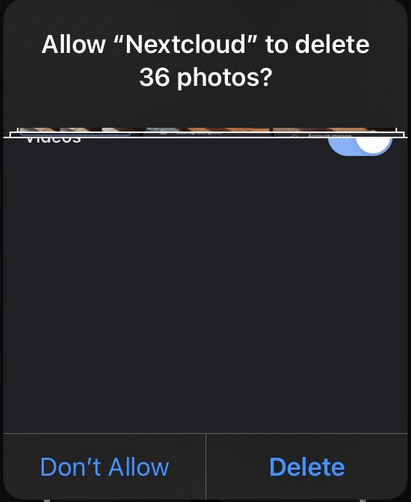
Every time the app is opened, a somewhat 'dangerous' prompt appears. This might:
- build up negative association towards Nextcloud.
- train the user in clicking delete with other apps as well.
Sharing is hindered as well. On some apps, you just can't share photos, videos from Nextcloud.
On other apps (ex: Telegram) you have to do Attach (giving a selection of photos) → File → iCloud Drive → (if not selected) (discovered by trying hard, accidentally, not obvious) swipe left or top left Browse (what can be dismissed as a lookalike to Back) → Nextcloud → {upload folder} → most recent file.
Expected behaviour
After enabling Remove from camera roll, show an option Prompt to remove on every app startup (true=current behaviour; perhaps even disabled by default?).
Probably better: don't have the option at all, show the Free up space if auto-prompt is disabled, and educate the user on first use (not first click! if they don't finish the first time, don't dismiss it). (The current Remove from camera roll would need to change to Always/Automatically prompt /every time to/ remove from camera roll.
Having the option disabled would add an item to the More menu:
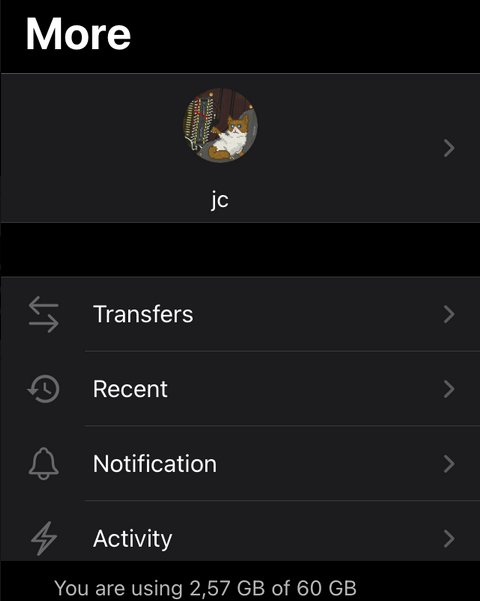
The Free up space / Remove uploaded from camera roll button should:
- not have a trash bin icon, might give mixed/false signals, that the files will be actually deleted.
- be in the top few. The iPhone SE I have shows only the top 4 — it should be easily accessible.
- after being pressed, jump straight to the OS / native deletion prompt (unless first time, see above).
Environment data
iOS version: 14.5 (18E199)
Nextcloud iOS app version: 3.5.0 (15)
Screenshots of other observations
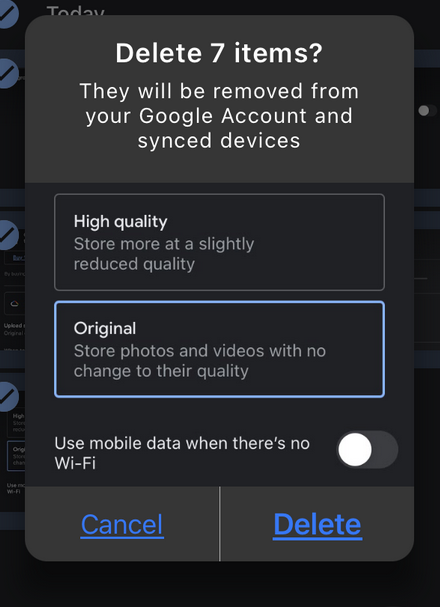
So I explored around, downloaded Google Photos to see how they do it on iOS.
The 'delete from everywhere/cloud' prompt is very lookalike to the native/OS one:
Contributor guide
First steps
- Read the whole issue, then the project's contributing guide.
- Comment on the issue to say you are picking it up — it saves two people doing the same work.
- Fork the repository and make your change on a branch.
- Open a pull request that references the issue number.
Research direction
The issue names no files, tests, or entry points. Start by tracing the iOS settings and startup flow for Auto upload and Remove from camera roll, then compare the current prompt with the proposed Free up space behavior. Done requires an agreed product direction and corresponding settings, menu placement, prompt, and first-use education behavior.
Written by the indexing model from the issue text.
Assessment
- Tech stack
- ios, swift
- Domain
- mobile
- Issue type
- Feature
- Difficulty
- 5/5
- Estimated time
- Over a week
- Activity status
- Stale
- Clarity
- Needs clarification
- Newbie friendliness
- 25/100