Media view: odd modification/creation/accessed date of files can cause a crash of the app
Nobody has claimed this yet.
- Dominant language
- Swift
- Stars
- 2.5k
- Forks
- 1k
- Avg merge
- 2d 18h
- Merged PRs (30d)
- 13
Description
Expected behaviour
App should not crash whatever the modification/creation/accessed date of a file is
Actual behaviour
App crashes for some modification/creation/accessed dates of files every time when I click on the "media" tab.
Steps to reproduce
Create files and change modification/creation/accessed date (I am still not sure which one or all three?!) to some very old date or a date in the future (don't know how far in the future it has to be, yet).
Reasoning or why should it be changed/implemented?
A crash is never a good thing ;)
iOS version
13.5
App version
2.25.9.2
Server configuration
18.0.4
Operating system:
Ubuntu 20.04
Web server:
Apache 2.4.41
Database:
MYSQL 8.0.20
PHP version:
PHP 7.4.3
Nextcloud version: (see Nextcloud admin page)
18.0.4
Some more background:

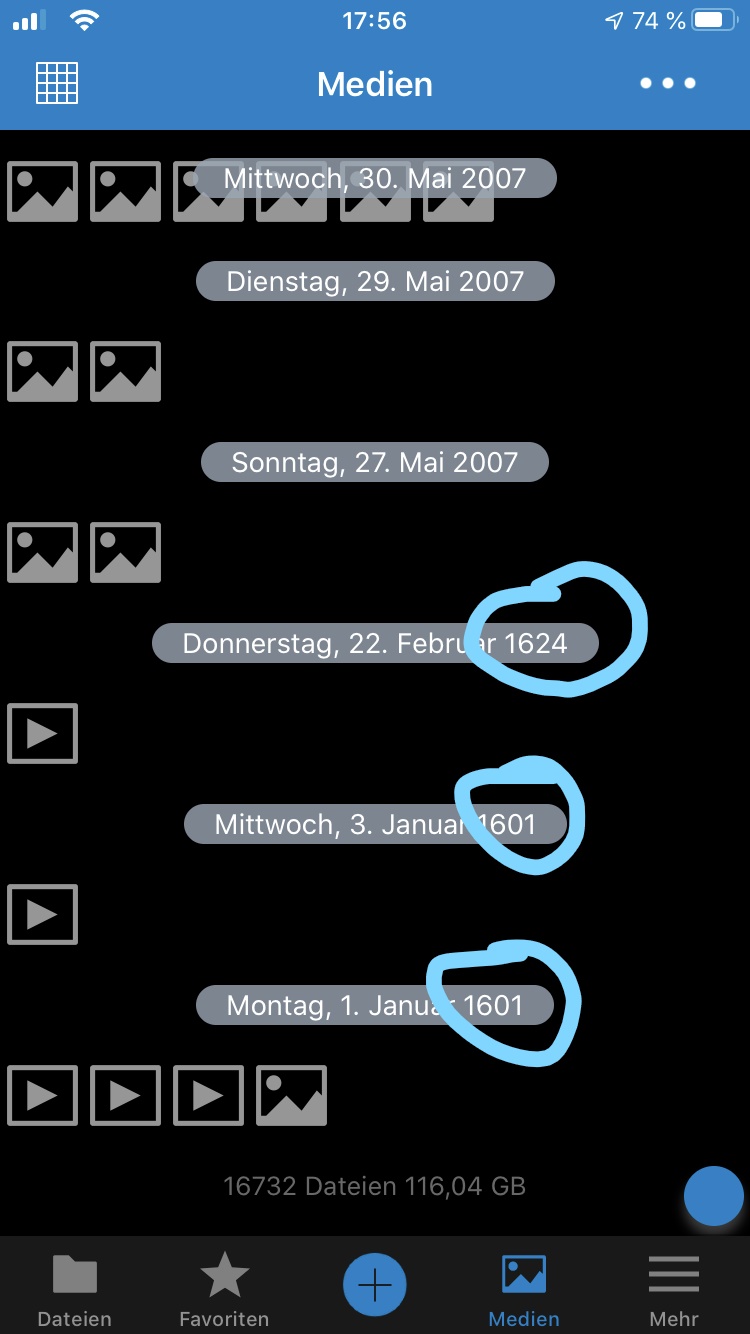
In my media folder of >15k files I had 5 videos and 1 picture that did cause the crash. I did notice that all of them are on the very bottom of the media view. I solved the crashes when I updated the modification and creation and accessed dates of all this 6 files to a new plausible date. I used the program "advanced renamer" for windows.
This problem can be resolved by clearing the cache. Then it is possible to click on the media tab again until the files with the broken dates are loaded and shown again. Then the crashes are back.
In the attached files there are the 6 files shown that caused the crash. As you can see, one of them has a modification date in 2032. The other screenshot shows the iOS app right before the crash occurs. There you can see the 6 files with a date in the years 1601 and 1624.
I don't know how the date can be 1601/1624 or even 2032 and how that did happen but I think it would be great to add some check or limitation of the dates within the app to avoid crashes. I know that I could simply find the files every time and update their dates but I can imagine that other users will experience the same crashes and are not able to find the cause and solve it that way.
Contributor guide
First steps
- Read the whole issue, then the project's contributing guide.
- Comment on the issue to say you are picking it up — it saves two people doing the same work.
- Fork the repository and make your change on a branch.
- Open a pull request that references the issue number.
Research direction
Reproduce the crash by clearing the cache, opening the media tab, and loading files with dates such as 1601, 1624, or 2032. Trace the media view's date handling and verify that files with unusual modification, creation, or access dates no longer crash the app when they are loaded and displayed.
Written by the indexing model from the issue text.
Assessment
- Tech stack
- ios, swift
- Domain
- mobile
- Issue type
- Bug
- Difficulty
- 4/5
- Estimated time
- 3-5 days
- Activity status
- Stale
- Clarity
- Mostly clear
- Newbie friendliness
- 35/100