nextcloud / nextcloud/groupfolders
"Deleted files" and "Group Folders" : Ability to show/hide folders and files belonging to group folders
Nobody has claimed this yet.
- Dominant language
- PHP
- Stars
- 343
- Forks
- 106
- Avg merge
- 2d 3h
- Merged PRs (30d)
- 34
Description
Hi,
Is your feature request related to a problem? Please describe.
As you know, when a file or folder is deleted in a group folder by a user with access to that group folder, the deleted item(s) end up in the recycle bin of all users with access to the group folder.
The problem is that when the group folder contains a lot of files and there are a lot of users... the number of files and folders deleted, depending on habits and uses, can be very high. In this case, it becomes difficult to know, among all these deleted files and folders, which belong to the instance (group folder) or to the user himself.
A classic mistake can be for the user to delete everything in the recycle bin (or simply too much, without saying all, thinking that he has only deleted his own files), that is to say, all the files and folders that belonged to him, but also, all the files and folders in the group folder. The fact that he deletes all his own files like a madman... is only his problem. On the other hand, if he permanently deletes all the files and folders in the group folder, they will disappear from the recycle bin of all the other people concerned, and no one will be able to restore them if they need to (and in this case, it's panic and you have to restore the items with a system administrator, or an upstream restoration interface at the server level, etc...) We can always say that people have to be careful, and well informed beforehand, but the fact remains that the current UX/UI, when you have group folders, is a bit dangerous.
Describe the solution you'd like
Add somewhere a button or checkbox to show/hide files and folders belonging to a group folder (for example, at the top next to the breadcrumb trail). Also, I really think that files and folders in group folders should be hidden by default.
If we decide to show them by clicking on the button or checkbox, each file or folder belonging to a group folder, should have a visual element (icon for example) that makes it easy to distinguish it from any other personal file or folder.
Here is a rendering of what I suggest:
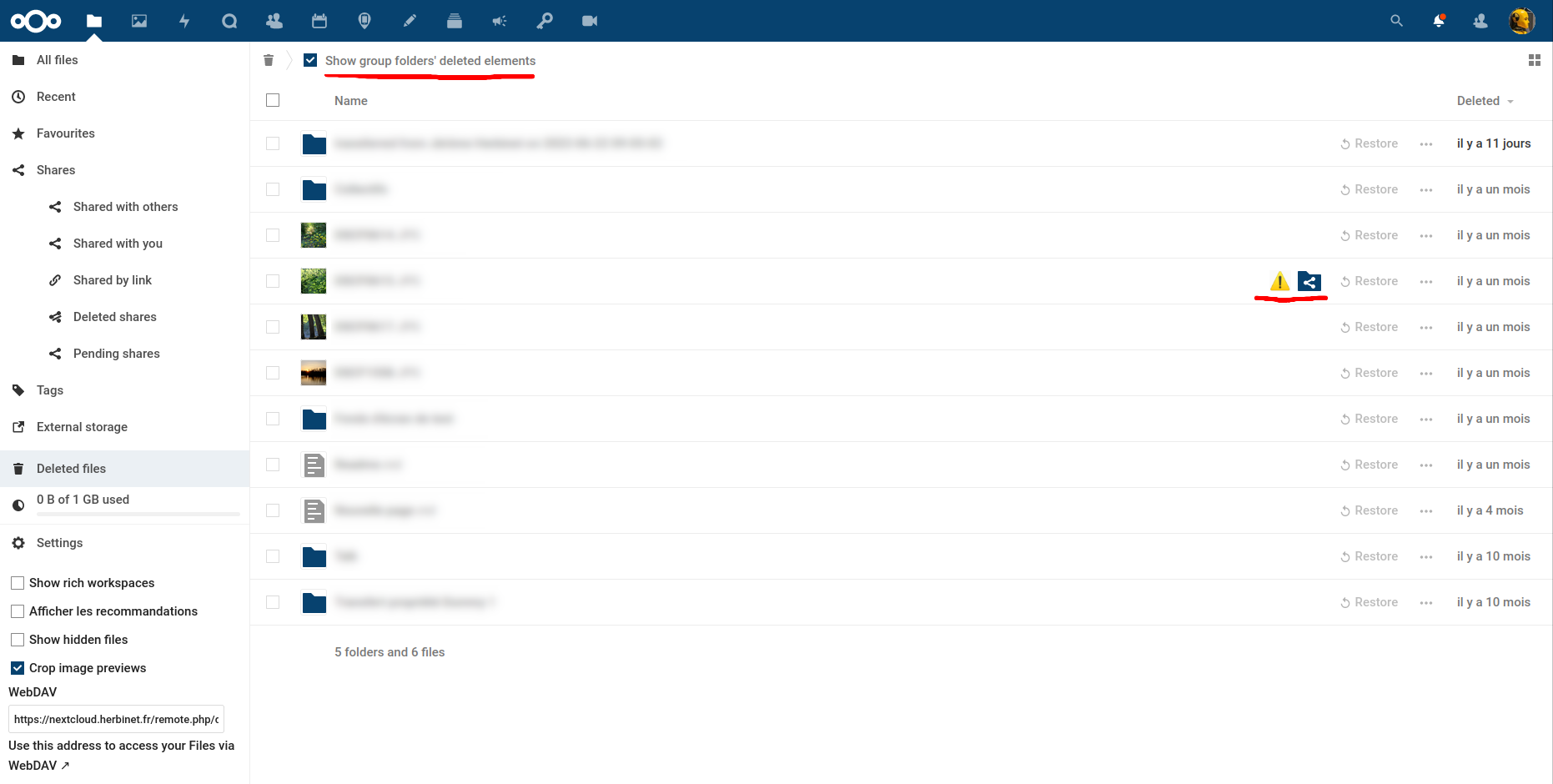
You can see at the top the checkbox that should be unchecked by default, but technically and from a UX point of view, I don't know if this is possible.
Next, we see a warning icon and a group folder icon in front of a folder belonging to a group folder.
We could imagine that by hovering over the warning icon with the cursor, we would warn the user with a tooltip: "this file or folder belongs to a group folder; if you delete it, it will no longer be recoverable by any other user" or something like that.
Hovering over the group folder icon would give a tooltip with the name of the group folder (all to save space).
All this would also be displayed in front of a file belonging to a group folder.
The UX/UI is definitely worth thinking about.
Lastly, if you decide to delete files and/or folders belonging to a group folder, it might be a good idea to provide a confirmation window.
Best regards,
Jérôme
Contributor guide
First steps
- Read the whole issue, then the project's contributing guide.
- Comment on the issue to say you are picking it up — it saves two people doing the same work.
- Fork the repository and make your change on a branch.
- Open a pull request that references the issue number.
Research direction
The issue does not name files, tests, or entry points. Start by tracing how group-folder items are represented and displayed in the deleted-files/recycle-bin experience, then review the existing group-folder UI patterns. Done means a defined, reviewed behavior for filtering, identification, and deletion confirmation that protects shared items.
Written by the indexing model from the issue text.
Assessment
- Tech stack
- php
- Domain
- backend, frontend
- Issue type
- Feature
- Difficulty
- 5/5
- Estimated time
- Over a week
- Activity status
- Stale
- Clarity
- Mostly clear
- Newbie friendliness
- 30/100