nextcloud / nextcloud/fulltextsearch
Wiki is unclear on installation and on "Search Platform:" configuration
Nobody has claimed this yet.
- Dominant language
- PHP
- Stars
- 234
- Forks
- 64
- Avg merge
- 6h 18m
- Merged PRs (30d)
- 10
Description
I installed it:

My logs report:
[fulltextsearch] Warning: Admin have not selected any IFullTextSearchPlatform
GET /ocs/v2.php/search/providers/fulltextsearch/search?term=fulltext&from=/settings/apps
from 192.168.0.11 by bernd at 2022-02-08T18:01:43+11:00
The settings page reads:
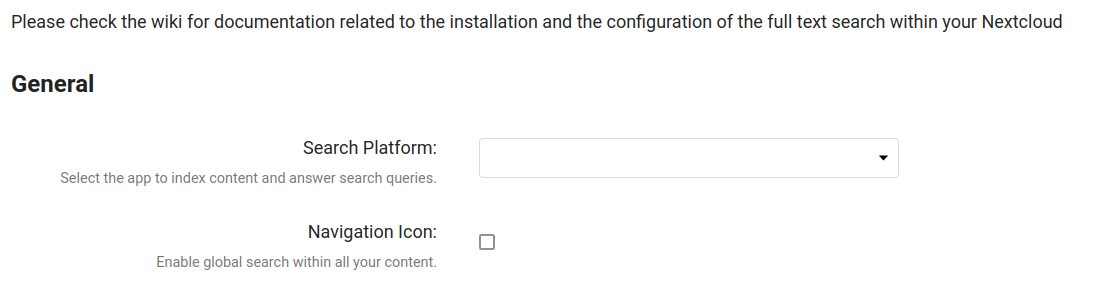
Yet there is no link to the wiki (and there could rightly be), but when i find it manually I read only:
https://github.com/nextcloud/fulltextsearch/wiki/Basic-Installation#installation-of-nextcloud-app
Which has three bullet points and no text explaining what they mean. As in, install all these, some of these, what's the deal?
And a search of the whole wiki for "Search Platform" yields nothing. So I have no way of knowing how to configure this alas.
Duly disabling it to clear my logs, but it would be nice to learn how to make a site wide full text search work.
Appreciate the idea, and the offering, but alas, not so handy for the clueless at present.
Contributor guide
First steps
- Read the whole issue, then the project's contributing guide.
- Comment on the issue to say you are picking it up — it saves two people doing the same work.
- Fork the repository and make your change on a branch.
- Open a pull request that references the issue number.
Research direction
Start with the Basic Installation wiki page linked in the issue and inspect the settings page where the Search Platform warning appears. Clarify what each installation step provides, explain how to configure a Search Platform, and link the relevant guidance from the settings page. Done means a new administrator can install and enable site-wide full-text search without relying on undocumented setup details.
Written by the indexing model from the issue text.
Assessment
- Tech stack
- php
- Domain
- documentation
- Issue type
- Documentation
- Difficulty
- 3/5
- Estimated time
- 1-2 days
- Activity status
- Stale
- Clarity
- Mostly clear
- Newbie friendliness
- 45/100