nextcloud / nextcloud/documentation
Share Link (for public links) documentation is outdated and unclear
Nobody has claimed this yet.
- Dominant language
- JavaScript
- Stars
- 628
- Forks
- 2.5k
- Avg merge
- 2d 11h
- Merged PRs (30d)
- 135
Description
At some point the user interface changed for sharing public links, and this does not seem to be reflected in the User Manual documentation. I believe the Share section could benefit from some additional verbosity and screenshots, making it more clear the difference between internal shares and external share links, and the different process for each type.
https://docs.nextcloud.com/server/18/user_manual/files/access_webgui.html#file-controls
Today I'm attempting to create a public share link but I'm not exactly sure what I need to do to make it "stick." I have an enforced expiration date of 30 days, so when I click the + next to share link, I get a dialog saying "Please enter the following required information before creating the share." and "Expiration date (enforced)", where the date is already set to 30 days from today. If I click outside the box, it cancels my link creation I guess. If I click on the date picker, I have to pick a date (but one is already set, so why is this step necessary?). There is no confirm option. Now if I click outside the box having clicked on the date and set it to the date it was already set to, it seems to have created the share. I'm not exactly sure what the process is supposed to be, since it doesn't work intuitively like before, and I'm just guessing and checking until it sticks. So I went to the documentation for clarity, but it is outdated and doesn't mention a single word about this new workflow.
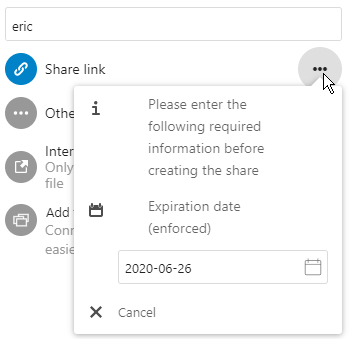
I'm guessing maybe I should post this issue on the main server repo as well? Any thoughts on this new sharing workflow?
Contributor guide
First steps
- Read the whole issue, then the project's contributing guide.
- Comment on the issue to say you are picking it up — it saves two people doing the same work.
- Fork the repository and make your change on a branch.
- Open a pull request that references the issue number.
Research direction
Start with the linked User Manual page at access_webgui.html#file-controls and compare its Share section with the public-link workflow described in the issue. Update the explanation of internal shares versus external share links, including the enforced expiration-date steps and screenshots, so users can tell how to create a link successfully.
Written by the indexing model from the issue text.
Assessment
- Domain
- documentation
- Issue type
- Documentation
- Difficulty
- 3/5
- Estimated time
- 1-2 days
- Activity status
- Stale
- Clarity
- Mostly clear
- Newbie friendliness
- 35/100