Multiselect dropdown for "Assign tag" is covered with control buttons in Description section
Open
Nobody has claimed this yet.
0. Needs triage
bug
client: 💻 desktop
feature: tags
frontend
- Dominant language
- JavaScript
- Stars
- 1.4k
- Forks
- 354
- Avg merge
- 1d 10h
- Merged PRs (30d)
- 43
Description
How to use GitHub
- Please use the 👍 reaction to show that you are affected by the same issue.
- Please don't comment if you have no relevant information to add. It's just extra noise for everyone subscribed to this issue.
- Subscribe to receive notifications on status change and new comments.
Describe the bug
Dropdown with z-index: 50 is covered with control buttons in Description: see .text-menubar z-index: 10021
To Reproduce
Steps to reproduce the behavior:
- Go to 'Deck' and open a card (right sidebar should appear)
- Click on 'Assign tag' multiselect (make sure to have more than 4 tags)
- See error
Expected behavior
Dropdown should be fully visible or scrollable
Screenshots
| Overview | Devtools |
|---|---|
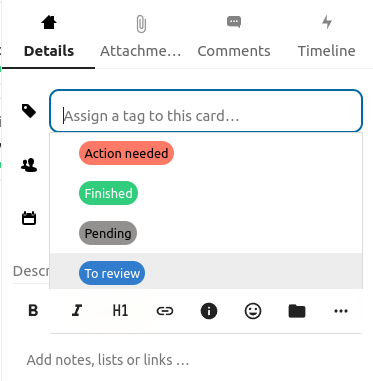 |
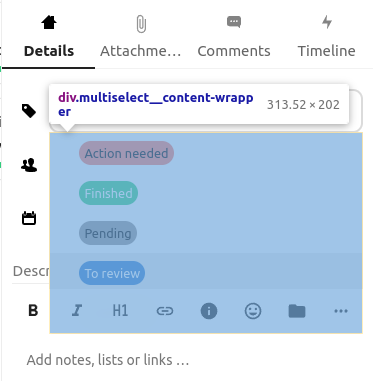 |
Contributor guide
First steps
- Read the whole issue, then the project's contributing guide.
- Comment on the issue to say you are picking it up — it saves two people doing the same work.
- Fork the repository and make your change on a branch.
- Open a pull request that references the issue number.
Research direction
Reproduce the issue in Deck by opening a card, expanding Assign tag with more than four tags, and inspect the dropdown and .text-menubar stacking rules in DevTools. Locate the z-index declarations involved and verify that the dropdown is fully visible or scrollable without being covered by the Description controls.
Written by the indexing model from the issue text.
Assessment
- Tech stack
- javascript
- Domain
- frontend
- Issue type
- Bug
- Difficulty
- 2/5
- Estimated time
- 1-3 hours
- Activity status
- Stale
- Clarity
- Mostly clear
- Newbie friendliness
- 48/100