Buttons do not explain context
Nobody has claimed this yet.
- Dominant language
- JavaScript
- Stars
- 1.4k
- Forks
- 354
- Avg merge
- 1d 10h
- Merged PRs (30d)
- 43
Description
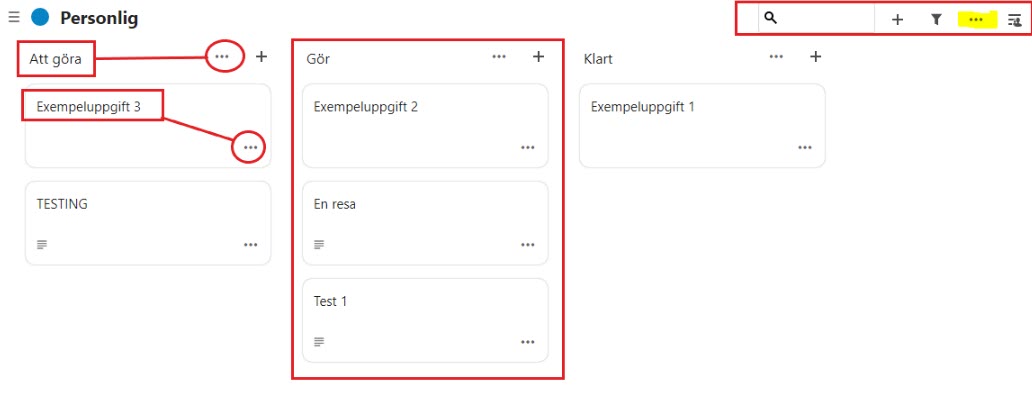
Many buttons in the interface have very generic accessible names. This makes it very hard to understand the difference between similar buttons, and what parts of the interface they’re connected to in the context.
Take the screenshot below from the Deck app. All the “…"-buttons have the same accessible name, this makes it nearly impossible for screen reader users to guess their function in the interface.
Make sure all accessible names explain the function of interactive elements clearly, including any context necessary to understand.
Contributor guide
First steps
- Read the whole issue, then the project's contributing guide.
- Comment on the issue to say you are picking it up — it saves two people doing the same work.
- Fork the repository and make your change on a branch.
- Open a pull request that references the issue number.
Research direction
Start by auditing the Deck interface buttons shown in the issue, especially the repeated “…” buttons in the screenshot, and identify where their accessible names are defined. Done means interactive elements have names that explain their function and include enough context for screen reader users to distinguish similar controls.
Written by the indexing model from the issue text.
Assessment
- Tech stack
- javascript
- Domain
- accessibility, frontend
- Issue type
- Bug
- Difficulty
- 4/5
- Estimated time
- 3-5 days
- Activity status
- Stale
- Clarity
- Mostly clear
- Newbie friendliness
- 35/100