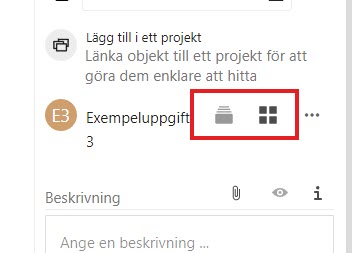
Missing alt-attributes in fly-out in the right side menu
Nobody has claimed this yet.
- Dominant language
- JavaScript
- Stars
- 1.4k
- Forks
- 354
- Avg merge
- 1d 10h
- Merged PRs (30d)
- 43
Description
In the fly-out in the right side menu, there are images without alt-attributes, which must be present for such elements. They are placed in links without link texts, which means that screen reader users don’t get any information on their purpose.
There seems to be a dynamic reading of a text through aria-describeby, but it disappears.
You can use the alternative texts for the images to give these links understandable link texts. Or you can give them alt="" and place texts in the links for much the same effect.
Contributor guide
First steps
- Read the whole issue, then the project's contributing guide.
- Comment on the issue to say you are picking it up — it saves two people doing the same work.
- Fork the repository and make your change on a branch.
- Open a pull request that references the issue number.
Research direction
Start by locating the right-side menu fly-out and inspect its images and links, especially the dynamic aria-describedby behavior mentioned in the issue. Ensure each image link exposes an understandable accessible name, then verify the result with a screen reader or accessibility checks.
Written by the indexing model from the issue text.
Assessment
- Tech stack
- javascript
- Domain
- accessibility, frontend
- Issue type
- Bug
- Difficulty
- 3/5
- Estimated time
- 1-2 days
- Activity status
- Stale
- Clarity
- Mostly clear
- Newbie friendliness
- 45/100