Impossible to change the date of an event due to the scroll anomaly
Nobody has claimed this yet.
- Dominant language
- JavaScript
- Stars
- 1.4k
- Forks
- 354
- Avg merge
- 1d 10h
- Merged PRs (30d)
- 43
Description
How to use GitHub
- Please use the 👍 reaction to show that you are affected by the same issue.
- Please don't comment if you have no relevant information to add. It's just extra noise for everyone subscribed to this issue.
- Subscribe to receive notifications on status change and new comments.
Describe the bug
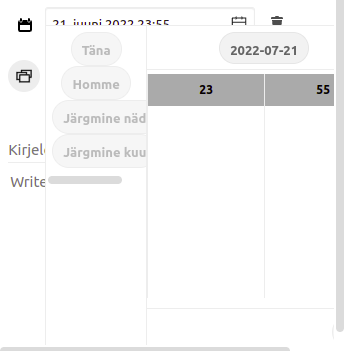
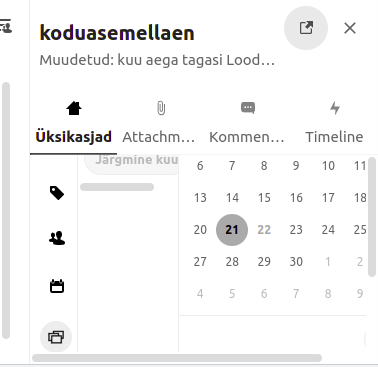
It's impossible to change the date of a created event as it requires horizontal scrolling and once scrolled the modal window that contains all the calendar stuff disappears.
To Reproduce
Steps to reproduce the behavior:
- Click an event that's already created!
- Change its date!
- Set the clock time!
- See that the button OK isn't visible!
- Scroll right!
- The modal window of changing the date disappears making it impossible to click the button mentioned in the step 4.
Expected behavior
It's possible to change the date of an event.
Screenshots
Client details:
- OS: Ubuntu
- Browser chrome
- Version 102.0.5005.61 (Official Build) (64-bit)
- Device: laptop
Server details
_Issue Template_ is just a white page having nothing in.Operating system:
No LSB modules are available.
Distributor ID: Ubuntu
Description: Ubuntu 20.04.4 LTS
Release: 20.04
Codename: focal
Web server: nginx
Database: mariadb
PHP version:
kalmer@test:~$ php --version
PHP 7.4.3 (cli) (built: Jun 13 2022 13:43:30) ( NTS )
Copyright (c) The PHP Group
Zend Engine v3.4.0, Copyright (c) Zend Technologies
with Zend OPcache v7.4.3, Copyright (c), by Zend Technologies
Nextcloud version: (see Nextcloud admin page)
24.0.2
Where did you install Nextcloud from:
at home
Signing status:
i've not signed anything regarding that
Login as admin user into your Nextcloud and access
http://example.com/index.php/settings/integrity/failed
paste the results here.
No errors have been found.
List of activated apps:
If you have access to your command line run e.g.:
sudo -u www-data php occ app:list
from within your Nextcloud installation folder
An unhandled exception has been thrown:
OCP\HintException: [0]: Memcache \OC\Memcache\APCu not available for local cache (Is the matching PHP module installed and enabled?)
Nextcloud configuration:
If you have access to your command line run e.g.:
  sudo -u www-data php occ config:list system
from within your Nextcloud installation folder

or

Insert your config.php content here
Make sure to remove all sensitive content such as passwords. (e.g. database password, passwordsalt, secret, smtp password, …)
An unhandled exception has been thrown:
OCP\HintException: [0]: Memcache \OC\Memcache\APCu not available for local cache (Is the matching PHP module installed and enabled?)
Are you using an external user-backend, if yes which one: LDAP/ActiveDirectory/Webdav/...
No.
Logs
Nextcloud log (data/nextcloud.log)
Insert your Nextcloud log here
Logimine just displays a white page, nothing in there.
Browser log
Insert your browser log here, this could for example include:

a) The javascript console log

> index.js:46 No OC found
> getLanguage @ index.js:46
> index.es.js:2337 Proxying an event bus of version 2.1.1 with 1.3.0
> t @ index.es.js:2337
> jquery-migrate.min.js:2 JQMIGRATE: Migrate is installed, version 3.4.0
> index.es.js:2337 Proxying an event bus of version 2.1.1 with 1.3.0
> t @ index.es.js:2337
> globals.js:62 jQuery is deprecated: The global jQuery is deprecated. It will be removed in a later versions without another warning. Please ship your own.
> Tt @ globals.js:62
> globals.js:62 $ is deprecated: The global jQuery is deprecated. It will be removed in a later versions without another warning. Please ship your own.
> Tt @ globals.js:62
> 2index.es.js:2337 Proxying an event bus of version 2.1.1 with 1.3.0
> t @ index.es.js:2337
> major.js:2 Proxying an event bus of version 2.1.1 with 1.3.0
> t @ major.js:2
> index.es.js:2337 Proxying an event bus of version 2.1.1 with 1.3.0
> e @ index.es.js:2337
> index.es.js:2337 Proxying an event bus of version 2.1.1 with 1.3.0
> t @ index.es.js:2337
> globals.js:62 jQuery is deprecated: The global jQuery is deprecated. It will be removed in a later versions without another warning. Please ship your own.
> Tt @ globals.js:62
> globals.js:62 $ is deprecated: The global jQuery is deprecated. It will be removed in a later versions without another warning. Please ship your own.
> Tt @ globals.js:62
> 2globals.js:62 Handlebars is deprecated: please ship your own, this will be removed in Nextcloud 20
> Tt @ globals.js:62
> index.es.js:2337 Proxying an event bus of version 2.1.1 with 1.3.0
> e @ index.es.js:2337
> ConsoleLogger.js:37 [WARN] viewer: Some mimes were ignored because they are not enabled in the server previews config Object
> log @ ConsoleLogger.js:37
> ConsoleLogger.js:33 [INFO] viewer: No OCA.Files app found, viewer is now in standalone mode Object
> 2globals.js:62 oc_appswebroots is deprecated: use OC.appswebroots instead, this will be removed in Nextcloud 20
> Tt @ globals.js:62
> globals.js:62 $ is deprecated: The global jQuery is deprecated. It will be removed in a later versions without another warning. Please ship your own.
> Tt @ globals.js:62
> 2globals.js:62 jQuery is deprecated: The global jQuery is deprecated. It will be removed in a later versions without another warning. Please ship your own.
> Tt @ globals.js:62
> index.es.js:2337 Proxying an event bus of version 2.1.1 with 1.3.0
> e @ index.es.js:2337
> 3globals.js:62 $ is deprecated: The global jQuery is deprecated. It will be removed in a later versions without another warning. Please ship your own.
> Tt @ globals.js:62
> index.es.js:2337 Proxying an event bus of version 2.1.1 with 1.3.0
> t @ index.es.js:2337
> index.es.js:2337 Proxying an event bus of version 2.1.1 with 1.3.0
> e @ index.es.js:2337
> index.es.js:2337 Proxying an event bus of version 2.1.1 with 1.3.0
> e @ index.es.js:2337
> 2capabilities.js:35 OC.getCapabilities is deprecated and will be removed in Nextcloud 21. See @nextcloud/capabilities
> getCapabilities @ capabilities.js:35
> search.js:29 OCA.Search is deprecated. Please use the unified search API instead
> e @ search.js:29
> index.es.js:2337 Proxying an event bus of version 2.1.1 with 1.3.0
> t @ index.es.js:2337
> index.es.js:2337 Proxying an event bus of version 2.1.1 with 1.3.0
> e @ index.es.js:2337
> ConsoleLogger.js:33 [INFO] viewer: 5 viewer handlers registered Object
> session-heartbeat.js:103 session heartbeat polling started
> 4globals.js:62 $ is deprecated: The global jQuery is deprecated. It will be removed in a later versions without another warning. Please ship your own.
> Tt @ globals.js:62
> content.js:63  Warning : Do not paste code into this window.
Contributor guide
First steps
- Read the whole issue, then the project's contributing guide.
- Comment on the issue to say you are picking it up — it saves two people doing the same work.
- Fork the repository and make your change on a branch.
- Open a pull request that references the issue number.
Research direction
Start by reproducing the issue through the event date editor described in the reproduction steps, using the reported Chrome setup if available. Trace the frontend modal and scrolling behavior; the work is done when an existing event's date and time can be changed and the OK button remains accessible.
Written by the indexing model from the issue text.
Assessment
- Tech stack
- javascript
- Domain
- frontend
- Issue type
- Bug
- Difficulty
- 3/5
- Estimated time
- 1-2 days
- Activity status
- Stale
- Clarity
- Mostly clear
- Newbie friendliness
- 35/100