new cards not shown when searched was performed before [NC24RC1]
Nobody has claimed this yet.
- Dominant language
- JavaScript
- Stars
- 1.4k
- Forks
- 354
- Avg merge
- 1d 10h
- Merged PRs (30d)
- 43
Description
How to use GitHub
- Please use the 👍 reaction to show that you are affected by the same issue.
- Please don't comment if you have no relevant information to add. It's just extra noise for everyone subscribed to this issue.
- Subscribe to receive notifications on status change and new comments.
Describe the bug
After failed search, new cards are not shown directly
To Reproduce
Steps to reproduce the behavior:
- Go to your deck board
- Search for something that doesn't exist and returns emtpy result (don't close the result window)
- Add a new card to the list (enter text hit enter) and list stays empty
Expected behavior
New card shows up, but after hitting enter, it is empty. If you reload the board, the card shows up in the list.
Screenshots
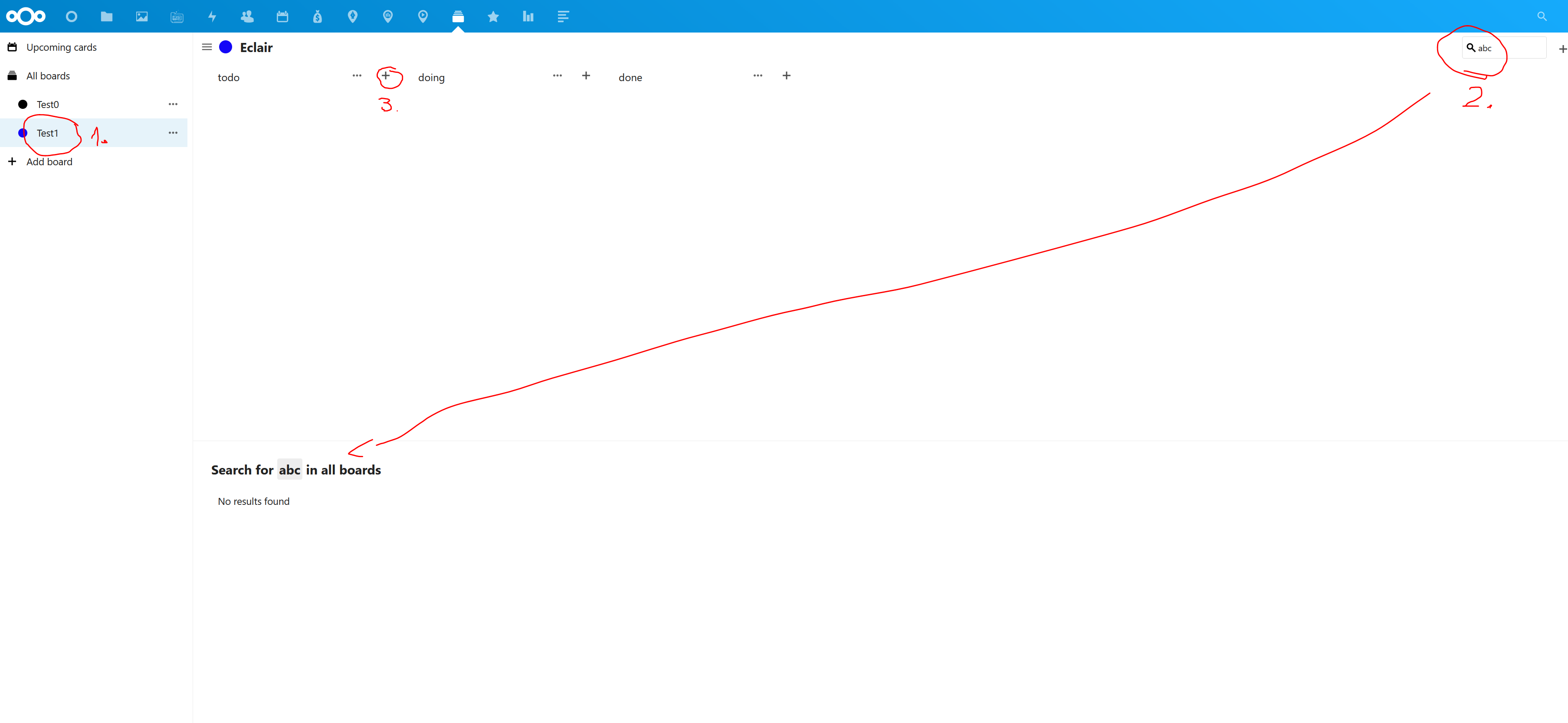
Client details:
- OS: Win 10
- Browser FF
- Version 99.0.1 64 bit
- Device: desktop
Here are some of the server details, I didn't put everything since it looks more like a frontend problem:
Server details
Operating system: FreeBSD
Web server: Nginx
Database: Mysql
PHP version: 7.4
Nextcloud version: NC24RC1
Where did you install Nextcloud from: Manually
Signing status: No issues.
Login as admin user into your Nextcloud and access
http://example.com/index.php/settings/integrity/failed
paste the results here.
List of activated apps:
Enabled:
  - accessibility: 1.10.0
  - activity: 2.16.0
  - bookmarks: 10.3.1
  - calendar: 3.2.2
  - checksum: 1.1.3
  - cloud_federation_api: 1.7.0
  - comments: 1.14.0
  - contacts: 4.1.0
  - contactsinteraction: 1.5.0
  - cospend: 1.4.6
  - dashboard: 7.4.0
  - dav: 1.22.0
  - deck: 1.7.0-beta.1
  - federatedfilesharing: 1.14.0
  - federation: 1.14.0
  - files: 1.19.0
  - files_accesscontrol: 1.14.0
  - files_automatedtagging: 1.14.0
  - files_external: 1.16.1
  - files_pdfviewer: 2.5.0
  - files_rightclick: 1.3.0
  - files_sharing: 1.16.2
  - files_trashbin: 1.14.0
  - files_versions: 1.17.0
  - files_videoplayer: 1.13.0
  - firstrunwizard: 2.13.0
  - gpxpod: 4.3.0
  - integration_discourse: 1.0.2
  - logreader: 2.9.0
  - lookup_server_connector: 1.12.0
  - mediadc: 0.1.9
  - news: 18.0.1-beta3
  - nextcloud_announcements: 1.13.0
  - notifications: 2.12.0
  - oauth2: 1.12.0
  - password_policy: 1.14.0
  - photos: 1.6.0
  - polls: 3.6.0-beta1
  - privacy: 1.8.0
  - provisioning_api: 1.14.0
  - recommendations: 1.3.0
  - serverinfo: 1.14.0
  - settings: 1.6.0
  - sharebymail: 1.14.0
  - systemtags: 1.14.0
  - text: 3.5.1
  - twofactor_backupcodes: 1.13.0
  - twofactor_totp: 6.3.0-alpha.1
  - updatenotification: 1.14.0
  - user_external: 3.0.0-beta1
  - user_status: 1.4.0
  - viewer: 1.8.0
  - weather_status: 1.4.0
  - workflowengine: 2.6.0
Contributor guide
First steps
- Read the whole issue, then the project's contributing guide.
- Comment on the issue to say you are picking it up — it saves two people doing the same work.
- Fork the repository and make your change on a branch.
- Open a pull request that references the issue number.
Research direction
Start by reproducing the issue in a Deck board: perform a search with no results, leave the result window open, then add a card to a list. Trace the frontend search and card-creation flow; done means the new card appears immediately without reloading the board.
Written by the indexing model from the issue text.
Assessment
- Tech stack
- javascript
- Domain
- frontend
- Issue type
- Bug
- Difficulty
- 3/5
- Estimated time
- 1-2 days
- Activity status
- Stale
- Clarity
- Mostly clear
- Newbie friendliness
- 35/100