Unable to @-mention users having a specific tag structure
Nobody has claimed this yet.
- Dominant language
- JavaScript
- Stars
- 1.4k
- Forks
- 354
- Avg merge
- 1d 10h
- Merged PRs (30d)
- 43
Description
Describe the bug
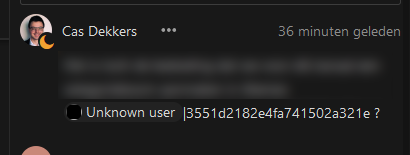
My SME uses Nextcloud in combination with Auth0 and SAML SSO. By default, Auth0 employs user IDs of the form auth0, followed by a |, followed by a hash of 30 characters in the range 0-9 and a-f; for example, auth0|3551d2182e4fa741502a321e. This ID is used by Nextcloud as a user's tag. In Deck, you are not able to @-mention people properly having such a tag, or a tag with a similar structure, whilst typing card comments.
This is caused by two factors:
- You are not able to autocomplete users by their name whilst commenting. For example. let's say you'd want to tag a user with the name John Smith, and their tag is
auth0|3551d2182e4fa741502a321e; typing@shows a list of matching user names, including John Smith; but consecutively typing aJafter the@does not result in a match with John Smith. This is because the matching algorithm only matches tags, and no tags starting with aJexist, only tags starting with ana(ofauth0|...) exist. - After finding the right name in the list and seemingly successfully tagging the user and pressing the "Save" arrow, the tagging mechanism fails in the comment that is posted. It is shown as a tag to "Unknown user" followed by
|3551d2182e4fa741502a321e:
To Reproduce
Steps to reproduce the behavior:
- Have a user, e.g. John Smith, registered with a tag having a structure similar to
auth0|3551d2182e4fa741502a321e, as explained above. - Navigate to a board in Deck.
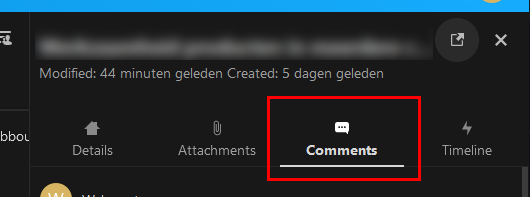
- Either create a new card on the board, or pick an existing card from the board, and navigate to the card's "Comments" tab in the top right.
- Start typing an @-mention in the comments with the
@-sign; notice that this matches all users. - Start typing the first letter(s) of the name of the person you would like to find, in this case,
Jfor "John Smith"; this only matches the tag and not the user's name, thus@Jyields no results. - After finding John Smith in the list some other way, notice how your @-mention is initially shown correctly in the input textarea.
- Post the comment. Notice that the @-mention now is malformed; it is shown as a tag to "Unknown user" followed by
|3551d2182e4fa741502a321e(as shown in the first screenshot snippet).
Expected behavior
In step 5 above, you would expect to match a user's name whilst typing an @-mention. In case of the example, typing @J is expected to give a list of matched users containing John Smith.
In step 7 above, one would expect the user that was successfully tagged whilst typing the comment, to be the user that is tagged in the posted comment.
Client details:
- OS: Windows 10
- Browser Firefox
- Version 85.0.1 (64-bit)
- Device: Desktop
Contributor guide
First steps
- Read the whole issue, then the project's contributing guide.
- Comment on the issue to say you are picking it up — it saves two people doing the same work.
- Fork the repository and make your change on a branch.
- Open a pull request that references the issue number.
Research direction
Start in Deck's card Comments tab and trace the @-mention autocomplete and comment-posting flow described in the reproduction steps. Reproduce with a user tag shaped like auth0|3551d2182e4fa741502a321e; done means searching by the user's name works and the posted comment preserves the intended user mention.
Written by the indexing model from the issue text.
Assessment
- Tech stack
- javascript
- Domain
- frontend
- Issue type
- Bug
- Difficulty
- 3/5
- Estimated time
- 1-2 days
- Activity status
- Stale
- Clarity
- Mostly clear
- Newbie friendliness
- 42/100