nextcloud / nextcloud/contacts
[CardDAV] Multiple lines in Street are joined to one line with ","
Nobody has claimed this yet.
- Dominant language
- JavaScript
- Stars
- 642
- Forks
- 220
- Avg merge
- 14h 39m
- Merged PRs (30d)
- 51
Description
Describe the bug
When a CardDAV client like DAVx⁵ uploads a contact with multiple lines in a field, for instance in the street, it uploads:
ADR:;;Street Line1,Street Line2;…
The lines are separated by ,; see RFC 6.3.50 ADR:
The text components are separated by the SEMICOLON character (U+003B). Where it makes semantic sense, individual text components can include multiple text values (e.g., a "street" component with multiple lines) separated by the COMMA character (U+002C).
On Android, this is regularly the case because most contacts apps put the whole address into the street field, so that it can easily consist of multiple lines.
When such a vCard is uploaded to Nextcloud, Nextcloud Contacts shows it with ",":
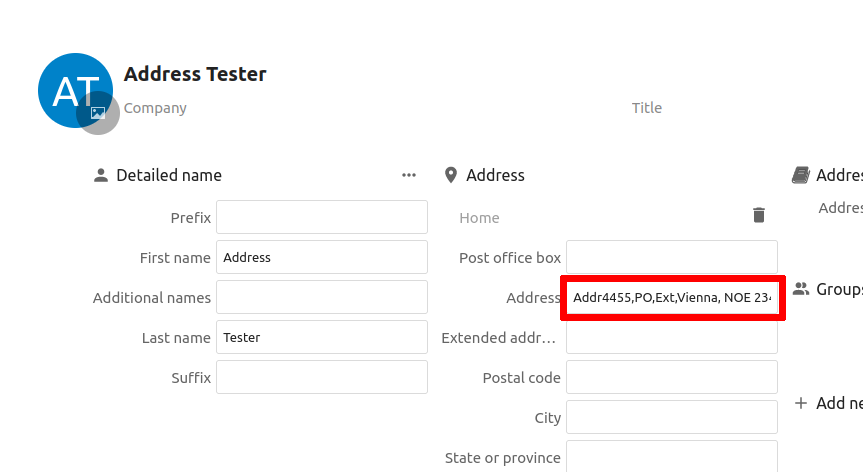
However, it should show the lines separately.
Steps to reproduce
Upload a vCard with multiple lines with curl:
cat >multiple-lines.vcf <<EOF
BEGIN:VCARD
VERSION:4.0
UID:0271ceac-d598-4b28-837e-906fa3d4f064
FN:Address Tester
N:Tester;Address;;;
ADR:;;1,2,3,4;;;;
END:VCARD
EOF
curl -nvT multiple-lines.vcf 'https://cloud.example.com/remote.php/dav/addressbooks/users/test/931ba8fd-f3eb-4a9d-bed4-3109b9c64616/multiple-lines.vcf'
(or upload a contact with multiple lines in the street for instance with DAVx⁵)
Expected behavior
- street and ideally other fields should support multiple lines
- line breaks in vCards (
,) should be handled correctly
Actual behavior
- street has only one line
- line breaks in vCards (
,) are not handled correctly and result in an unreadable single-line text
Contact version
4.2.1
Operating system
No response
PHP engine version
No response
Web server
No response
Database
No response
Additional info
Somehow related to https://github.com/nextcloud/contacts/issues/72
Contributor guide
First steps
- Read the whole issue, then the project's contributing guide.
- Comment on the issue to say you are picking it up — it saves two people doing the same work.
- Fork the repository and make your change on a branch.
- Open a pull request that references the issue number.
Research direction
No source file or test is named. Start by reproducing the upload with the provided curl command and vCard fixture, then trace how the CardDAV ADR value is parsed and rendered; done means street lines appear separately instead of being joined with commas, with other applicable fields handled correctly.
Written by the indexing model from the issue text.
Assessment
- Tech stack
- javascript
- Domain
- full-stack
- Issue type
- Bug
- Difficulty
- 4/5
- Estimated time
- 3-5 days
- Activity status
- Stale
- Clarity
- Mostly clear
- Newbie friendliness
- 45/100