nextcloud / nextcloud/contacts
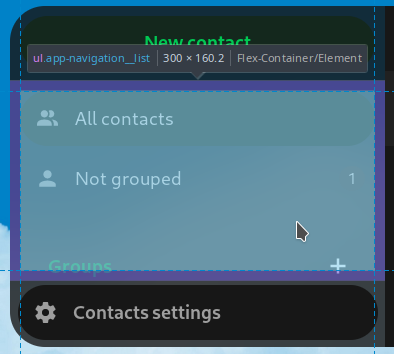
Left sidebar: "Contacts settings" button and sidebar header don't align
Open
Nobody has claimed this yet.
1. to develop
bug
design
design review
feature: contacts
- Dominant language
- JavaScript
- Stars
- 642
- Forks
- 220
- Avg merge
- 14h 39m
- Merged PRs (30d)
- 51
Description
Describe the bug
The "Contacts settings" button at the bottom is not as wide as the buttons on the top of the sidebar.
This could be caused by 2 different things:
- The header is too narrow (most likely).
- The "Contacts settings" button at the bottom is a bit too wide.
Steps to reproduce
- Open the Contacts app.
- Observe the left sidebar.
Expected behavior
The buttons at the top and the bottom should have the exact same width.
Actual behavior
The button on the bottom is a bit too wide.
Contact version
main
Contributor guide
First steps
- Read the whole issue, then the project's contributing guide.
- Comment on the issue to say you are picking it up — it saves two people doing the same work.
- Fork the repository and make your change on a branch.
- Open a pull request that references the issue number.
Research direction
No source file or test is named. Open the Contacts app and inspect the left sidebar implementation and its styling, comparing the top buttons with the bottom “Contacts settings” button. Done means the header and both button areas have exactly the same width when viewing the sidebar.
Written by the indexing model from the issue text.
Assessment
- Tech stack
- javascript
- Domain
- frontend
- Issue type
- Bug
- Difficulty
- 2/5
- Estimated time
- 1-3 hours
- Activity status
- Stale
- Clarity
- Mostly clear
- Newbie friendliness
- 35/100