nextcloud / nextcloud/contacts
Sidebar menu obstructs Add Contact form on medium screen
Nobody has claimed this yet.
- Dominant language
- JavaScript
- Stars
- 642
- Forks
- 220
- Avg merge
- 14h 39m
- Merged PRs (30d)
- 51
Description
Related to: https://github.com/nextcloud/server/issues/16934
Describe the bug
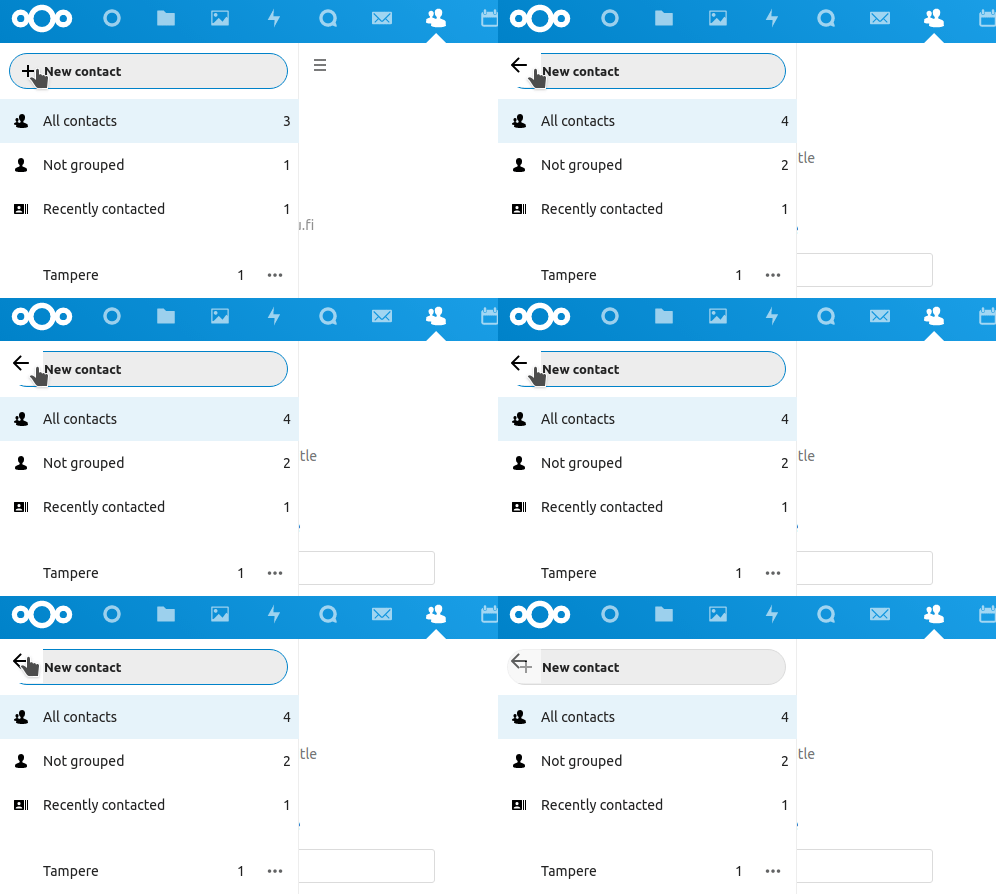
On a medium screen, such as a tablet, when clicking the "+ New contact" button, the sidebar remains visible and is not possible to collapse. This makes it impossible to fill in the contact details form, as the sidebar overlaps the form fields.
To Reproduce
Steps to reproduce the behavior:
- Go to Contacts
- Click on the hamburger menu to show the sidebar
- Observe that the sidebar overlaps the form
- Observe there is no visible way to collapse the sidebar
Expected behavior
The sidebar would automatically collapse when clicking on "+ New contact", revealing the full form contents.
Actual behavior
The sidebar remains open and the hamburger icon disappears, obstructing the form with no way to collapse the sidebar.
Screenshots
Server configuration
Nextcloud version: 20.0
Contacts version: 3.4.1
Contributor guide
First steps
- Read the whole issue, then the project's contributing guide.
- Comment on the issue to say you are picking it up — it saves two people doing the same work.
- Fork the repository and make your change on a branch.
- Open a pull request that references the issue number.
Research direction
Reproduce the issue in the Contacts app on a medium-sized screen using the listed steps, with the sidebar open before selecting "+ New contact." Inspect the responsive sidebar and form behavior; done means the sidebar collapses automatically and all contact form fields remain accessible without a visible hamburger control.
Written by the indexing model from the issue text.
Assessment
- Tech stack
- javascript
- Domain
- frontend
- Issue type
- Bug
- Difficulty
- 3/5
- Estimated time
- 1-2 days
- Activity status
- Stale
- Clarity
- Clearly specified
- Newbie friendliness
- 38/100