"Shared to Circles" is difficult to use
Nobody has claimed this yet.
- Dominant language
- JavaScript
- Stars
- 177
- Forks
- 68
- Avg merge
- 2d 22h
- Merged PRs (30d)
- 60
Description
When clicking Shared to Circles in the left side of the Files app, I'd like to see everything I've shared to circles in a clear list. Thanks! @daita
In the files app, users can select Shared to Circle from the left hand menu.

This action is confusing, because unlike other menu options it will not return a list of files and folders. Instead, the user sees this almost blank page:
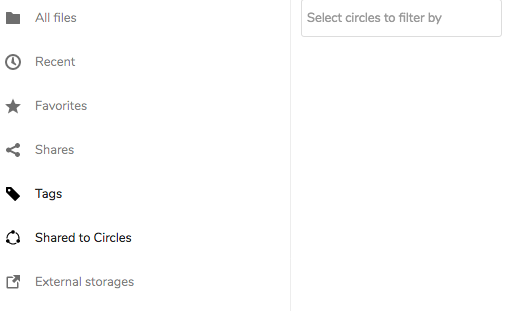
To see what they have shared with each and every circle, the user must:
- Click
Select circles to filter by - Select one circle at a time.
- Wait a few seconds for the page to refresh with any results.
- Repeat Step 1 until every circle is selected
Contributor guide
First steps
- Read the whole issue, then the project's contributing guide.
- Comment on the issue to say you are picking it up — it saves two people doing the same work.
- Fork the repository and make your change on a branch.
- Open a pull request that references the issue number.
Research direction
Start by reproducing the Files app's Shared to Circles entry point and reviewing how circle filters are selected and refreshed. Done means the view presents everything shared to circles in a clear list without requiring users to select each circle individually.
Written by the indexing model from the issue text.
Assessment
- Tech stack
- javascript
- Domain
- frontend
- Issue type
- Feature
- Difficulty
- 3/5
- Estimated time
- 1-2 days
- Activity status
- Stale
- Clarity
- Mostly clear
- Newbie friendliness
- 38/100