nextcloud / nextcloud/calendar
Birthday Calendar isn’t synced to the normal calendar because the sync thinks Birthday calendars are disabled
Nobody has claimed this yet.
- Dominant language
- JavaScript
- Stars
- 1.2k
- Forks
- 332
- Avg merge
- 16h 13m
- Merged PRs (30d)
- 137
Description
Steps to reproduce
- Import calendar and contacts(some of the contain birthdays) from a previous installation.
- Normal calendar and birthday calendar both appear for my user but birthday calendar is created.
Expected behavior
Birthday calendar is empty even though some contacts have birthdays, even in the nextcloud webcalendar so this has nothing to do with clients.
Actual behaviour
I expect the birthdays of my contacts to be automatically sync to the birthday calendar. I then tried manually sycing my users contacts to the birthday calendar.
occ dav:sync-birthday-calendar Hydranet
Then I got the following output/error:
In SyncBirthdayCalendar.php line 119:
Birthday calendars are disabled
I checked that file and a few lines above there(line 116) it shows what it checks for:
$isEnabled = $this->config->getAppValue(‘dav’, ‘generateBirthdayCalendar’, ‘yes’);
I went to check the database table for this user to verify the settings are correct:
±--------±------±-------------------------±------------+
| userid | appid | configkey | configvalue |
±--------±------±-------------------------±------------+
| Hydranet | dav | generateBirthdayCalendar | yes |
±--------±------±-------------------------±------------+
I finally found that under "Admin Settings → Groupware there was a slider for "Automatically generate birthday calendar” which was turned off, I turned it on and the birthdays of my contacts appeared in the birthday calendar. See attached screenshot of the setting I turned on.
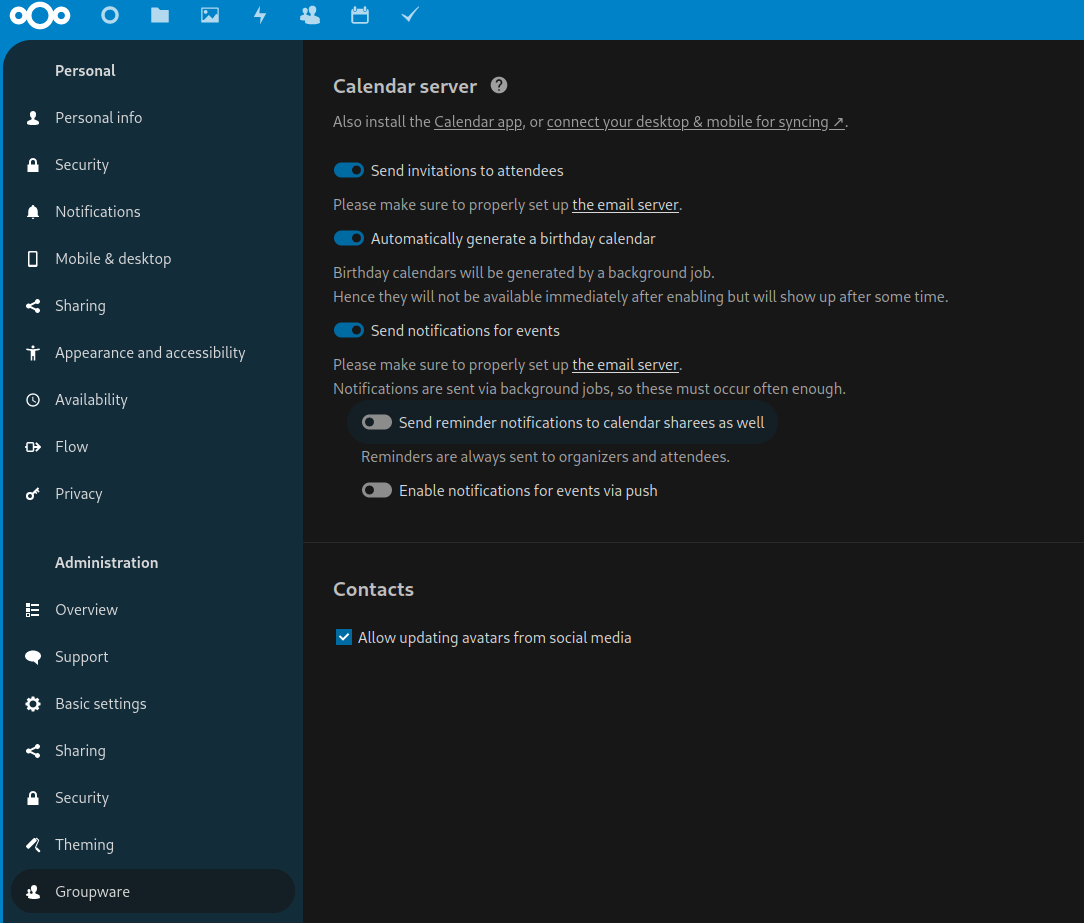
However it doesn't make any sense that nextcloud didn't pickup that I have a birthday calendar after having imported my contacts. I wouldn't expect if I import a calendar and my contacts that no birthday calendar should automatically be created if that slider for "Automatically generate birthday calendar” isn't turned on. In my case since after my fresh installation I imported my contacts and calendar the birthday calendar appeared so I assumed all was good but because of that import it seems that nextcloud thought I never enabled the birthday calendar.
So I think in short when someone imports a calendar and contacts that the birthday calendar should not be created as well. I do have to admit it's some months ago that I did this and I may have not remembered some details but thought it might help to report it.
Calendar app version
4.2.3
CalDAV-clients used
No response
Browser
No response
Client operating system
No response
Server operating system
RHEL9.1
Web server
Apache
Database engine version
MySQL
PHP engine version
PHP 8.1
Nextcloud version
25.0.3
Updated from an older installed version or fresh install
Updated from an older version
List of activated apps
Enabled:
  - activity: 2.17.0
  - bruteforcesettings: 2.5.0
  - calendar: 4.2.3
  - circles: 25.0.0
  - cloud_federation_api: 1.8.0
  - comments: 1.15.0
  - contacts: 5.1.0
  - contactsinteraction: 1.6.0
  - dashboard: 7.5.0
  - dav: 1.24.0
  - federatedfilesharing: 1.15.0
  - federation: 1.15.0
  - files: 1.20.1
  - files_pdfviewer: 2.6.0
  - files_rightclick: 1.4.0
  - files_sharing: 1.17.0
  - files_trashbin: 1.15.0
  - files_versions: 1.18.0
  - firstrunwizard: 2.14.0
  - logreader: 2.10.0
  - lookup_server_connector: 1.13.0
  - nextcloud_announcements: 1.14.0
  - notifications: 2.13.1
  - oauth2: 1.13.0
  - password_policy: 1.15.0
  - photos: 2.0.1
  - privacy: 1.9.0
  - provisioning_api: 1.15.0
  - recommendations: 1.4.0
  - related_resources: 1.0.4
  - serverinfo: 1.15.0
  - settings: 1.7.0
  - sharebymail: 1.15.0
  - support: 1.8.0
  - survey_client: 1.13.0
  - systemtags: 1.15.0
  - tasks: 0.14.5
  - text: 3.6.0
  - theming: 2.0.1
  - twofactor_backupcodes: 1.14.0
  - twofactor_totp: 7.0.0
  - updatenotification: 1.15.0
  - user_status: 1.5.0
  - viewer: 1.9.0
  - weather_status: 1.5.0
  - workflowengine: 2.7.0
Disabled:
  - admin_audit
  - encryption
  - event_update_notification: 2.0.0
  - files_external
  - news: 20.0.1
  - suspicious_login
  - user_ldap
Nextcloud configuration
{
    "system": {
        "instanceid": "***REMOVED SENSITIVE VALUE***",
        "passwordsalt": "***REMOVED SENSITIVE VALUE***",
        "secret": "***REMOVED SENSITIVE VALUE***",
        "trusted_domains": [
            "nc.example.com"
        ],
        "datadirectory": "***REMOVED SENSITIVE VALUE***",
        "dbtype": "mysql",
        "version": "25.0.3.2",
        "overwrite.cli.url": "https:\/\/nc.example.com",
        "dbname": "***REMOVED SENSITIVE VALUE***",
        "dbhost": "***REMOVED SENSITIVE VALUE***",
        "dbport": "",
        "dbtableprefix": "oc_",
        "mysql.utf8mb4": true,
        "dbuser": "***REMOVED SENSITIVE VALUE***",
        "dbpassword": "***REMOVED SENSITIVE VALUE***",
        "installed": true,
        "mail_from_address": "***REMOVED SENSITIVE VALUE***",
        "mail_smtpmode": "smtp",
        "mail_sendmailmode": "smtp",
        "mail_domain": "***REMOVED SENSITIVE VALUE***",
        "mail_smtpsecure": "tls",
        "mail_smtphost": "***REMOVED SENSITIVE VALUE***",
        "mail_smtpport": "587",
        "maintenance": false,
        "theme": "",
        "loglevel": 2,
        "twofactor_enforced": "false",
        "twofactor_enforced_groups": [],
        "twofactor_enforced_excluded_groups": [],
        "default_phone_region": "NL",
        "memcache.local": "\\OC\\Memcache\\APCu"
    }
}
Web server error log
No response
Log file
No response
Browser log
No response
Additional info
No response
Contributor guide
First steps
- Read the whole issue, then the project's contributing guide.
- Comment on the issue to say you are picking it up — it saves two people doing the same work.
- Fork the repository and make your change on a branch.
- Open a pull request that references the issue number.
Research direction
Start in SyncBirthdayCalendar.php around the generateBirthdayCalendar check near lines 116-119, then trace the calendar and contacts import flow described in the report. Reproduce with occ dav:sync-birthday-calendar and verify the imported contacts' birthdays are available without an inconsistent disabled state; add a regression test covering that scenario.
Written by the indexing model from the issue text.
Assessment
- Tech stack
- php
- Domain
- backend
- Issue type
- Bug
- Difficulty
- 4/5
- Estimated time
- 3-5 days
- Activity status
- Stale
- Clarity
- Mostly clear
- Newbie friendliness
- 42/100