nextcloud / nextcloud/calendar
Always "Out of Office"
Nobody has claimed this yet.
- Dominant language
- JavaScript
- Stars
- 1.2k
- Forks
- 332
- Avg merge
- 16h 13m
- Merged PRs (30d)
- 137
Description
Steps to reproduce
- Click on Personal Settings > Groupware
- Add an availability time range > Save > Remove it > Save
- Got to Calendar app > New event
- Add an attendees show busy times
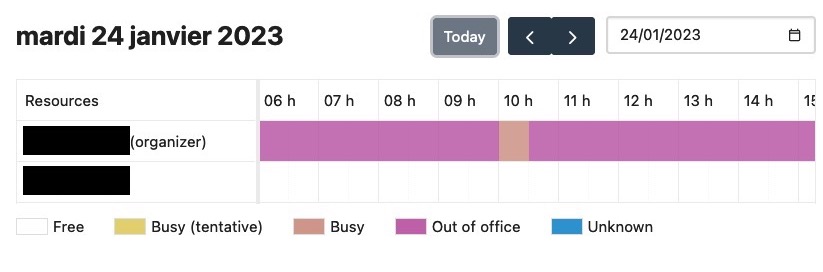
- From now on, the user schedule is fully "Out of Office"
Expected behavior
Out of office status should be removed
Actual behaviour
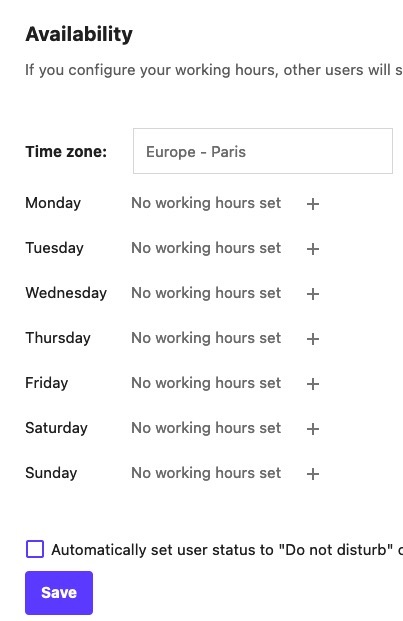
Availability feature seems to break the user calendar availability.
My availability settings:
My availability status:
Calendar app version
4.2.1
CalDAV-clients used
web
Browser
109.0 (64-bit)
Client operating system
macOS
Server operating system
debian Buster
Web server
Nginx
Database engine version
PostgreSQL
PHP engine version
PHP 8.1
Nextcloud version
25.0.2
Updated from an older installed version or fresh install
Fresh install
List of activated apps
Enabled:
  - activity: 2.17.0
  - admin_audit: 1.15.0
  - bruteforcesettings: 2.5.0
  - calendar: 4.2.1
  - cloud_federation_api: 1.8.0
  - contacts: 5.0.2
  - contactsinteraction: 1.6.0
  - dav: 1.24.0
  - federatedfilesharing: 1.15.0
  - files: 1.20.1
  - group_everyone: 0.1.11
  - ldap_contacts_backend: 1.5.0
  - logreader: 2.10.0
  - lookup_server_connector: 1.13.0
  - nextcloud_announcements: 1.14.0
  - notifications: 2.13.1
  - oauth2: 1.13.0
  - password_policy: 1.15.0
  - provisioning_api: 1.15.0
  - serverinfo: 1.15.0
  - settings: 1.7.0
  - side_menu: 3.5.0
  - tasks: 0.14.5
  - theming: 2.0.1
  - twofactor_backupcodes: 1.14.0
  - twofactor_totp: 7.0.0
  - twofactor_webauthn: 1.0.0
  - unroundedcorners: 1.0.8
  - updatenotification: 1.15.0
  - user_ldap: 1.15.0
  - viewer: 1.9.0
  - workflowengine: 2.7.0
Disabled:
  - circles: 24.0.0
  - comments: 1.14.0
  - dashboard: 7.4.0
  - encryption
  - event_update_notification: 2.0.0
  - federation: 1.14.0
  - files_external
  - files_pdfviewer: 2.5.0
  - files_rightclick: 1.3.0
  - files_sharing: 1.16.2
  - files_trashbin: 1.14.0
  - files_versions: 1.17.0
  - firstrunwizard: 2.13.0
  - photos: 1.6.0
  - privacy: 1.9.0
  - recommendations: 1.4.0
  - related_resources: 1.0.4
  - sharebymail: 1.14.0
  - support: 1.7.0
  - survey_client: 1.13.0
  - suspicious_login
  - systemtags: 1.14.0
  - text: 3.5.1
  - user_status: 1.4.0
  - weather_status: 1.4.0
Nextcloud configuration
{
    "system": {
        "default_phone_region": "FR",
        "memcache.local": "\\OC\\Memcache\\APCu",
        "memcache.locking": "\\OC\\Memcache\\Memcached",
        "instanceid": "***REMOVED SENSITIVE VALUE***",
        "passwordsalt": "***REMOVED SENSITIVE VALUE***",
        "secret": "***REMOVED SENSITIVE VALUE***",
        "trusted_domains": [
            "***REMOVED SENSITIVE VALUE***"
        ],
        "datadirectory": "***REMOVED SENSITIVE VALUE***",
        "dbtype": "pgsql",
        "version": "25.0.2.3",
        "overwrite.cli.url": "***REMOVED SENSITIVE VALUE***",
        "dbname": "***REMOVED SENSITIVE VALUE***",
        "dbhost": "***REMOVED SENSITIVE VALUE***",
        "dbport": "",
        "dbtableprefix": "oc_",
        "dbuser": "***REMOVED SENSITIVE VALUE***",
        "dbpassword": "***REMOVED SENSITIVE VALUE***",
        "installed": true,
        "appstoreenabled": true,
        "has_internet_connection": true,
        "updater.release.channel": "stable",
        "updatechecker": false,
        "forcessl": true,
        "ldapProviderFactory": "OCA\\User_LDAP\\LDAPProviderFactory",
        "twofactor_enforced": "true",
        "twofactor_enforced_groups": [],
        "twofactor_enforced_excluded_groups": [],
        "mail_smtpmode": "smtp",
        "mail_sendmailmode": "smtp",
        "mail_domain": "***REMOVED SENSITIVE VALUE***",
        "mail_smtphost": "***REMOVED SENSITIVE VALUE***",
        "mail_from_address": "***REMOVED SENSITIVE VALUE***",
        "mail_smtpport": "25",
        "defaultapp": "calendar",
        "maintenance": false,
        "theme": "",
        "loglevel": 0,
        "app_install_overwrite": [
            "ldap_contacts_backend"
        ]
    }
}
Web server error log
No response
Log file
No response
Browser log
No response
Additional info
No response
Contributor guide
First steps
- Read the whole issue, then the project's contributing guide.
- Comment on the issue to say you are picking it up — it saves two people doing the same work.
- Fork the repository and make your change on a branch.
- Open a pull request that references the issue number.
Research direction
Start by reproducing the listed Personal Settings and Calendar steps in the web client, focusing on availability removal and the attendee busy-time view. Trace the availability settings and calendar availability behavior involved; done means removing the time range restores the user's availability instead of showing them as permanently out of office.
Written by the indexing model from the issue text.
Assessment
- Tech stack
- javascript
- Domain
- web-dev
- Issue type
- Bug
- Difficulty
- 4/5
- Estimated time
- 3-5 days
- Activity status
- Stale
- Clarity
- Mostly clear
- Newbie friendliness
- 35/100