nextcloud / nextcloud/calendar
Imported or subscribed calendar events show up twice in calendar
Nobody has claimed this yet.
- Dominant language
- JavaScript
- Stars
- 1.2k
- Forks
- 332
- Avg merge
- 16h 13m
- Merged PRs (30d)
- 137
Description
Steps to reproduce
I subscribed to an external calendar and noticed that all events showed up twice. This was also the case when downloading it and importing events into a Nextcloud calendar. Other calendar apps synced via CalDAV do not display the imported events twice, so I guess it's a frontend issue.
You can reproduce the issue using the following file:
BEGIN:VCALENDAR
PRODID:https://example.com
VERSION:2.0
CALSCALE:GREGORIAN
BEGIN:VTIMEZONE
TZID:Europe/Berlin
LAST-MODIFIED:20220317T223602Z
TZURL:http://tzurl.org/zoneinfo/Europe/Berlin
X-LIC-LOCATION:Europe/Berlin
X-PROLEPTIC-TZNAME:LMT
BEGIN:STANDARD
TZNAME:CET
TZOFFSETFROM:+005328
TZOFFSETTO:+0100
DTSTART:18930401T000000
END:STANDARD
BEGIN:DAYLIGHT
TZNAME:CEST
TZOFFSETFROM:+0100
TZOFFSETTO:+0200
DTSTART:19160430T230000
RDATE:19400401T020000
RDATE:19430329T020000
RDATE:19460414T020000
RDATE:19470406T030000
RDATE:19480418T020000
RDATE:19490410T020000
RDATE:19800406T020000
END:DAYLIGHT
BEGIN:STANDARD
TZNAME:CET
TZOFFSETFROM:+0200
TZOFFSETTO:+0100
DTSTART:19161001T010000
RDATE:19421102T030000
RDATE:19431004T030000
RDATE:19441002T030000
RDATE:19451118T030000
RDATE:19461007T030000
END:STANDARD
BEGIN:DAYLIGHT
TZNAME:CEST
TZOFFSETFROM:+0100
TZOFFSETTO:+0200
DTSTART:19170416T020000
RRULE:FREQ=YEARLY;UNTIL=19180415T010000Z;BYMONTH=4;BYDAY=3MO
END:DAYLIGHT
BEGIN:STANDARD
TZNAME:CET
TZOFFSETFROM:+0200
TZOFFSETTO:+0100
DTSTART:19170917T030000
RRULE:FREQ=YEARLY;UNTIL=19180916T010000Z;BYMONTH=9;BYDAY=3MO
END:STANDARD
BEGIN:DAYLIGHT
TZNAME:CEST
TZOFFSETFROM:+0100
TZOFFSETTO:+0200
DTSTART:19440403T020000
RRULE:FREQ=YEARLY;UNTIL=19450402T010000Z;BYMONTH=4;BYDAY=1MO
END:DAYLIGHT
BEGIN:DAYLIGHT
TZNAME:CEMT
TZOFFSETFROM:+0200
TZOFFSETTO:+0300
DTSTART:19450524T020000
RDATE:19470511T030000
END:DAYLIGHT
BEGIN:DAYLIGHT
TZNAME:CEST
TZOFFSETFROM:+0300
TZOFFSETTO:+0200
DTSTART:19450924T030000
RDATE:19470629T030000
END:DAYLIGHT
BEGIN:STANDARD
TZNAME:CET
TZOFFSETFROM:+0100
TZOFFSETTO:+0100
DTSTART:19460101T000000
RDATE:19800101T000000
END:STANDARD
BEGIN:STANDARD
TZNAME:CET
TZOFFSETFROM:+0200
TZOFFSETTO:+0100
DTSTART:19471005T030000
RRULE:FREQ=YEARLY;UNTIL=19491002T010000Z;BYMONTH=10;BYDAY=1SU
END:STANDARD
BEGIN:STANDARD
TZNAME:CET
TZOFFSETFROM:+0200
TZOFFSETTO:+0100
DTSTART:19800928T030000
RRULE:FREQ=YEARLY;UNTIL=19950924T010000Z;BYMONTH=9;BYDAY=-1SU
END:STANDARD
BEGIN:DAYLIGHT
TZNAME:CEST
TZOFFSETFROM:+0100
TZOFFSETTO:+0200
DTSTART:19810329T020000
RRULE:FREQ=YEARLY;BYMONTH=3;BYDAY=-1SU
END:DAYLIGHT
BEGIN:STANDARD
TZNAME:CET
TZOFFSETFROM:+0200
TZOFFSETTO:+0100
DTSTART:19961027T030000
RRULE:FREQ=YEARLY;BYMONTH=10;BYDAY=-1SU
END:STANDARD
END:VTIMEZONE
BEGIN:VEVENT
DTSTAMP:20220422T084308Z
DTSTART:20220419T100000
DTEND:20220419T120000
SUMMARY:Test Event
LOCATION:Test
ORGANIZER;CN="Test":
UID:2022-04-19T10:00-foo
RRULE:FREQ=WEEKLY;UNTIL=20220725
RDATE:20220419T100000
END:VEVENT
END:VCALENDAR
Expected behavior
The imported/subscribed events should be displayed.
Actual behaviour
Every event is displayed twice. Deleting one event also deletes the other.
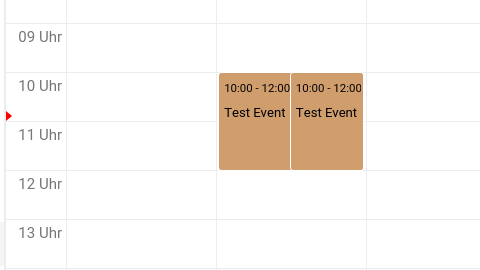
Calendar app version
3.2.2
CalDAV-clients used
DAVx5
Browser
Firefox 99
Client operating system
Arch Linux
Server operating system
Arch Linux
Web server
Other
Database engine version
MariaDB
PHP engine version
PHP 8.1
Nextcloud version
23.0.3
Updated from an older installed version or fresh install
Updated from an older version
List of activated apps
No response
Nextcloud configuration
No response
Web server error log
No response
Log file
No response
Browser log
No response
Additional info
No response
Contributor guide
First steps
- Read the whole issue, then the project's contributing guide.
- Comment on the issue to say you are picking it up — it saves two people doing the same work.
- Fork the repository and make your change on a branch.
- Open a pull request that references the issue number.
Research direction
Start by reproducing the duplicate display with the provided ICS file in the Calendar app, focusing on the frontend handling of imported or subscribed recurring events. Done means each event is displayed once and deleting it does not reveal or remove a duplicate.
Written by the indexing model from the issue text.
Assessment
- Tech stack
- javascript
- Domain
- frontend
- Issue type
- Bug
- Difficulty
- 4/5
- Estimated time
- 3-5 days
- Activity status
- Stale
- Clarity
- Mostly clear
- Newbie friendliness
- 35/100