nextcloud / nextcloud/calendar
Improve readability
Nobody has claimed this yet.
- Dominant language
- JavaScript
- Stars
- 1.2k
- Forks
- 332
- Avg merge
- 16h 13m
- Merged PRs (30d)
- 137
Description
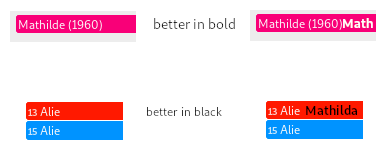
The calendar, especially in month view, displays an awful lot of information. Therefore it is crucial that the information can be read clearly.
Currently, I can only tune the colours for the events. Depending on the colour, the event text is shown in black or white. This decision is not always optimal, personally I would like some blacks to be white and vice versa. This may, however, be related to the choice of the font used to display the event texts. I seem to have no control over that either.
So to be able to improve the readability, I would like to propose a way to select the fonts used, and a checkbox to toggle black/white rendering.
Contributor guide
First steps
- Read the whole issue, then the project's contributing guide.
- Comment on the issue to say you are picking it up — it saves two people doing the same work.
- Fork the repository and make your change on a branch.
- Open a pull request that references the issue number.
Research direction
Start by locating the calendar month-view event rendering and the existing event-colour settings. Review how event text colours and fonts are currently selected, then define the scope for configurable fonts and a black/white rendering toggle. Done should make both readability options available in the calendar UI and work consistently with event colours.
Written by the indexing model from the issue text.
Assessment
- Tech stack
- javascript
- Domain
- design, frontend
- Issue type
- Feature
- Difficulty
- 5/5
- Estimated time
- Over a week
- Activity status
- Stale
- Clarity
- Needs clarification
- Newbie friendliness
- 25/100