Internal shares are not represented correctly in the App
- Dominant language
- Kotlin
- Stars
- 5.6k
- Forks
- 2k
- Avg merge
- 2d 18h
- Merged PRs (30d)
- 92
Description
### Steps to reproduce
1. Share a file with a internal user
2. Open the Android app, select the file and click the "..." button next to the share
### Expected behaviour
- I see the right share settings for internal shares
### Actual behaviour
Right after clicking the '...' menu I see this:
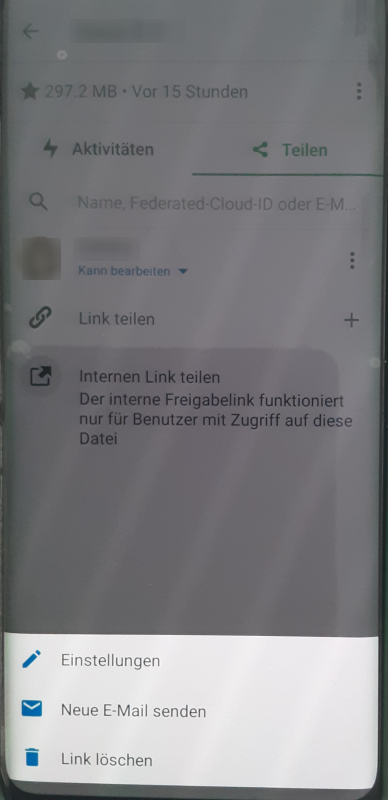
Sorry for the German screenshots. But the menu at the button shows the option:
* Settings
* Send new e-mail
* delete link
This looks like the menu for a link share or a share by mail, but not like a internal share. If I move on to the settings I see:
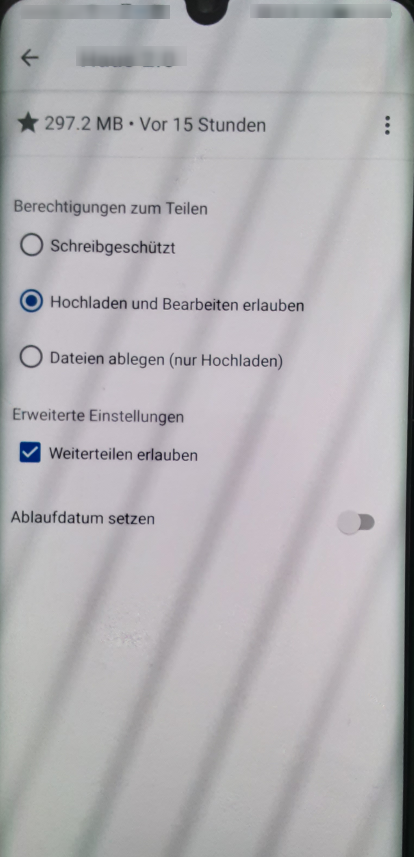
The options are (radio buttons):
* "write protection"
* allow uploading and edditing
* file drop
Additional settings (checkbox):
* allow to re-share
Tested with Android app version 3.18.1 on a Nextcloud 22.2.3 server
Contributor guide
Assessment
This issue has not been assessed yet.