QR logins should be easy to find
- Dominant language
- Kotlin
- Stars
- 5.6k
- Forks
- 2k
- Avg merge
- 2d 18h
- Merged PRs (30d)
- 92
Description
Hello,
I hope I have found the right place to post this.
### Is your feature request related to a problem? Please describe.
I installed the Nextcloud app from the google play store. First thing needed is to login to my server. I see there is a QR option which is *fantastic* because otherwise I need to generate the credentials on my desktop and tediously get the to me phone. But then... where does the QR code come from? There is no help text, no instruction, link to a support page, no nothing.
So back on the desktop I am searching. Found this thread from Feb 2019 describing: [Cannot find QRCode for setting up mobile clients](https://help.nextcloud.com/t/cannot-find-qrcode-for-setting-up-mobile-clients/48202)
> it looks like the mobile app has QRCode scanner built in for easier client setup, but I cannot find where in my Nextcloud server are those QRCode for client setup
(There is also links to gh issues I cannot understand; I think it was about the technical implementation of the QR feature.)
### Describe the solution you'd like
Since the above was in a support thread, a very helpful explanation was [provided](https://help.nextcloud.com/t/cannot-find-qrcode-for-setting-up-mobile-clients/48202):
> Reiner_Nippes Jun '19
>
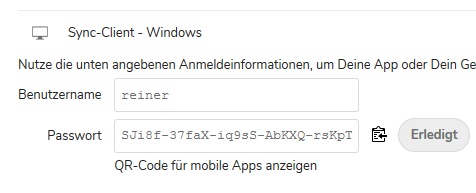
> settings -> user security -> generate new password
>
> 
>
> grafik
>
> the text “QR-Code für mobile Apps anzeigen” is a link. click it.
This information should be provided
1. In the app either directly on the screen with the QR code, AND
- Could link to a help page instead if clutter is undesirable
- *but* if the QR code is easier to get to then instructions would fit easily on a phone screen.
- personally I like to have the information I need available where I need it
3. The text of the above method (generating app password) should indicate that there is a QR code. Even though I have made ap passwords many times, I was still unable to recall that this is where the option lives. An tiny QR code icon would help attract the eye.
 AND
2. In the bottom left corner thing, like this (sorry it's so crappy, just to show the concept):
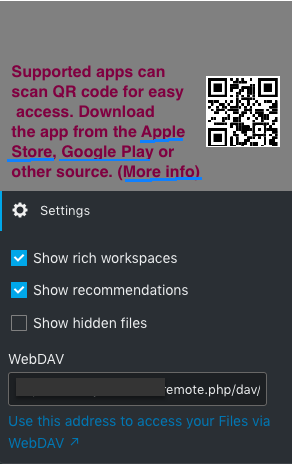, OR
4. Minimally, the [support page](https://docs.nextcloud.com/server/19/user_manual/files/access_webdav.html) linked to in the above menu should describe the above solution, link to it, or *something*.
### Describe alternatives you've considered
I cannot imagine I am the first person to think of this. I did look for other issues describing the same thing but wasn't able to find.
### Additional context
This would also make the app stuff more obvious and perhaps tempting to someone who is just using the web interface. It will remind them of how trivial it would be to set up.
Nextcloud is being promoted as an alternative to google drive, etc. So I presume lots of people will want to install the app as a first order of business. Having the option of using a QR code (_extremely_ convenient) but then no way top *find* the QR code without digging into support forums made me feel really disappointed. It looks like a half-finished feature tbh. I don't really even know what happens past the intro because I seem to have ended up on github instead of solving the problem I was working on..... Admittedly that's not exactly what will happen in every case. 🤓 But it might prompt something to think "I'll deal with this later" and never get to it.
I have heard good things about this app so of course will keep going with it. I am interested in a bit of learning along the way, but my impression is the nextcloud is being marketed to people who just want something that will *work* as well.
I presume there are technical issues with generating QR codes everywhere the way I've described. If that's the case then there should be *links* to everything so it can be really smooth.
Contributor guide
Assessment
This issue has not been assessed yet.