No login form shows up on Android 8.1 device
- Dominant language
- Kotlin
- Stars
- 5.6k
- Forks
- 2k
- Avg merge
- 2d 18h
- Merged PRs (30d)
- 92
Description
### ⚠️ Before posting ⚠️
- [X] This is a **bug**, not a question or an enhancement.
- [X] I've [searched for similar issues](https://github.com/nextcloud/android/issues) and didn't find a duplicate.
- [X] I've written a clear and descriptive title for this issue, not just "Bug" or "Crash".
- [X] I agree to follow Nextcloud's [Code of Conduct](https://nextcloud.com/contribute/code-of-conduct/).
### Steps to reproduce
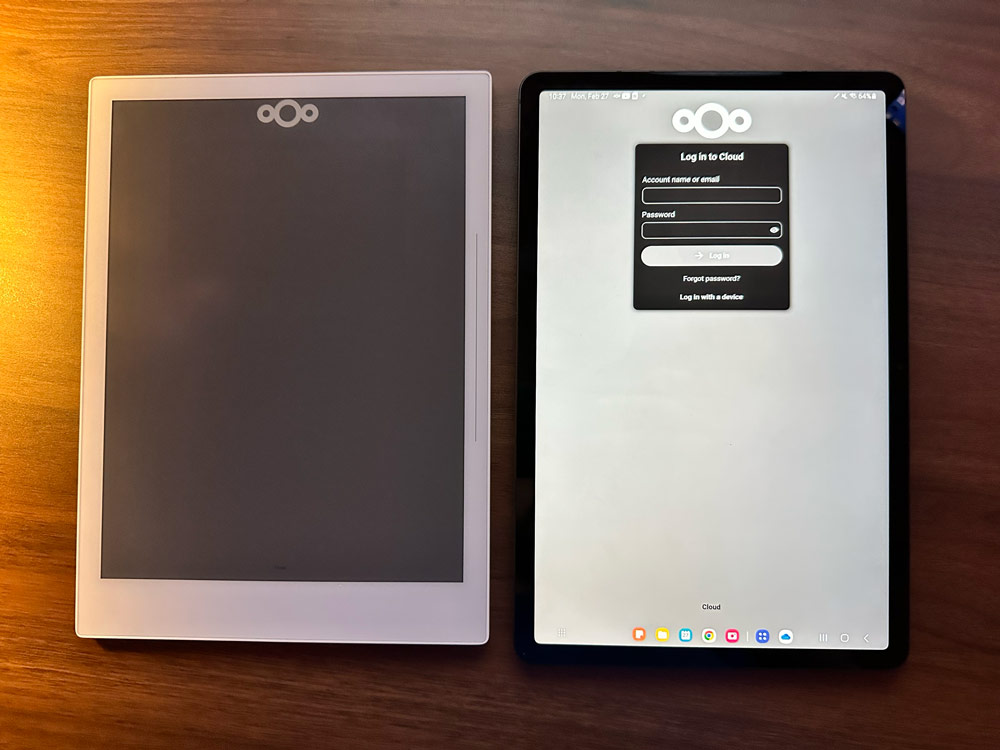
I was hoping to get Nextcloud to work on my Supernote A5X (Android 8.1, e-ink device). However, when I download the latest APK and install it, I get stuck on the part of the login screen where you type your username and password. The login box simply never appears.
I'm not sure if this concerns the Android app or the Nextcloud server. It appears that the login process has changed somewhere between version 17 and version 25 because the login box does appear for a server that is running version 17, but not for the newest version.
Does this have something to do with the JavaScript limitations of the system browser in Android 8.1?
### Expected behaviour
I would expect the login box to appear like it does on my Galaxy Tab S8. You can see the two devices and what they are doing:
### Actual behaviour
Log in box never shows up. I have tried this on multiple Nextcloud servers. I only has worked on old, outdated versions.
### Android version
8.1
### Device brand and model
Supernote A5X
### Stock or custom OS?
Custom (explain in "additional information")
### Nextcloud android app version
3.24.1
### Nextcloud server version
25.0.3
### Using a reverse proxy?
No
### Android logs
_No response_
### Server error logs
_No response_
### Additional information
_No response_
Contributor guide
Assessment
This issue has not been assessed yet.