nextcloud-libraries / nextcloud-libraries/nextcloud-vue
`NcDateTimePicker` popover too small
Open
Beginner friendly
Nobody has claimed this yet.
bug
design
feature: datepicker
- Dominant language
- Vue
- Stars
- 246
- Forks
- 99
- Avg merge
- 1d 20h
- Merged PRs (30d)
- 103
Description
The width of the popover is too low, so the "next"-button is clipped:
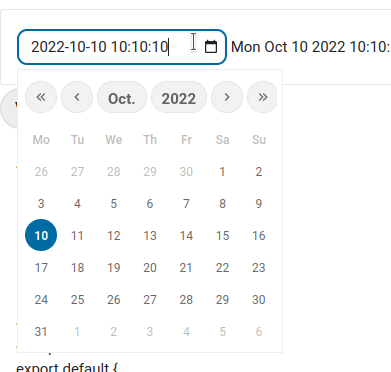
This seems to be cause by
.mx-datepicker-main .mx-calendar {
  width: 264px;
}
Settings this to following fixes the issue
.mx-datepicker-main .mx-calendar {
  width: fit-content;
}
Contributor guide
First steps
- Read the whole issue, then the project's contributing guide.
- Comment on the issue to say you are picking it up — it saves two people doing the same work.
- Fork the repository and make your change on a branch.
- Open a pull request that references the issue number.
Research direction
Locate the .mx-datepicker-main .mx-calendar CSS rule used by NcDateTimePicker and inspect the popover layout around the calendar width. Adjust the width so the “next” button is fully visible, then verify the date picker visually at the affected size.
Written by the indexing model from the issue text.
Assessment
- Tech stack
- css
- Domain
- frontend
- Issue type
- Bug
- Difficulty
- 1/5
- Estimated time
- Under an hour
- Activity status
- Stale
- Clarity
- Clearly specified
- Newbie friendliness
- 62/100