musescore / musescore/MuseScore
Issue with highlighted chord after using "Move chord/rest right/left" (Shift-Right, Shift-Left)
@Eism is already working on this.
Since May 5, 2023.
- Dominant language
- C++
- Stars
- 15.1k
- Forks
- 3.3k
- Avg merge
- 2d 2h
- Merged PRs (30d)
- 91
Description
Issue type
UI bug
Bug description
When using the "Move chord/rest right/left" (Shift-Right, Shift-Left) when in note entry mode, just folowed by a move of the insertion point using Left or Right key, highlighted note/chord becomes inconsistent. See steps below.
Steps to reproduce
Here is how to reproduce:
-
Let's create a bar with 8 quarter rests, replace the rest on beat 2 with a quarter note

-
Enter note entry mode with 'N' on this note

-
Move the note to beat 4 with 4 times Shift-Right
-
Blue highlighted entry point is staying on beat 2

-
Move the entry point with 'Right' key, the highlight jumps directly to beat 4.5, after the moved note.
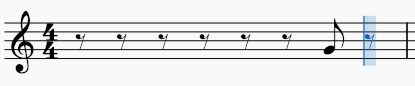
==> expected to move only 1 step right, to beat 2.5 -
Move back the highlight on the note on beat 4
-
Move the note to beat 2 with 4 times Shift-Left
-
Highlight is still on beat 4

-
enter a new note by typing G

==> this new note is inserted on beat 4 where was the highlight, as expected, but is inconsistent with what happens on step 5.
Screenshots/Screen recordings
No response
MuseScore Version
OS: Windows 10 Version 2009, Arch.: x86_64, MuseScore version (64-bit): 4.0.2-230651553, revision: github-musescore-musescore-dbe7c6d
Regression
Choose option...
Operating system
Windows 10 64bits
Additional context
No response
Contributor guide
First steps
- Read the whole issue, then the project's contributing guide.
- Comment on the issue to say you are picking it up — it saves two people doing the same work.
- Fork the repository and make your change on a branch.
- Open a pull request that references the issue number.
Assessment
This issue has not been assessed yet.