musescore / musescore/MuseScore
Undocked playback controls disappear when scaled and inconsistencies
@Eism is already working on this.
Since Apr 20, 2023.
- Dominant language
- C++
- Stars
- 15.1k
- Forks
- 3.3k
- Avg merge
- 2d 2h
- Merged PRs (30d)
- 91
Description
Issue type
UI bug
Bug description
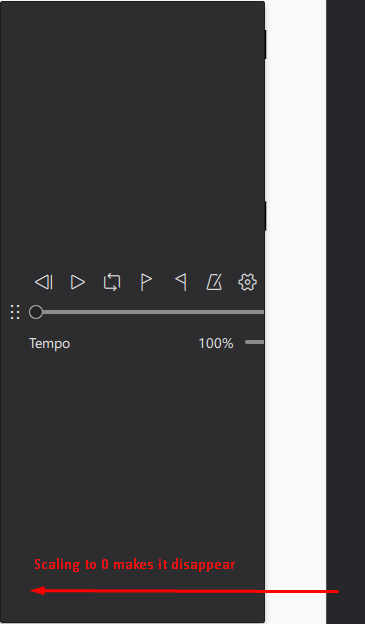
It seems that there is no minimum width/height provided for the playback controls yet they are resizable when undocked. This means that their width and/or height can be scaled to 0 rendering them inaccessible as they are made invisible and cannot be redocked.
This is problematic as the only way to reset this is to go to View>Toolbars>Playback Controls and toggle and un-toggle the playback controls to reset them to a docked position.
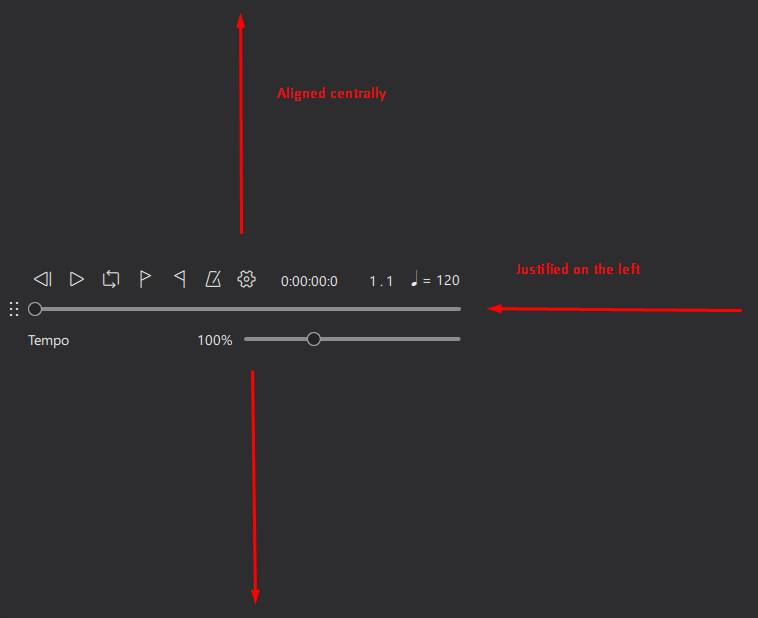
Furthermore I found that while scaling the UI vertically the controls are aligned centrally yet when scaled horizontally they are justified from the left rather than centrally and the empty space around controls cannot be used to drag the playback control window around.
Steps to reproduce
- Undock the playback controls in a score
- Move cursor to edge of playback control window to make scale controls appear
- Drag cursor until width and/or height is reduced to 0
Screenshots/Screen recordings
Controls disappearing
Alignment issue
MuseScore Version
MuseScore 4.0.2-230651553
Regression
I don't know
Operating system
Windows 10
Additional context
No response
Contributor guide
First steps
- Read the whole issue, then the project's contributing guide.
- Comment on the issue to say you are picking it up — it saves two people doing the same work.
- Fork the repository and make your change on a branch.
- Open a pull request that references the issue number.
Assessment
This issue has not been assessed yet.