musescore / musescore/MuseScore
Click selection defaults to wrong voice on shared noteheads
@Eism is already working on this.
Since Apr 12, 2023.
- Dominant language
- C++
- Stars
- 15.1k
- Forks
- 3.3k
- Avg merge
- 2d 2h
- Merged PRs (30d)
- 91
Description
Issue type
UI bug
Bug description
In MS3, when you click on a shared notehead, the voice 1 notehead is selected.
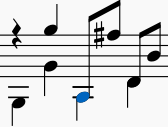
If you shift + click on the shared notehead it selects only the range equivalent to the duration of the voice 1 notehead.
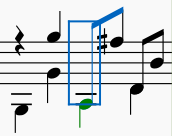
This is invaluable as it allows you to immediately adjust the pitch by moving both voices of the shared notehead in tandem with the keyboard arrows
In MS4, this has changed. When you click on a shared notehead the selection defaults to the voice 2 note.
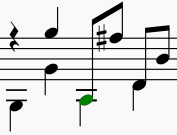
And if you shift click the shared notehead, the selection defaults to the voice 2 duration:
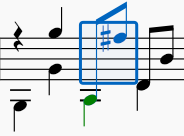
This is a critical difference because now the selection is not confined to the shared notehead but also includes one or more subsequent notes (note that in guitar music, particularly fingerstyle, voice 1 in shared noteheads is usually of a smaller duration than voice 2 )
It may seem like a small thing, but actually it's a significant loss of utility from MS3.
Steps to reproduce
-
Open the attached score in both MS3 and MS4.
default_select_voice.zip -
Shift + click on a shared notehead and use the keyboard arrows to move the pitch up and down.
RESULT: In MS3 you only move the shared notehead (good). In MS4 you end up moving one or more subsequent notes as well (not good).
MuseScore Version
MS 4.0.2-230651545, revision: github-musescore-musescore-dbe7c6d
Regression
Yes, this used to work in Musescore 3.x and now is broken
Operating system
Linux Mint 20.1 Cinnamon
Contributor guide
First steps
- Read the whole issue, then the project's contributing guide.
- Comment on the issue to say you are picking it up — it saves two people doing the same work.
- Fork the repository and make your change on a branch.
- Open a pull request that references the issue number.
Assessment
This issue has not been assessed yet.