musescore / musescore/MuseScore
Erratic behaviour when repositioning (text) objects or changing their offset values
Nobody has claimed this yet.
- Dominant language
- C++
- Stars
- 15.1k
- Forks
- 3.3k
- Avg merge
- 2d 2h
- Merged PRs (30d)
- 91
Description
Issue type
UI bug
Bug description
The behaviour of objects when repositioning can be unpredictable as can their offsets.
Steps to reproduce
-
Open the attached file.
positioning_and_offsets.zip
As you can see it consists of notes with fingering numbers in the default position. -
Click on the first fingering.
-
Open the Appearance panel, and reduce the value of the vertical offset step by step.
ACTUAL RESULT: The object initially moves upwards (as expected), but when it gets to -3 it suddenly flips downwards again. Then continues upwards.
EXPECTED RESULT: The object should move smoothly in line with the user's expectations. -
Now increase the value of the same offset.
ACTUAL RESULT: As the offset moves back to zero the fingering moves closer to the note and at zero is exactly over the note – effectively disappearing from the user's view. You have to use "R" to reset the note back to its default.
EXPECTED RESULT: When the offset is returned to zero, the fingering should be in the original default position (in this case, above the note). -
Reset the position of the same fingering.
-
Now, with the Appearance box still open, use the keyboard UP arrow to move the fingering in the same way.
ACTUAL RESULT: The fingering moves consistently upwards. However, at intervals it seems to stall even though the offset value (in Properties) is still changing.
EXPECTED RESULT: Each push of the keyboard arrow should generate a movement. -
Reset the fingering again.
-
Use the keyboard arrow to move the fingering upwards.
-
In "Appearance" press "Set as default style for this score"
RESULT: As expected all the fingerings are updated. -
Return the score to its initial settings.
-
Now use the mouse to drag the same fingering upwards.
-
In "Appearance" press "Set as default style for this score"
ACTUAL RESULT: The adjusted fingering stays in its expected position but the other fingerings jump to an unexpectedly higher position (see screencast below).
EXPECTED RESULT: Updated fingering should move to a position comparable with the adjusted fingering.
Screenshots/Screen recordings
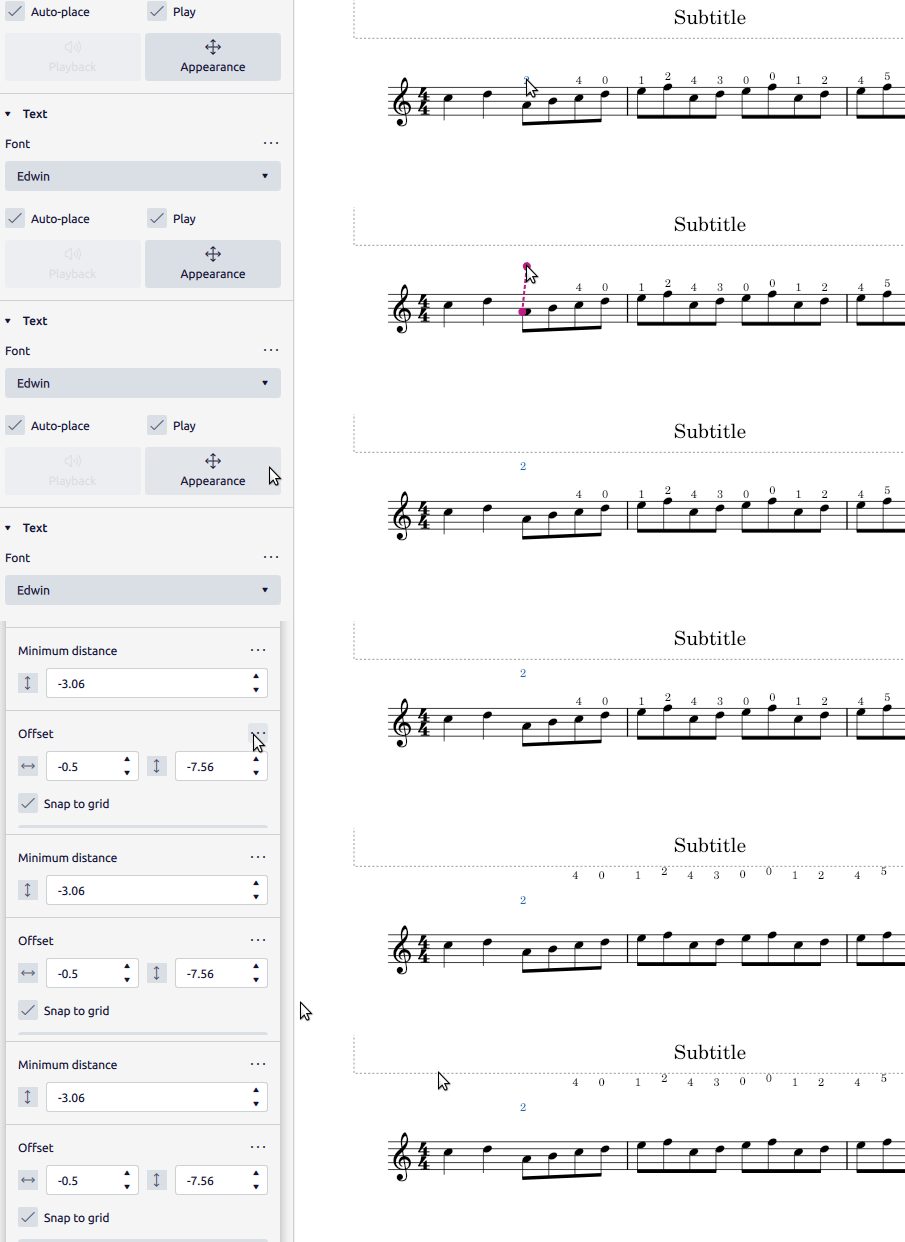
MuseScore Version
MuseScore version (64-bit): 4.0.2-230640504, revision: github-musescore-musescore-769b3af
Regression
Choose option...
Operating system
OS: Linux Mint 20.1, Arch.: x86_64
Additional context
No response
Contributor guide
First steps
- Read the whole issue, then the project's contributing guide.
- Comment on the issue to say you are picking it up — it saves two people doing the same work.
- Fork the repository and make your change on a branch.
- Open a pull request that references the issue number.
Assessment
This issue has not been assessed yet.