musescore / musescore/MuseScore
Suggestion: Compile Instructions guide step to disable CMakePresets if not already done
Nobody has claimed this yet.
- Dominant language
- C++
- Stars
- 15.1k
- Forks
- 3.3k
- Avg merge
- 2d 2h
- Merged PRs (30d)
- 91
Description
Describe the bug
Not a bug but more of a small suggestion for the compile instructions guide to make things easier for less experienced developers. While following the compile instructions I ran into an issue at step 2.1 'Standard Build' where I was expecting CMake to generate a msvc.build_x64 folder in the checkout directory but this was not being generated. I eventually figured out that because I have a recent fresh install of Visual Studio I had a CMake option enabled which automatically generates a CMakePresets.json file which was causing VS to ignore the CMakeSettings.json file.
I think it would be helpful for those not so familiar with CMake to mention that this might happen and suggest to check CMake settings in VS. Something small like 'In the event that msvc.build_x64 is not generating in the checkout directory (root), be sure to check that Visual Studio is correctly picking up the x64-RelWithDebInfo configuration and not one of the default Visual Studio configurations'.
To Reproduce
Steps to reproduce the behavior:
- Open Visual Studio
- Click on tools
- Click on options
- Click on CMake in the dropdown menu on the left
- Click on General
- Under 'CMake configuration file' select 'Always use CMake Presets'
- Follow the Compile Instructions from the beginning under the assumption that there is no existing knowledge of this setting. (I believe it is the default in Visual Studio).
Expected behavior
I think this is probably pretty obvious for more experienced developers but as a newbie to C++ build tools, I was expecting to follow the Compile Instructions guide and for the msvc.build_x64 folder to get generated without having to change any settings in Visual Studio itself. Simple enough to solve but it might save someone else a bit of time.
Screenshots
With the following setting selected:
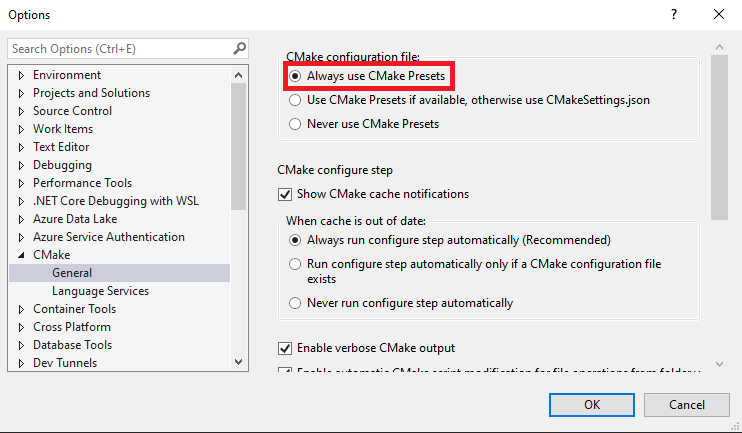
Visual Studio generates a file called 'CMakePresets.json' and will try to build for the default VS x64Debug or another default option:

Changing the setting to 'Never use CMake Presets ':
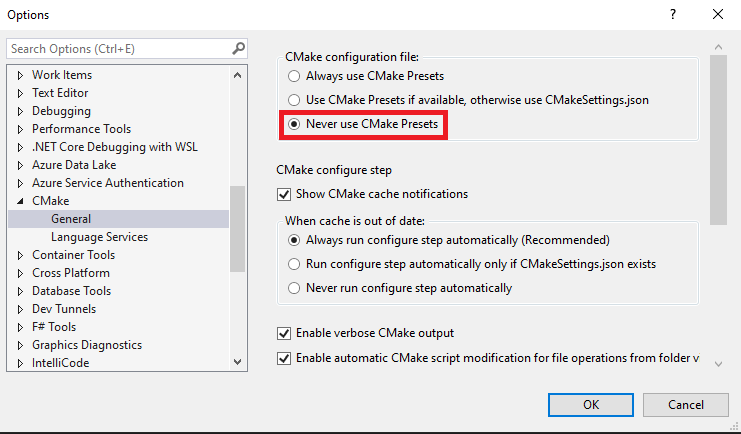
Now the correct build configuration is selected and CMake will correctly generate the msvc.build_x64 folder.

Platform information
- OS: Windows 11
Additional context
Visual Studio 17 2022
Contributor guide
First steps
- Read the whole issue, then the project's contributing guide.
- Comment on the issue to say you are picking it up — it saves two people doing the same work.
- Fork the repository and make your change on a branch.
- Open a pull request that references the issue number.
Research direction
Start with the compile instructions guide, specifically the Windows Visual Studio “2.1 Standard Build” step, and review its CMakeSettings and CMakePresets guidance. Update the instructions to cover the Visual Studio CMake configuration that can prevent msvc.build_x64 from being generated, then verify that the documented steps match the expected build configuration.
Written by the indexing model from the issue text.
Assessment
- Tech stack
- cmake, cpp
- Domain
- build-system, documentation
- Issue type
- Documentation
- Difficulty
- 2/5
- Estimated time
- 1-3 hours
- Activity status
- Stale
- Clarity
- Mostly clear
- Newbie friendliness
- 45/100