musescore / musescore/MuseScore
Instrument renames aren't propagated to export dialog or exported files
Nobody has claimed this yet.
- Dominant language
- C++
- Stars
- 15.1k
- Forks
- 3.3k
- Avg merge
- 2d 2h
- Merged PRs (30d)
- 91
Description
Describe the bug
When changing the name of an instrument, some parts of MuseScore seem to "not get the memo".
I also sometimes observe MS4 to crash, and think this is somehow related to this, but I'm not quite sure, and can't reproduce it, so I won't mention it here again.
Manual workaround: After renaming an instrument, save, quit MS4 completely, and open it again.
To Reproduce
Steps to reproduce the behavior:
- Open MuseScore
- Use the empty template, add two flutes (the exact instrument doesn't really matter)
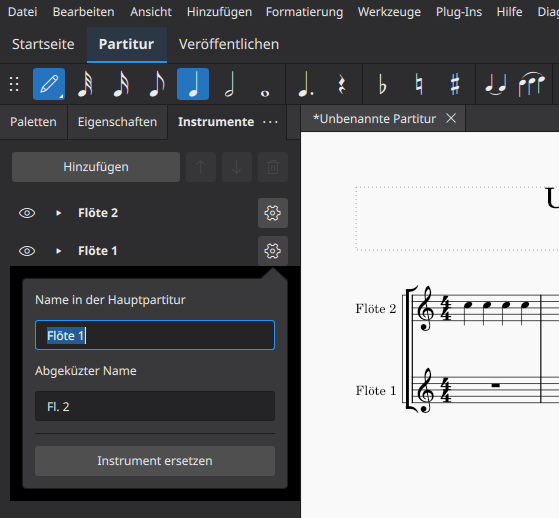
- In the instrument panel, rename the flutes to be "the other way around", see Screenshot 1. (Optionally add some notes to make the flutes easier to distinguish.)
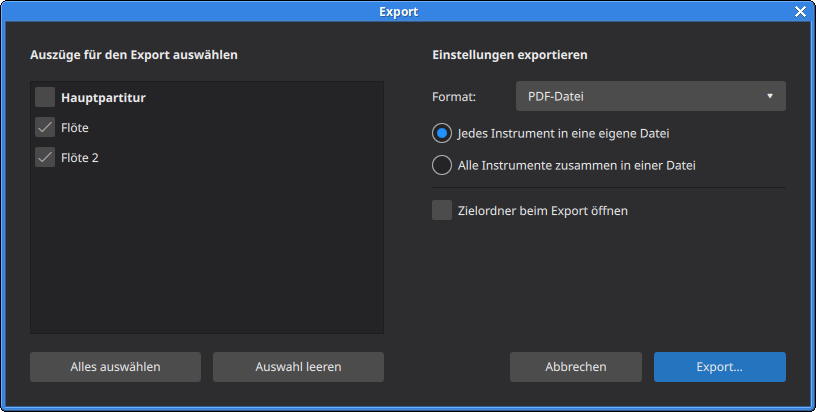
- Export as PDF (see Screenshot 2)
Actual behavior
- The export dialog calls the voices by their old names, "Flöte / Flöte 2" instead of the new names "Flöte 2 / Flöte 1".
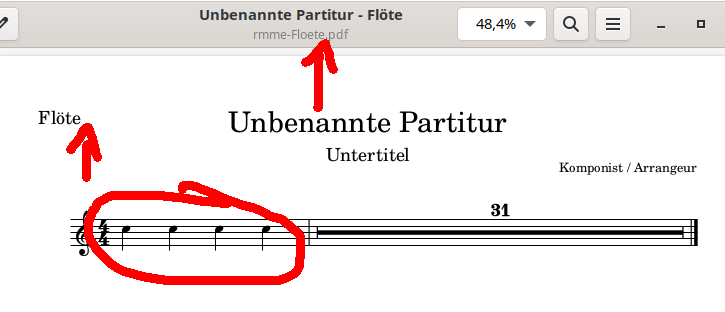
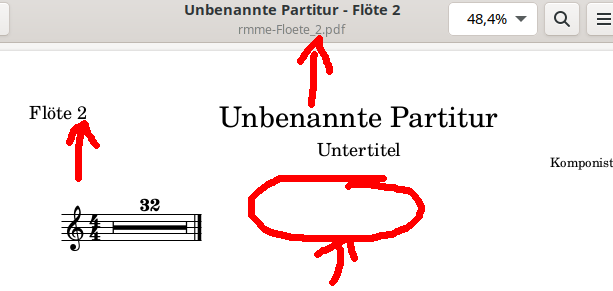
- The exported PDFs also have no indication that I ever renamed the voices, despite the preview in MuseScore showing that I did.
Expected behavior
- The export dialog uses the new instrument names.
- The exported PDFs (filename and content) use the new instrument names.
Screenshots
Screenshot 1: Putting in new (and weird) names
Screenshot 2: The export dialog
Screenshots 3 and 4: The exported PDFs got the voices mixed up
Platform information
- Linux, German locale
- MuseScore 4.0.1, Revision 9b70a8c (why can't I easily copy this string?)
Additional context
Add any other context about the problem here.
Contributor guide
First steps
- Read the whole issue, then the project's contributing guide.
- Comment on the issue to say you are picking it up — it saves two people doing the same work.
- Fork the repository and make your change on a branch.
- Open a pull request that references the issue number.
Research direction
Reproduce the issue with the empty template by adding and renaming two instruments, then compare the instrument panel, export dialog, and generated PDF. Trace how renamed instrument data reaches the export dialog and PDF export; done means both use the new names, including the PDF filename and content.
Written by the indexing model from the issue text.
Assessment
- Domain
- desktop
- Issue type
- Bug
- Difficulty
- 4/5
- Estimated time
- 3-5 days
- Activity status
- Stale
- Clarity
- Mostly clear
- Newbie friendliness
- 35/100