musescore / musescore/MuseScore
Add a "Paste as rhythmic cues" option
Nobody has claimed this yet.
- Dominant language
- C++
- Stars
- 15.1k
- Forks
- 3.3k
- Avg merge
- 2d 2h
- Merged PRs (30d)
- 91
Description
Describe the bug
This would improve the intuitiveness and productivity of score input, jazz drums especially. Jazz drums scores typically use a combination of slash notations and rhythmic cues. Cues can come from a horn part, to let the drummer know where the horn's accents are.

The process of writing down those drum parts is not intuitive, and following the provided tutorial is almost mandatory.
The user has to know :
- voice 3 should be used, in slash notation mode
- swap voices 1-3 should be used. NOT the voice3 icon in the toolbar.
- slash notation for voice 1 should be added afterward
It would be great if we could just :
right-click --> paste as rhythmic cues
and get the same result
To Reproduce
- copy the part where your rhythmic cues are
- paste in the drum score
- swap voices 1-3
- toggle rhythmic slash notations
- fill with slashes on voice 1
- if necessary, correct wrong stem orientations
- if necessary add ties
(use 2x video playback speed)
https://user-images.githubusercontent.com/2691085/214557588-cd5d9dc2-1bd8-4e9d-b125-35f471100852.mp4
Expected behavior
- copy the part where your rhythmic cues are
- right-click --> paste as rhythmic cues
- get the same result
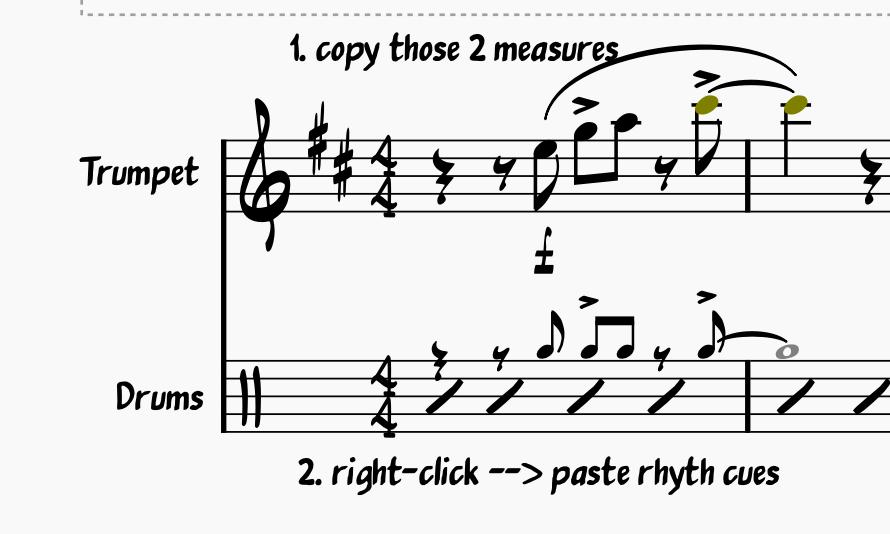
This would make it more intuitive and user-friendly.
Additional Info
This could be useful for drums, of course, but possibly for many other instruments.
note : I'm using a hidden whole note for a better looking tie, like described here : https://github.com/musescore/MuseScore/issues/16052
Contributor guide
First steps
- Read the whole issue, then the project's contributing guide.
- Comment on the issue to say you are picking it up — it saves two people doing the same work.
- Fork the repository and make your change on a branch.
- Open a pull request that references the issue number.
Assessment
This issue has not been assessed yet.