musescore / musescore/MuseScore
Position of symbols added to articulation palette is remembered
@avvvvve is already working on this.
Since Aug 13, 2026.
- Dominant language
- C++
- Stars
- 15.1k
- Forks
- 3.3k
- Avg merge
- 2d 2h
- Merged PRs (30d)
- 91
Description
Currently, symbols added to the articulation palette keep their "original" position (not assigned by the user).
It would be great to have them remember the relative position assigned by the user so that when recalled again from the palette, their placement is correct and does not need manual adjustment. The aim is to make the custom articulations behave as the stock ones, with a consistent behaviour and placement.
To Reproduce
Steps to reproduce the behavior:
- Select a note
- Go to View > Master Palette
- Add a symbol to the note
- Adjust its placement relative to the note
- Add the symbol to the Articulation Palette
- Add a new note
- Add the newly created articulation to this note
- The placement is that of the original symbol and not that assigned by the user at the creation of the custom articulation.
I encountered this problem when creating a jetè attack using the following symbol
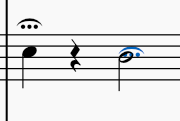
The first note is the correct positioning and it is from where I added the symbol to the Articulation palette. The second note is when I added the articulation from the Articulation palette. The placement is not remembered.
Having the placement remembered would allow users to create a variety of symbols that are not present in MU at the moment.
Contributor guide
First steps
- Read the whole issue, then the project's contributing guide.
- Comment on the issue to say you are picking it up — it saves two people doing the same work.
- Fork the repository and make your change on a branch.
- Open a pull request that references the issue number.
Assessment
This issue has not been assessed yet.