MUI [Checkbox] component - attribute 'checked' is displayed all time in HTML if element is checked or not.
@rehanmohiuddin is already working on this.
Since Jun 24, 2022.
- Dominant language
- JavaScript
- Stars
- 99.1k
- Forks
- 32.5k
- Avg merge
- 2d 17h
- Merged PRs (30d)
- 106
Description
Duplicates
- I have searched the existing issues
Latest version
- I have tested the latest version
Current behavior 😯
For Controlled CheckBox, after component is rendered, in attribute 'checked' is displayed if component is checked or not.
Expected behavior 🤔
When CheckBox is not checked - in attribute 'checked' should not be displayed.
Steps to reproduce 🕹
Steps:
Add following component :
<Checkbox
 checked={checked}
 onChange={handleChange}
 inputProps={{ 'aria-label': 'controlled' }}
 />
-
If CheckBox is checked - in element you can see attribute 'checked'.

-
If CheckBox is not checked - in you can see attribute 'checked'.
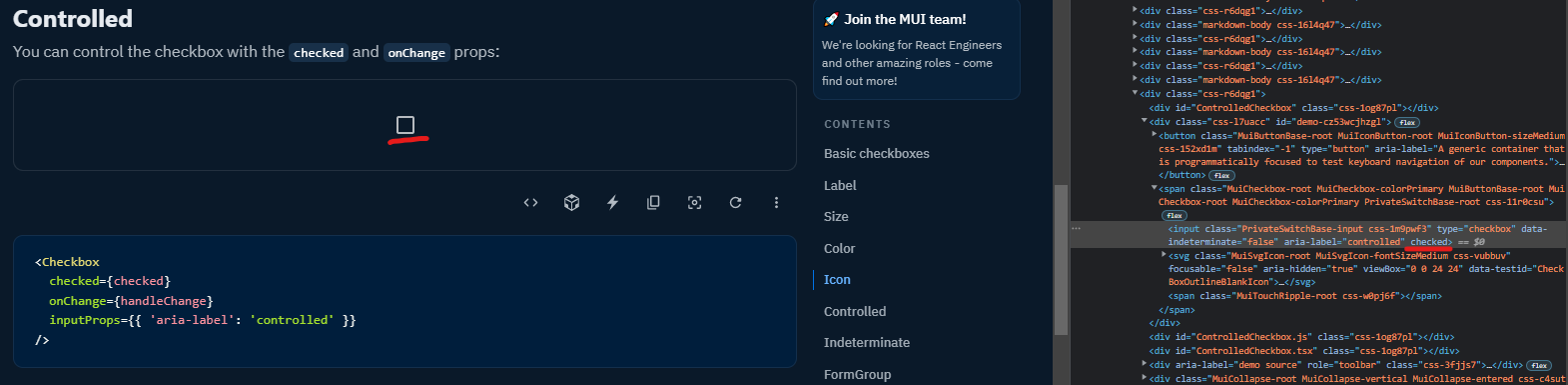
Note: screens are taken from https://mui.com/material-ui/react-checkbox/#controlled
Context 🔦
If you have automation tests - you can't identify if CheckBox component is checked or not.
Your environment 🌎
npx @mui/envinfo
  System:
    OS: Windows 10 10.0.19043
  Binaries:
    Node: 16.13.1 - ~\scoop\apps\nvm\current\nodejs\nodejs\node.EXE
    Yarn: 1.22.10 - ~\scoop\apps\nodejs\current\bin\yarn.CMD
    npm: 8.9.0 - ~\scoop\apps\nvm\current\nodejs\nodejs\npm.CMD
  Browsers:
    Edge: Spartan (44.19041.1266.0), Chromium (102.0.1245.44)
Contributor guide
First steps
- Read the whole issue, then the project's contributing guide.
- Comment on the issue to say you are picking it up — it saves two people doing the same work.
- Fork the repository and make your change on a branch.
- Open a pull request that references the issue number.
Assessment
This issue has not been assessed yet.