[TextField] Label is incorrectly positioned in SSR
Nobody has claimed this yet.
- Dominant language
- JavaScript
- Stars
- 99.1k
- Forks
- 32.5k
- Avg merge
- 2d 17h
- Merged PRs (30d)
- 106
Description
Duplicates
- I have searched the existing issues
Latest version
- I have tested the latest version
Current behavior 😯
A label of a TextField rendered in SSR is placed over the input's bottom line.
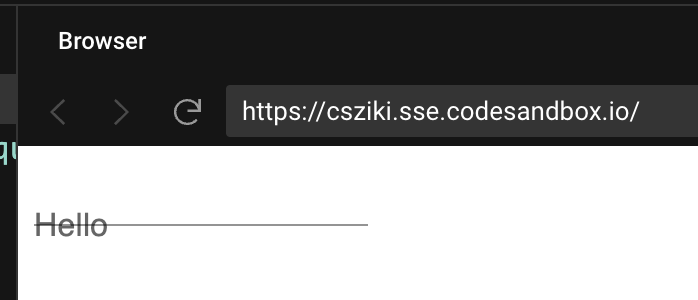
The style which should place the input in correct position is:
label + .css-szfptr-MuiInputBase-root-MuiInput-root {
  margin-top: 12px
}
but it is not applied because the HTML is:
<label>Hello</label>
<style>label + .css-szfptr-MuiInputBase-root-MuiInput-root { margin-top: 12px }</style>
<input .../>
The CSS rules is not applied because there is the style tag between label and input and in order to apply label + input the input element needs to be directly after label element.
Expected behavior 🤔
Label should be correctly placed as it is when rendering on client side.
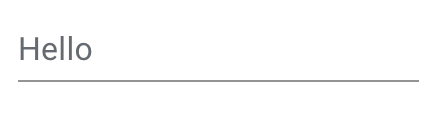
Steps to reproduce 🕹
Reproducible example: https://codesandbox.io/s/express-forked-csziki?file=/src/ssr.js
Steps:
- Render on server side:
<ThemeProvider theme={createTheme()}>
  <TextField label="Hello" variant="standard" />
</ThemeProvider>
Context 🔦
Trying to render the page on the server.
Your environment 🌎
`npx @mui/envinfo`
  System:
    OS: macOS 12.3.1
  Binaries:
    Node: 16.14.2 - ~/.nvm/versions/node/v16.14.2/bin/node
    Yarn: 1.22.17 - ~/www/stuart/mission-control/node_modules/.bin/yarn
    npm: 8.5.0 - ~/.nvm/versions/node/v16.14.2/bin/npm
  Browsers:
    Chrome: 100.0.4896.127
    Edge: Not Found
    Firefox: Not Found
    Safari: 15.4
  npmPackages:
    @emotion/react: ^11.9.0 => 11.9.0
    @emotion/styled: ^11.8.1 => 11.8.1
    @mui/base:  5.0.0-alpha.77
    @mui/icons-material: ^5.6.0 => 5.6.2
    @mui/lab: ^5.0.0-alpha.76 => 5.0.0-alpha.78
    @mui/material: ^5.6.0 => 5.6.3
    @mui/private-theming:  5.6.2
    @mui/styled-engine:  5.6.1
    @mui/styles: ^5.6.0 => 5.6.2
    @mui/system:  5.6.3
    @mui/types:  7.1.3
    @mui/utils:  5.6.1
    @mui/x-date-pickers: ^5.0.0-alpha.0 => 5.0.0-alpha.1
    @types/react: ^17.0.0 => 17.0.38
    react: ^17.0.1 => 17.0.2
    react-dom: ^17.0.1 => 17.0.2
    typescript: ^4.3.5 => 4.5.4
Contributor guide
First steps
- Read the whole issue, then the project's contributing guide.
- Comment on the issue to say you are picking it up — it saves two people doing the same work.
- Fork the repository and make your change on a branch.
- Open a pull request that references the issue number.
Research direction
Start with the linked reproduction in src/ssr.js and compare the server-rendered TextField markup with the client-rendered result. Trace how the label, style tag, and input are emitted during SSR; done means the label is positioned like the client version and the adjacent CSS rule applies.
Written by the indexing model from the issue text.
Assessment
- Tech stack
- javascript, react
- Domain
- frontend
- Issue type
- Bug
- Difficulty
- 4/5
- Estimated time
- 3-5 days
- Activity status
- Stale
- Clarity
- Mostly clear
- Newbie friendliness
- 38/100