[FormControl] Form Label not respecting the color prop
Nobody has claimed this yet.
- Dominant language
- JavaScript
- Stars
- 99.1k
- Forks
- 32.5k
- Avg merge
- 2d 17h
- Merged PRs (30d)
- 106
Description
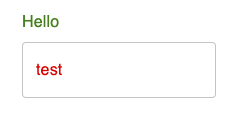
Trying to review my labels and I came across this one. No matter what I set my InputLabel color prop to be the text remains text.secondary.
<InputLabel shrink={false} disableAnimation={true} color="primary">Foo Bar</InputLabel>
Given my text.primary color is set to red and my text.secondary is set to green. I see a correct class name being generated for 'MuiFormLabel-colorSecondary' but the composed color isn't being taken into account. See screen shots as examples.
In this given example (https://codesandbox.io/s/silent-monad-v0gih7?file=/src/App.tsx)
The input label is green despite giving it the color as primary. I can override with an sx prop for color, but I would expect the component to use the theme palette color as described in the documents.

I'm happy to work on a solution if no one has the time to check this out.
Contributor guide
First steps
- Read the whole issue, then the project's contributing guide.
- Comment on the issue to say you are picking it up — it saves two people doing the same work.
- Fork the repository and make your change on a branch.
- Open a pull request that references the issue number.
Research direction
Start with the linked FormLabel.js line and reproduce the issue using the provided CodeSandbox, setting InputLabel color="primary" with distinct text.primary and text.secondary theme colors. Trace why the generated color class does not affect the rendered text; done means the label uses the theme palette color requested by its color prop.
Written by the indexing model from the issue text.
Assessment
- Tech stack
- javascript, react
- Domain
- frontend
- Issue type
- Bug
- Difficulty
- 2/5
- Estimated time
- 1-2 days
- Activity status
- Stale
- Clarity
- Clearly specified
- Newbie friendliness
- 45/100