[TextField] Label position and triangle icon button for drop down lists are not tied to root font size
Nobody has claimed this yet.
- Dominant language
- JavaScript
- Stars
- 99.1k
- Forks
- 32.5k
- Avg merge
- 2d 17h
- Merged PRs (30d)
- 106
Description
Duplicates
- I have searched the existing issues
Latest version
- I have tested the latest version
Current behavior 😯
Text field label position and small triangle button for drop down lists are not tied to root font size and become misaligned vertically if the root font changes, normally done for responsive fonts.
If the font is higher than 16px they remain too low
If the font is lower than 16px they remain too high
It happens because their position is specified in px and not rem, like the other parts of the components.
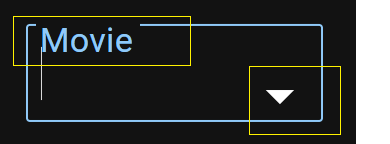
The two issues are related and should be solved together because there are components that use both elements, like select and autocomplete
Expected behavior 🤔
They should be tied to root font size to avoid misalignment and center them horizontally, like they are when font size is 16px
Steps to reproduce 🕹
Steps:
1.Set any other root font size than the default 16px via css or browser settings
2.Check the position of the label when clicking inside it
3.
4.
Context 🔦
it affects textfield, select and any other components that use them like autocomplete
Your environment 🌎
`npx @mui/envinfo`
    @emotion/react: ^11.7.1 => 11.7.1
    @emotion/styled: ^11.6.0 => 11.6.0
    @mui/base:  5.0.0-alpha.69
    @mui/icons-material: ^5.4.2 => 5.4.2
    @mui/material: ^5.4.2 => 5.4.2
    @mui/private-theming:  5.4.2
    @mui/styled-engine:  5.4.2
    @mui/system:  5.4.2
    @mui/types:  7.1.2
    @mui/utils:  5.4.2
    @types/react:  17.0.32
    react: ^17.0.2 => 17.0.2
    react-dom: ^17.0.2 => 17.0.2
    typescript:  4.5.5

any browser
Contributor guide
First steps
- Read the whole issue, then the project's contributing guide.
- Comment on the issue to say you are picking it up — it saves two people doing the same work.
- Fork the repository and make your change on a branch.
- Open a pull request that references the issue number.
Research direction
Reproduce the issue by changing the root font size and checking TextField, Select, and Autocomplete. Inspect the components' label and triangle-button positioning, then verify that both stay vertically centered at root sizes above and below 16px.
Written by the indexing model from the issue text.
Assessment
- Tech stack
- javascript, react
- Domain
- frontend
- Issue type
- Bug
- Difficulty
- 3/5
- Estimated time
- 1-2 days
- Activity status
- Stale
- Clarity
- Mostly clear
- Newbie friendliness
- 35/100