Docker Client.Timeout when specifying static ip in netplan configuration
Nobody has claimed this yet.
Assessment
- Difficulty
- 4/5
- Estimated time
- 3-5 days
- Newbie friendliness
- 25/100
- Issue type
- Bug
- Clarity
- Needs clarification
- Activity status
- Stale
- Tech stack
- docker, linux, ubuntu
- Domain
- networking
Research direction
No repository file, test, or entry point is identified. Start by comparing the Ubuntu netplan configuration for enp3s0 with and without the static address, then reproduce the Docker login or image-pull timeout; done means identifying the network configuration causing the failure and documenting a working configuration or confirmed cause.
Written by the indexing model from the issue text.
Description
Ok i'll try to keep this brief....
Basically I have an ubuntu v18 server that i am assigning a static ip so that I can setup port-forwarding on my router. The issue I am running into is when I modify the netplan file and specify the static ip in the "addresses:" array under "enp3s0" it breaks the network for docker and it's unable to do anything from logging in to pulling a simple image.
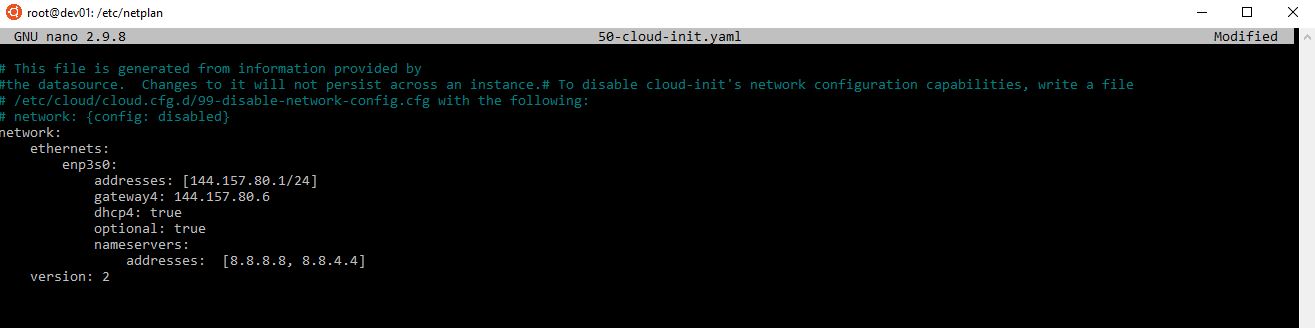

If I clear the addresses array and re-apply netplan then docker magically stops timing out....


Can someone help me figure out what i'm doing wrong? I tried assigning a static ip in the addresses array for docker but that didn't work either.
- Dominant language
- Go
- Stars
- 2.2k
- Forks
- 875
- PR merge metrics
- No merged PRs in 30d
Contributor guide
No contributing guide indexed for this repository
First steps
- Read the whole issue, then the project's contributing guide.
- Comment on the issue to say you are picking it up — it saves two people doing the same work.
- Fork the repository and make your change on a branch.
- Open a pull request that references the issue number.
More from moby/libnetwork
-
Difficulty 1/5 Under an hour Newbie friendliness 90/100
moby/libnetwork#2555 ·
-
Difficulty 5/5 Over a week Newbie friendliness 15/100
moby/libnetwork#2686 ·
-
Difficulty 4/5 3-5 days Newbie friendliness 35/100
moby/libnetwork#2663 · 5 comments ·
-
Difficulty 4/5 3-5 days Newbie friendliness 25/100
moby/libnetwork#2662 · 1 comment ·
-
Difficulty 4/5 3-5 days Newbie friendliness 45/100
moby/libnetwork#2653 · 4 comments · 4 reactions ·
Similar issues
-
optimization optimization:agents-md-curator
Difficulty 2/5 1-3 hours Newbie friendliness 86/100
githubnext/gh-aw-cao#13143 ·
-
Difficulty 2/5 1-3 hours Newbie friendliness 84/100
blinklabs-io/bursa#904 ·
-
Difficulty 2/5 1-3 hours Newbie friendliness 84/100
yanet-platform/ipfw-go#129 ·
-
bug confmap/provider/googlesecretmanagerprovider needs triage
Difficulty 2/5 1-3 hours Newbie friendliness 72/100
open-telemetry/opentelemetry-collector-contrib#51273 · 2 comments ·
-
bug: AI Gateway client filter lists "Unknown" twice when NULL and literal Unknown clients coexist Openbug
Difficulty 2/5 1-3 hours Newbie friendliness 90/100