All OpenGL apps fail on WSLg with Ubuntu 18
Nobody has claimed this yet.
- Dominant language
- C++
- Stars
- 11.9k
- Forks
- 429
- PR merge metrics
- No merged PRs in 30d
Description
#Description
All OpenGL (mesa) apps fail when trying to create an OpenGL context.
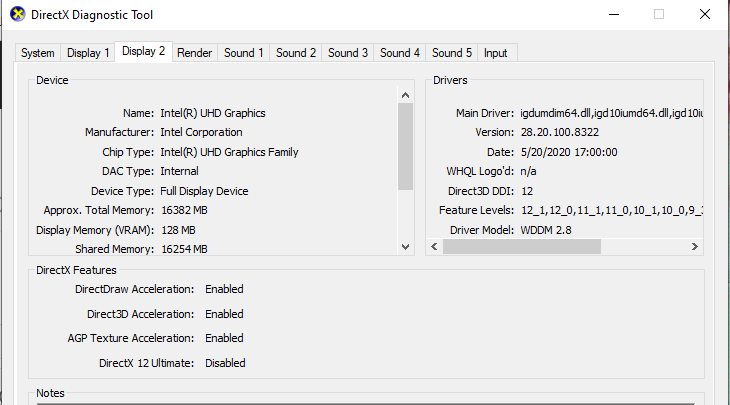
On my Dell XPS 15 9500 laptop, I have a USB-C docking station with two displays attached. WSLg
is installed and X applications (e.g. gedit, nautilus) work fine.
Other developers that have a single GPU and where all monitors are directly connected to internal HDMI or DP ports seem to have no problem with GLX apps. I think the problem has to do with one of these:
1. The Nvidia driver is WDDM 3.0 driver and the Intel drivers are WDDM 2.8 so there's a possible mismatch of functionality
2. The nvidia driver is operating as a Render-Only Display Device
3. The Intel driver supports two Full Display Devices but the display connectors are on a thunderbolt docking station, not directly connected to the laptop. In fact the laptop has no external monitor HDMI ports and the only way to use a display other than the laptop's built-in panel is to use an Dell docking station. In this case it's model number WD19TB running the latest firmware
Expected behavior
All OpenGL apps should work
Environment
Windows 10 Pro Eval copy Build 21390.co_release.210521-1658
Windows build number:  Win32NT             10.0.21390.0 Microsoft Windows NT 10.0.21390.0
Your Distribution version: **Ubuntu 18.04**
Your WSLg version: Windows Subsystem for Linux WSLg Preview 1.0.22
Steps to reproduce
- Install WSLg
- export DISPLAY=:0
- verify gedit works
- Install nvidia WSLg drivers
- Install intell WSLg drivers (reboot)
- Powershell wsl --update then wsl --shutdown
- sudo apt update
- sudo apt upgrade
- glxgears [fails]
$:$ echo $DISPLAY$ glxgears
:0
$:
Error: glXCreateContext failed
$:$ glxinfo -B$
name of display: :0
X Error of failed request: BadValue (integer parameter out of range for operation)
Major opcode of failed request: 148 (GLX)
Minor opcode of failed request: 24 (X_GLXCreateNewContext)
Value in failed request: 0x0
Serial number of failed request: 58
Current serial number in output stream: 59
$:
sudo apt-get install mesa-common-dev libgl1-mesa-dev libglu1-mesa-dev
[sudo] password for ken:
Reading package lists... Done
Building dependency tree
Reading state information... Done
libglu1-mesa-dev is already the newest version (9.0.0-2.1build1).
libgl1-mesa-dev is already the newest version (21.1.3kisak1b).
mesa-common-dev is already the newest version (21.1.3kisak1b).
The following packages were automatically installed and are no longer required:
libx11-xcb-dev libxcb-dri2-0-dev libxcb-dri3-dev libxcb-glx0-dev libxcb-present-dev libxcb-randr0-dev
libxcb-shape0-dev libxcb-sync-dev libxcb-xfixes0-dev libxshmfence-dev libxxf86vm-dev x11proto-xf86vidmode-dev
Use 'sudo apt autoremove' to remove them.
0 upgraded, 0 newly installed, 0 to remove and 0 not upgraded.
/dev/dxg does exist
I've added the ppa and updated. Also ran $sudo apt install mesa (no effect)
sudo add-apt-repository ppa:kisak/kisak-mesa
I've installed the WSLg recommended drivers for both Nvidia and Intel


Contributor guide
First steps
- Read the whole issue, then the project's contributing guide.
- Comment on the issue to say you are picking it up — it saves two people doing the same work.
- Fork the repository and make your change on a branch.
- Open a pull request that references the issue number.
Research direction
No source files or tests are named. Start by reproducing the failure with glxgears and glxinfo -B using the reported WSLg, Ubuntu, Nvidia, Intel, and docking-station setup, then inspect the WSLg graphics path implicated by the GLX error. Done means OpenGL applications can create contexts successfully in this environment.
Written by the indexing model from the issue text.
Assessment
- Tech stack
- linux, ubuntu
- Domain
- computer-graphics, operating-systems
- Issue type
- Bug
- Difficulty
- 4/5
- Estimated time
- 3-5 days
- Activity status
- Stale
- Clarity
- Needs clarification
- Newbie friendliness
- 25/100