microsoft / microsoft/winget-pkgs
[Package Issue]: ZoomUMX
Nobody has claimed this yet.
- Dominant language
- No language data
- Stars
- 11.1k
- Forks
- 9.7k
- Avg merge
- 1h 32m
- Merged PRs (30d)
- 376
Description
Please confirm these before moving forward
- I have searched for my issue and not found a work-in-progress/duplicate/resolved issue.
- I have not been informed if the issue is resolved in a preview version of the winget client.
Category of the issue
Other
Brief description of your issue
Hey,
if you have installed the standard Zoom application, downloaded from https://explore.zoom.us and then doing some winget list the output will say the installed package ID is ZoomUMX. But when you do some winget search --exact --id ZoomUMX WinGet says it´s not a valid package ID. For better explanation just have a look at the attached screenshot.
Best regards,
MBODM
Steps to reproduce
- Install standard Zoom application from https://explore.zoom.us
winget listwinget list --exact --id ZoomUMXwinget search --exact --id ZoomUMX
Actual behavior
Expected behavior
Environment
C:\Users\Marcel\Desktop\Go\projects\wingetupd>winget --info
Windows-Paket-Manager v1.2.10271
Copyright (c) Microsoft Corporation. Alle Rechte vorbehalten.

Windows: Windows.Desktop v10.0.19044.1706
Paket: Microsoft.DesktopAppInstaller v1.17.10271.0

Protokolle: %LOCALAPPDATA%\Packages\Microsoft.DesktopAppInstaller_8wekyb3d8bbwe\LocalState\DiagOutputDir

Links
-----------------------------------------------------------------------------------------
Datenschutzerklärung              https://aka.ms/winget-privacy
Lizenzvereinbarung                https://aka.ms/winget-license
Hinweise von Drittanbietern       https://aka.ms/winget-3rdPartyNotice
Startseite                        https://aka.ms/winget
Windows Store Nutzungsbedingungen https://www.microsoft.com/en-us/storedocs/terms-of-sale


Environment:
- Windows 10 Pro 21H2 Build 19044.1706
- WinGet
- Zoom Application (installed from https://explore.zoom.us)
Screenshots and Logs
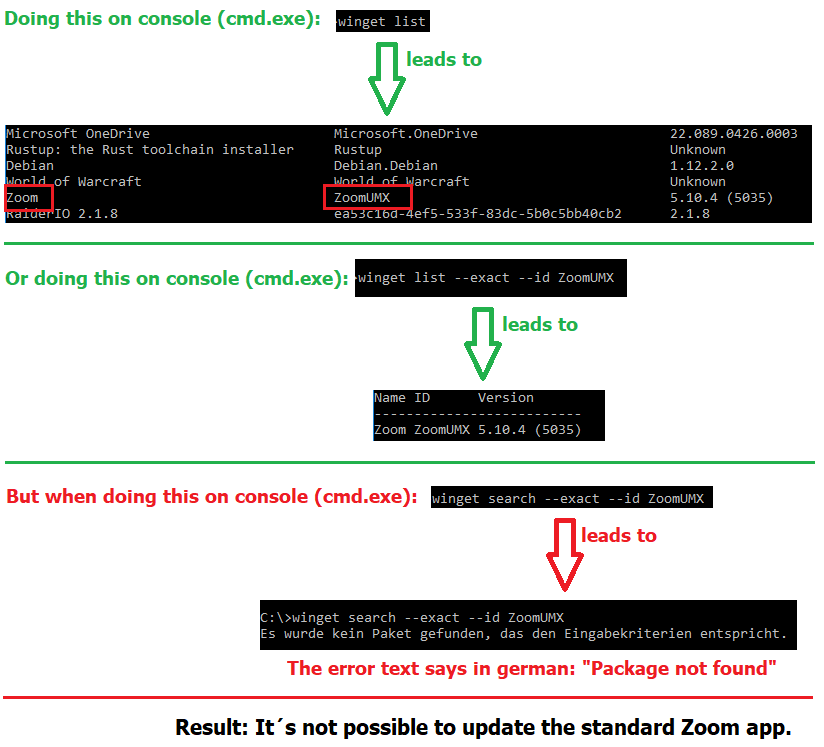
Contributor guide
First steps
- Read the whole issue, then the project's contributing guide.
- Comment on the issue to say you are picking it up — it saves two people doing the same work.
- Fork the repository and make your change on a branch.
- Open a pull request that references the issue number.
Research direction
Start by comparing the attached Actual.txt and Expect.txt, then reproduce the listed winget list and winget search --exact --id ZoomUMX commands in the stated Windows environment. Done means the installed ZoomUMX package is represented consistently and the exact search behaves as expected.
Written by the indexing model from the issue text.
Assessment
- Domain
- cli
- Issue type
- Bug
- Difficulty
- 3/5
- Estimated time
- 1-2 days
- Activity status
- Stale
- Clarity
- Needs clarification
- Newbie friendliness
- 35/100