microsoft / microsoft/winget-cli
Winget Wont Install App Outside MS Store
Open
Nobody has claimed this yet.
Issue-Bug
- Dominant language
- C++
- Stars
- 26.4k
- Forks
- 1.8k
- Avg merge
- 1d 11h
- Merged PRs (30d)
- 15
Description
Brief description of your issue
I tried to install OBS studio and other things
but got this
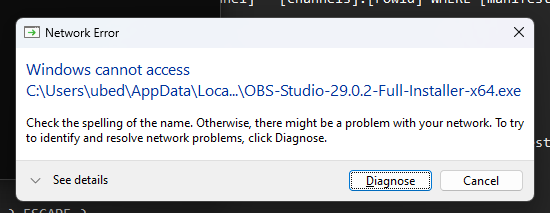

Steps to reproduce
winget install OBSProject.OBSStudio
successful
UAC prompt appeared
enters passwords (this is standard account, not the admin one)
it got that error
Expected behavior
install normally
Actual behavior
crashes
WinGet-2023-03-22-05-33-39.644.log
Environment
Windows Package Manager v1.4.10173
Copyright (c) Microsoft Corporation. All rights reserved.

Windows: Windows.Desktop v10.0.22624.1465
System Architecture: X64
Package: Microsoft.DesktopAppInstaller v1.19.10173.0

Logs: %LOCALAPPDATA%\Packages\Microsoft.DesktopAppInstaller_8wekyb3d8bbwe\LocalState\DiagOutputDir

User Settings: %LOCALAPPDATA%\Packages\Microsoft.DesktopAppInstaller_8wekyb3d8bbwe\LocalState\settings.json
Contributor guide
First steps
- Read the whole issue, then the project's contributing guide.
- Comment on the issue to say you are picking it up — it saves two people doing the same work.
- Fork the repository and make your change on a branch.
- Open a pull request that references the issue number.
Research direction
Start by reproducing winget install OBSProject.OBSStudio with the standard-account and UAC setup described, then inspect the attached WinGet log. Compare the failure with the provided Windows, package manager, and App Installer versions; done means the installation completes normally outside the Microsoft Store flow without crashing.
Written by the indexing model from the issue text.
Assessment
- Tech stack
- cpp
- Domain
- cli, operating-systems
- Issue type
- Bug
- Difficulty
- 4/5
- Estimated time
- 3-5 days
- Activity status
- Stale
- Clarity
- Needs clarification
- Newbie friendliness
- 25/100