Agents window: make out-of-workspace agent changes clearer in the Changes panel (2 prototypes + user study)
- Dominant language
- TypeScript
- Stars
- 193k
- Forks
- 42.4k
- PR merge metrics
- PR metrics pending
Description
## Demo
### Variant B: grouped by location (recommended default)
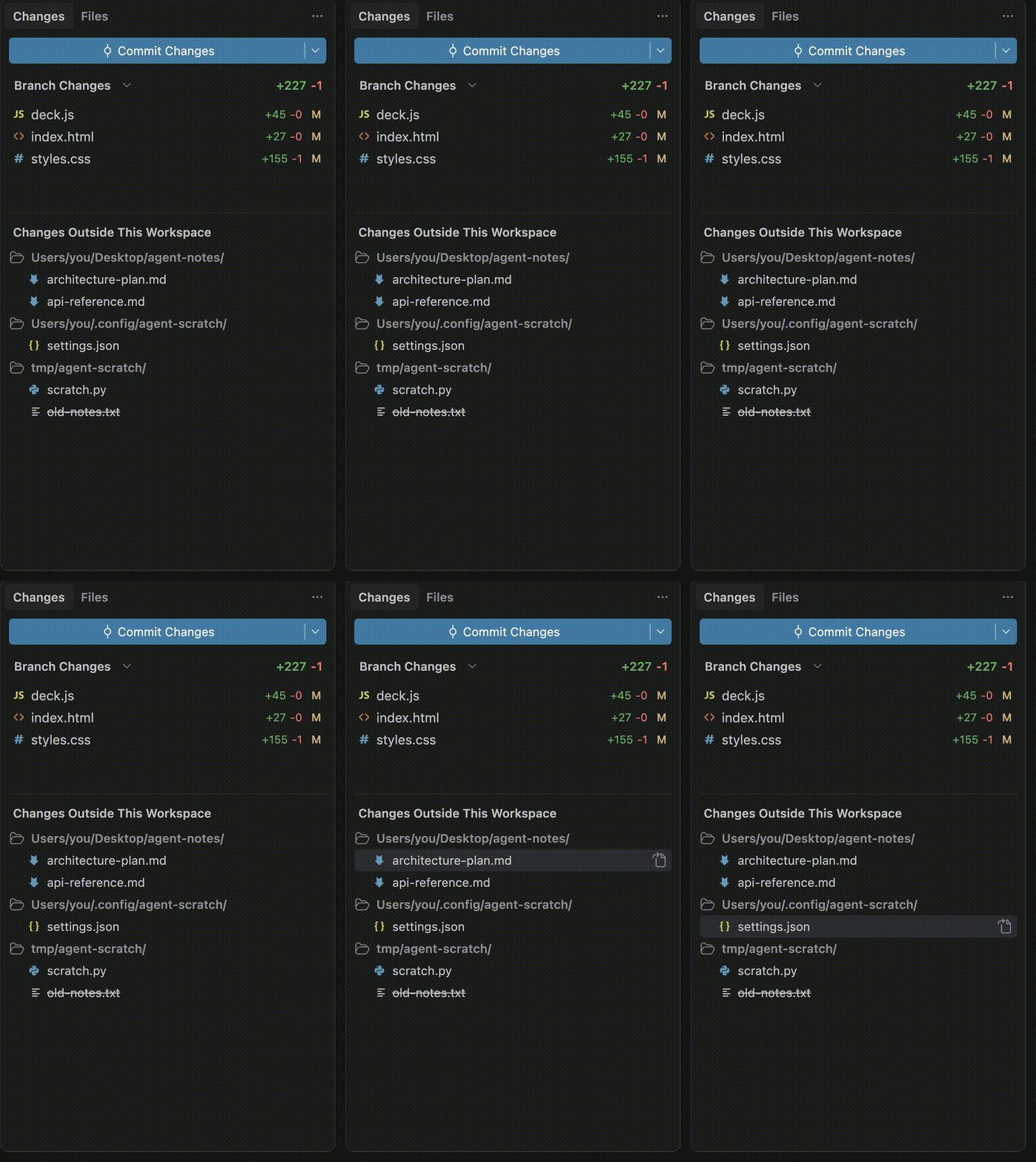
Full video (MP4): [https://github.com/microsoft/vscode/blob/e5ef30e975eb33cc2998dc534b1ef1b4f74fd765/uxr-media/external-changes/variant-B-grouped-by-location.mp4](https://github.com/microsoft/vscode/blob/e5ef30e975eb33cc2998dc534b1ef1b4f74fd765/uxr-media/external-changes/variant-B-grouped-by-location.mp4)
### Variant A: enriched list
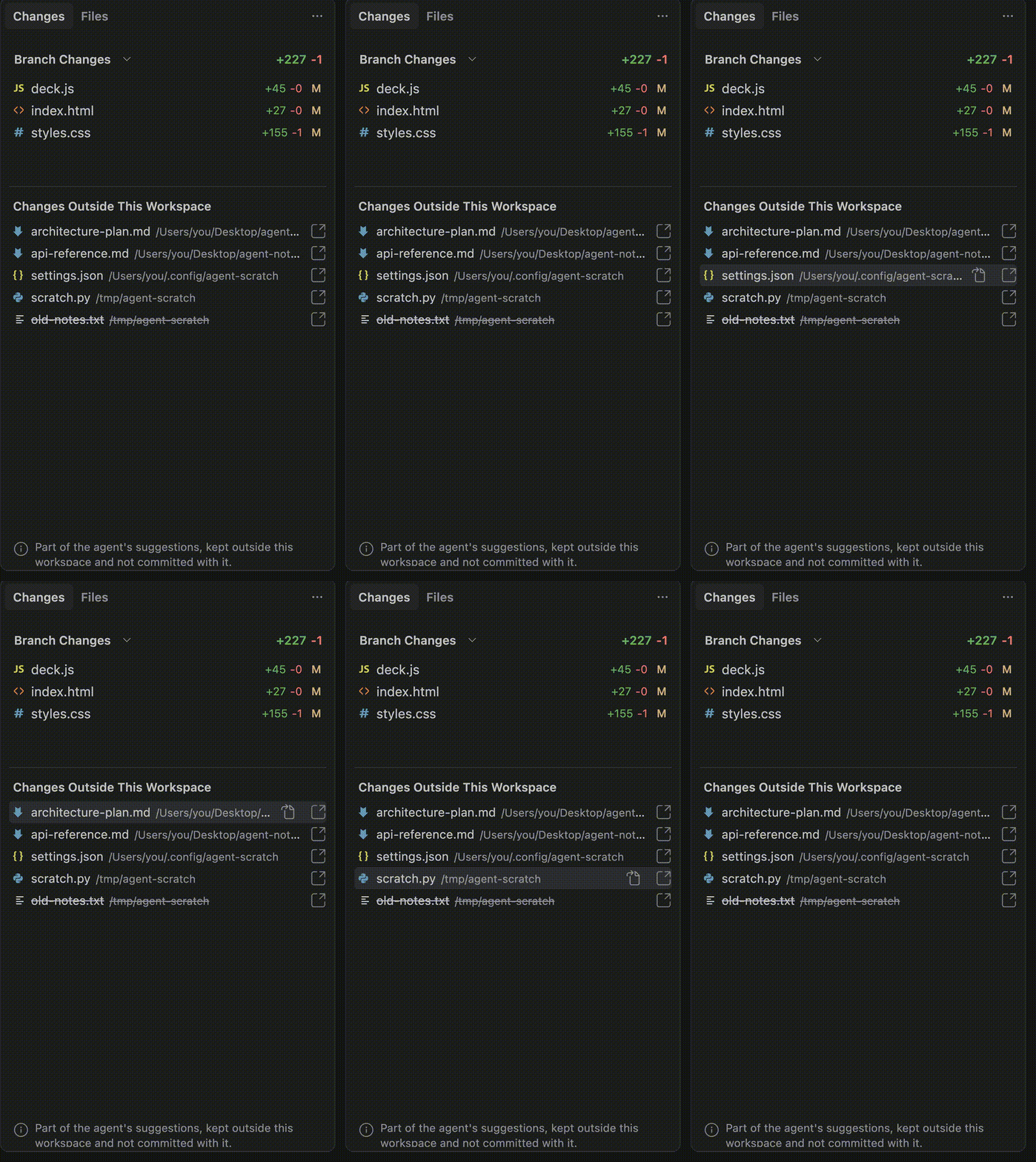
Full video (MP4): [https://github.com/microsoft/vscode/blob/e5ef30e975eb33cc2998dc534b1ef1b4f74fd765/uxr-media/external-changes/variant-A-enriched-list.mp4](https://github.com/microsoft/vscode/blob/e5ef30e975eb33cc2998dc534b1ef1b4f74fd765/uxr-media/external-changes/variant-A-enriched-list.mp4)
## Summary and recommendation
We ran a think-out-loud study (5 participants who code or vibe code and use AI assistants) on two prototypes for showing the files an agent creates or edits **outside** the current workspace in the Agents window Changes panel.
**The concept validated cleanly, and the recommendation is to ship the dedicated "Changes Outside This Workspace" section using Variant B (grouped by containing folder) as the default, keeping Variant A available.** Every participant could tell which files lived outside the workspace and understood they were shown separately from the committable workspace changes. In the head to head, participants leaned toward the grouped version for a clearer mental model and more confidence when reviewing. This is choosing the tested winner, not a redesign.
## What we heard (n=5, directional)
**1. The separation reads clearly.** Every participant rated the ease of identifying outside files 6 or 7 out of 7, and described the section as clean and self-explanatory.
- P19: "the files showed clearly ... very clear which folder and which workspace the files belong to."
- P81: "I do see the changes very visibly and I do see the changes outside the workspace, and there are links to it as well ... pretty self-explanatory."
- P61: "pretty easy to tell which files were outside the workspace because they are already clearly separated on their own."
**2. Variant B (grouped by location) was preferred.** No participant preferred Variant A over B when comparing them.
- P61: "I selected the second version grouped by folder because it gives me a better mental model of where everything is ... it feels more organized, provides more context, and gives me more confidence when reviewing changes before committing."
- P70: "I prefer the second one because it is well described and everything is there."
- P19: "having the folders right on top of the files makes the location very clear ... very clean."
**3. Mild action and purpose gap (follow-up, not a blocker).** Participants understood *where* the files were but were less sure *what to do* with them or *what each file was for*.
- P61: "clearly separated ... but whether [they] actually needed to take any action on them [was unclear] ... a small icon or label showing whether each file is temporary, documentation, configuration, or something the agent generated automatically would make it much easier to understand the purpose at a glance."
- P88 read the outside files as scratch or experiment work "you just did not want to interfere with the main project," a partial mental-model mismatch versus agent reference output.
## A vs B decision
At small n this is directional, but the direction is consistent: ship **Variant B (grouped by location)** as the default. Participants who compared the two chose B for organization and reviewing confidence, and none preferred A. Keep A available behind the toggle for now.
## Options to try
Both variants are still switchable at runtime from the Command Palette (Cmd+Shift+P / Ctrl+Shift+P), so reviewers can compare them live:
- **Developer: Cycle Agent External Changes Presentation (A/B)** switches between the two designs.
- **Developer: Toggle Sample Agent External Changes (Dev)** seeds representative out-of-workspace files so the section can be exercised without a real agent run.
These are developer/experimental commands, not surfaced to end users. Spike branch: `eli/agents/external-changes-presentation-spike`.
## Suggested follow-ups (from feedback, not blocking)
- A small per-file purpose hint (documentation, config, temporary, or agent-generated) so the intent of each outside file is clear at a glance.
- A clearer affordance for what action, if any, applies to these files, since they are not committed with the workspace.
## Method and caveats
- Think-out-loud UserTesting study, 5 participants, audience "Coders and vibe coders who use AI assistants and choose models" (screened for coding frequency, AI use inside an IDE, and model switching). Status: Complete 5/5.
- Study: https://app.usertesting.com/workspaces/408945/test/15049ce1-94bd-418e-937e-a39d7f5e337d
- Small sample, so findings are directional rather than conclusive. Quotes are speech to text, lightly cleaned.
- Product telemetry: I intended to triangulate with adjacent shipping behavior in the Agents window changes-review surface (how often agent sessions produce changes, and how often that surface is opened and reviewed), expressed in approximate terms. The telemetry cluster was not reachable at the time of writing, so those approximate usage figures will be appended in a follow-up comment rather than stated here without data.
Contributor guide
Assessment
This issue has not been assessed yet.